Note
Access to this page requires authorization. You can try signing in or changing directories.
Access to this page requires authorization. You can try changing directories.
This article explains how to design a hub-and-spoke network in Azure. A central hub virtual network hosts shared services while isolated spoke virtual networks host individual workloads.
What this article covers
This article covers hub virtual network shared services, spoke isolation, and routing patterns (standard, direct peering, and stamp-based). It also covers gateway transit for hybrid connectivity and scaling hub-spoke topologies with Azure Virtual Network Manager.
Who needs this article
Read this article if one or more of these conditions apply:
- You need shared network services such as firewall, DNS, Bastion, VPN Gateway, or ExpressRoute for multiple workloads.
- You want to centralize traffic inspection, routing control, or administration instead of repeating those services in every VNet.
- You need a repeatable topology for separating shared platform services from workload VNets.
- You want to compare hub-and-spoke with other transit models before standardizing your topology.
If you have a single workload with no shared-service requirements, start with a flat network topology instead.
Tip
Following a scenario path? Select your scenario at the top of the page for tailored guidance. The core guidance that follows applies to all readers.
Lift-and-shift focus: Read this article if you're moving on-premises workloads to Azure and need centralized shared services (DNS, firewall, VPN Gateway) across multiple spoke VNets. Hub-and-spoke is the default topology for multi-workload lift-and-shift migrations that require shared infrastructure in a single hub.
Modernization focus: Read this article if you're deploying PaaS services across multiple regions and need dual-hub topology with IT-owned hubs and app-team-owned spokes. The hub-and-spoke model scales to support separate subscription boundaries for platform services and application workloads.
Cross-cloud focus: Read this article if you're evaluating hub-and-spoke versus Virtual WAN for cross-cloud transit. If your cross-cloud estate is small enough that Virtual WAN isn't justified, a traditional hub-and-spoke with VPN Gateway connections to other clouds provides a simpler starting point.
Azure services and features
The following table lists the Azure services and features that support a hub-and-spoke topology:
| Service or feature | Role in hub-spoke | Learn more |
|---|---|---|
| Azure Virtual Network | Provides the hub and spoke virtual networks | Virtual network overview |
| VNet peering | Connects each spoke to the hub | Virtual network peering |
| Azure Firewall | Central traffic inspection and filtering in the hub | Azure Firewall overview |
| VPN Gateway or ExpressRoute Gateway | Hybrid connectivity shared across all spokes | VPN Gateway overview |
| Azure Bastion | Secure remote access to VMs across peered spokes | Azure Bastion overview |
| Azure Private DNS Resolver | DNS forwarding between Azure and on-premises | Private DNS Resolver overview |
| Azure DDoS Protection | Shared DDoS plan covering spoke public IPs | DDoS Protection overview |
| Azure Virtual Network Manager (AVNM) | Automated spoke peering, UDR management, and network groups at scale | AVNM overview |
How it works
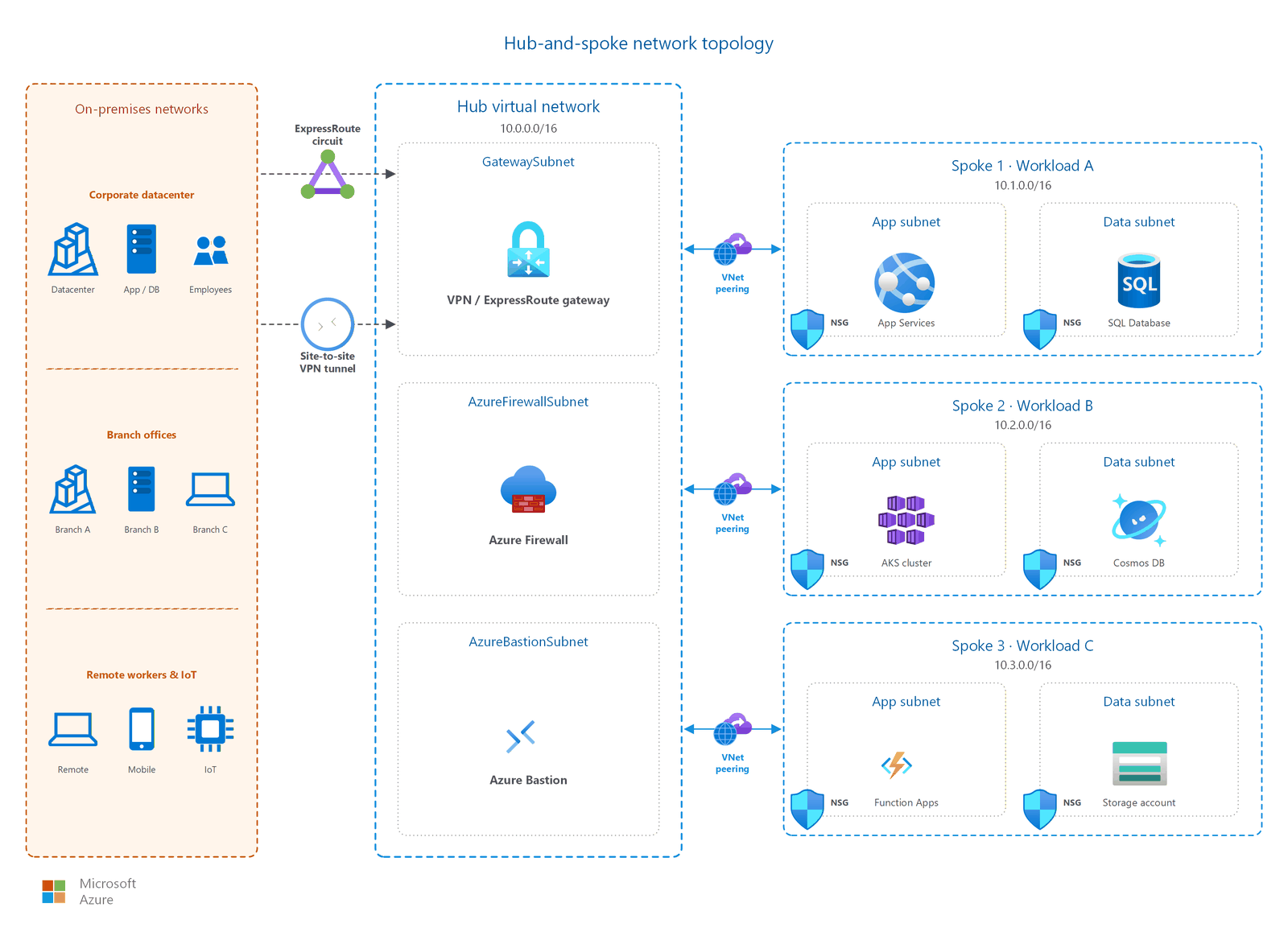
In a hub-and-spoke topology:
- A hub virtual network acts as the central point of connectivity. It contains shared network services such as a firewall, gateway, and Bastion host.
- Spoke virtual networks peer to the hub. Each spoke hosts a workload: an application, a team environment, or an isolated service.
- VNet peering is non-transitive. Spokes can reach the hub, but spokes can't reach each other directly through the hub unless you configure routing or direct peering between them.
What goes in the hub virtual network
Use the following table to determine which services to place in your hub:
| Service | Include? | Notes |
|---|---|---|
| Azure Firewall | Recommended | Provides centralized traffic inspection for all east-west and north-south traffic. Requires a subnet named exactly AzureFirewallSubnet. |
| VPN or ExpressRoute Gateway | If hybrid connectivity is needed | All spokes share a single gateway through gateway transit. Requires a subnet named exactly GatewaySubnet (minimum /27). |
| Azure Bastion | Recommended | One Bastion host in the hub reaches VMs in all peered spoke virtual networks. Requires Basic SKU or higher: Developer SKU doesn't support cross-VNet peering access. |
| Private DNS Resolver | If custom DNS is needed | Forwards DNS queries between Azure-hosted private DNS zones and on-premises DNS servers. |
| Azure DDoS Protection plan | If DDoS protection is enabled | A single plan can protect public IP addresses across all spoke virtual networks linked to the hub subscription. |
Important
Keep application workloads out of the hub. The hub hosts shared infrastructure services only: firewall, gateways, Bastion, and DNS. Application VMs, containers, and PaaS resources belong in spoke virtual networks. This separation keeps the hub clean, simplifies peering, and lets the platform team manage shared services independently of application teams.
Hub subnet layout
A well-designed hub virtual network typically includes these subnets:
| Subnet name | Purpose | Minimum size |
|---|---|---|
AzureFirewallSubnet |
Azure Firewall deployment | /26 |
AzureFirewallManagementSubnet |
Management NIC for forced tunneling (Standard/Premium only) | /26 |
GatewaySubnet |
VPN and ExpressRoute gateways | /27 |
AzureBastionSubnet |
Azure Bastion | /26 |
| DNS resolver inbound subnet | Private DNS Resolver inbound endpoint | /28 |
| DNS resolver outbound subnet | Private DNS Resolver outbound endpoint | /28 |
For detailed subnet sizing guidance, see VNets and subnets.
How to choose a variant
Hub-and-spoke has three common variants. Choose based on your isolation and communication requirements:
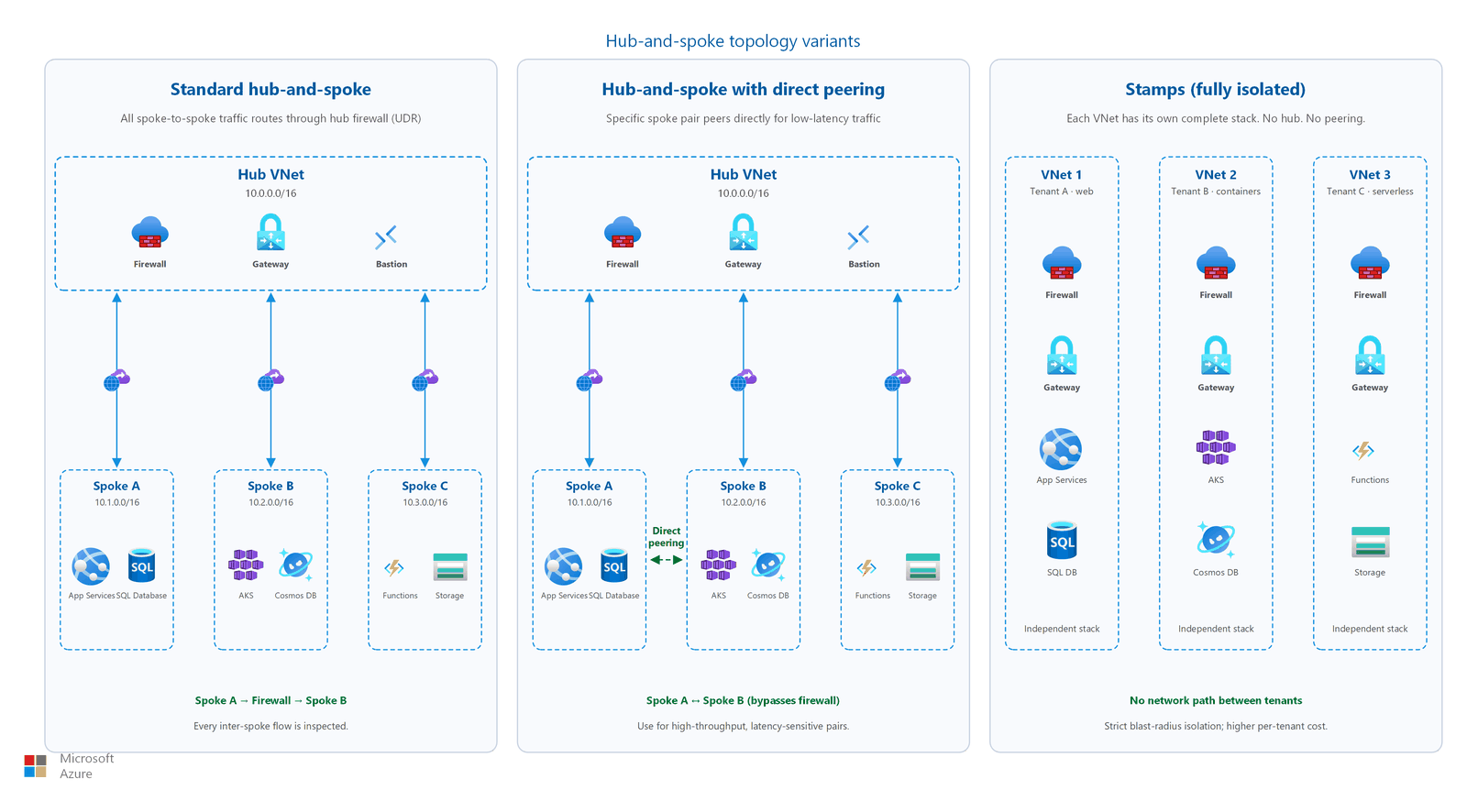
| Variant | Traffic path | When to use |
|---|---|---|
| Standard hub-and-spoke | All spoke-to-spoke traffic routes through the hub firewall | You need centralized traffic inspection. Spokes don't require direct peer-to-peer communication. |
| Hub-and-spoke with direct peering | Specific spoke pairs also peer directly with each other | Tightly coupled workloads need low-latency spoke-to-spoke communication without traversing the firewall. |
| Stamps (fully isolated) | No hub. Each virtual network is completely independent. | Strict blast-radius isolation, compliance-driven separation, or multitenant SaaS with independent stacks. |
Standard hub-and-spoke
This variant is the most common. All spoke-to-spoke traffic passes through the hub firewall for inspection. Spokes communicate only through the hub, never directly.
Routing pattern: Apply a user-defined route (UDR) to each spoke subnet with the default route (0.0.0.0/0) pointing to the hub firewall's private IP address. This forces all outbound traffic, including spoke-to-spoke, through the firewall for logging and filtering.
Peering limit: A single hub virtual network supports up to 500 peering connections (standard platform limit). If you use Azure Virtual Network Manager (AVNM) with a hub-spoke connectivity configuration, the limit increases to 1,000 spokes.
Hub-and-spoke with direct peering
In some architectures, specific spoke pairs need low-latency communication without traversing the hub firewall. For these cases, add direct VNet peering between the spoke pair, or use AVNM connected groups.
Use direct spoke peering when:
- Two workloads exchange high-throughput data (for example, database replication between spokes).
- Latency from the firewall hop is unacceptable for a specific data path.
- You accept that directly peered traffic bypasses the central firewall inspection.
Note
Peering between spokes doesn't remove the need for the hub. Hub-bound traffic (egress, hybrid connectivity, shared services) still routes through the hub firewall.
Stamps pattern (fully isolated)
The Stamps pattern is an alternative for scenarios that require strict blast-radius isolation. Each workload deploys into a fully independent virtual network with no hub and no peering to other workloads.
When to use Stamps:
- Regulatory compliance requires no network path between workloads.
- Multitenant SaaS where each tenant has an independent stack.
- Maximum fault isolation: a failure in one stamp can't propagate to others.
Example: Multitenant SaaS isolation
A SaaS provider hosts each enterprise customer in a dedicated stamp. Each stamp contains its own VNet (10.x.0.0/16), application gateway, compute tier, and database. No VNet peering exists between stamps, so a misconfigured NSG or compromised workload in Tenant A's stamp can't reach Tenant B's resources over the network. The provider manages stamps through Azure Resource Manager templates and deploys them into separate resource groups or separate subscriptions for large tenants. Cross-tenant data exchange, where required, uses a shared Azure Service Bus namespace. Each stamp accesses this namespace through private endpoints.
Trade-offs:
- No shared services. Each stamp needs its own firewall, gateway, and Bastion host (if needed), which increases cost.
- No inter-workload communication over private networking.
- Operational overhead increases because you manage independent networks instead of centralized infrastructure.
- Cost grows linearly with stamp count because shared-service savings don't apply.
If your workloads need any shared services or cross-workload communication, use the standard hub-and-spoke variant instead.
Spoke-to-spoke communication patterns
Because VNet peering is non-transitive, spoke-to-spoke communication requires explicit routing. This section walks through how traffic flows between spokes using the hub firewall.
Traffic flow: Spoke A to Spoke B through the hub firewall
The following sequence describes how a packet travels from a VM in Spoke A (10.1.0.4) to a VM in Spoke B (10.2.0.4):
- Spoke A VM sends a packet destined for
10.2.0.4. The VM's effective route table contains a UDR with0.0.0.0/0 → 10.0.1.4(the Azure Firewall private IP). - The packet crosses the VNet peering link from Spoke A to the hub VNet. Peering allows traffic to reach the firewall's subnet.
- Azure Firewall receives the packet on its internal interface. It evaluates the packet against network rules and application rules in priority order.
- If a rule permits the flow, the firewall forwards the packet to
10.2.0.4. The packet crosses the hub-to-Spoke-B peering link. - Spoke B VM receives the packet. The return traffic follows the same path in reverse. Spoke B's UDR sends the response back through the firewall.
Configuring the route tables
Apply these route tables to enable the preceding pattern:
- Create a route table for spoke subnets. Turn off BGP route propagation if you want to prevent on-premises routes from overriding your UDRs.
- Add a default route (
0.0.0.0/0) with the next hop typeVirtualApplianceand the next hop address set to the Azure Firewall private IP. - Associate the route table with each spoke subnet that needs to reach other spokes or the internet.
- Create firewall network rules that permit the specific spoke-to-spoke traffic. For example, allow
10.1.0.0/16 → 10.2.0.0/16on ports 443 and 1433.
Tip
Use IP Groups in Azure Firewall to organize spoke address ranges. This simplifies rule management as you add spokes.
Alternative: AVNM connected groups for direct spoke-to-spoke
If you don't need firewall inspection between specific spokes, AVNM connected groups provide a mesh connectivity model. Spokes in the same connected group communicate directly without traversing the hub. This reduces latency and firewall throughput requirements, but bypasses centralized inspection.
Important
If you enable forced tunneling on Azure Firewall (to route internet-bound traffic to an on-premises appliance), you need the Standard or Premium tier. Forced tunneling also requires a management subnet (AzureFirewallManagementSubnet) and turns off DNAT rules.
Gateway transit
Gateway transit lets all spokes share a single VPN or ExpressRoute gateway deployed in the hub. Without gateway transit, each spoke needs its own gateway to reach on-premises networks.
Configuration steps
- Deploy a VPN or ExpressRoute gateway in the hub's
GatewaySubnet. - On the hub-side peering connection (hub → spoke): enable Allow gateway transit.
- On the spoke-side peering connection (spoke → hub): enable Use remote gateways.
- Verify route propagation. After configuration, check the effective routes on a spoke VM NIC. The route table shows on-premises prefixes learned through the hub gateway with a next hop type of
VNetGlobalPeeringorVNetPeering.
When configured, routes learned by the hub gateway (for example, on-premises prefixes from ExpressRoute) automatically propagate to spoke routing tables.
Gateway transit limitations
- Gateway transit works with all VPN Gateway tiers except the Basic tier. If you use the Basic VPN Gateway, you can't share it with peered virtual networks.
- A spoke virtual network can use only one remote gateway. You can't enable
Use remote gatewayson a spoke that peers with multiple hubs. - If you use UDRs to force traffic through the firewall, make sure UDR doesn't override the gateway-propagated on-premises routes unintentionally. Set more specific routes for on-premises prefixes if needed.
Note
When you use ExpressRoute with gateway transit, enable Allow gateway transit before you establish the spoke peerings. The gateway must exist and be provisioned first.
Azure Virtual Network Manager at scale
When your environment grows beyond a handful of spokes, managing peering connections and route tables manually becomes complex. AVNM provides automation for hub-spoke topologies:
| AVNM capability | What it does |
|---|---|
| Hub-spoke connectivity configuration | Automatically creates and maintains peering between the hub and all spokes in a network group. Supports up to 1,000 spokes per hub. |
| Connected groups | Enables direct spoke-to-spoke connectivity without manual peering. Default limit: 250 virtual networks per group (expandable to 1,000 by request). |
| Network groups with dynamic membership | Uses Azure Policy conditions to automatically add virtual networks to groups based on tags, naming, or subscriptions. |
| UDR management | Automates route table deployment across multiple hub-spoke topologies. |
AVNM is especially valuable when you manage hub-spoke topologies across multiple regions or need dynamic membership as new spoke virtual networks come online.
Scaling considerations
As your hub-spoke topology grows, plan for the following platform limits and organizational patterns:
Peering and connectivity limits
| Dimension | Standard limit | With AVNM | Notes |
|---|---|---|---|
| VNet peerings per virtual network | 500 | 1,000 (hub-spoke config) | Each spoke-to-hub peering consumes one slot on both sides |
| Virtual networks per AVNM connected group | 250 (default) | Up to 1,000 (by request) | Request increase through Azure support |
| Subscriptions per AVNM scope | N/A | 1,000 | Scope can span multiple subscriptions in a management group |
Subscription organization
- Separate spokes into workload-specific subscriptions for environments with more than 10 spokes. This isolates billing, RBAC, and quota limits per workload team.
- Use a dedicated connectivity subscription for the hub VNet, gateways, and firewall. This is the pattern recommended by Azure landing zones (platform subscription).
- Group subscriptions under a management group so AVNM can dynamically discover and manage spoke VNets across subscriptions by using Azure Policy conditions.
Enforcing topology with Azure Policy
Use Azure Policy to prevent configuration drift:
- Deny peering to non-hub VNets. Assign a policy at the management group level that blocks VNet peering creation unless the target is the designated hub VNet.
- Require UDR association. Assign a policy that audits (or denies) spoke subnets without a route table that includes the
0.0.0.0/0 → Firewallroute. - Enforce AVNM group membership. Use dynamic membership rules in AVNM based on tags (for example,
NetworkRole:Spoke) so new VNets are automatically enrolled.
Migration path from flat to hub-spoke
If you started with a flat network topology and your environment has grown to require shared services or inter-workload segmentation, follow this migration path:
Step 1: Plan the hub VNet
- Allocate a new address space for the hub (for example,
10.0.0.0/16) that doesn't overlap with your existing flat VNet. - Determine which shared services to deploy: firewall, gateway, Bastion, DNS resolver.
- Size hub subnets per the hub subnet layout table.
Step 2: Deploy shared services in the hub
- Create the hub VNet and deploy Azure Firewall (or your chosen NVA).
- Deploy the VPN/ExpressRoute gateway if you need hybrid connectivity.
- Deploy Azure Bastion for secure VM access.
- Configure Private DNS Resolver if using custom DNS.
Step 3: Migrate workloads into spokes
- Create spoke VNets with new address spaces for each workload. If you can't re-IP, you can keep existing ranges as long as they don't overlap with the hub.
- Peer each spoke to the hub. Enable gateway transit on the hub side and use remote gateways on the spoke side.
- Apply UDRs to spoke subnets with the default route pointing to the hub firewall.
- Move or redeploy VMs and services from the flat VNet into the appropriate spoke. Use Azure Resource Mover or redeployment, depending on workload complexity.
- Create firewall rules to permit the inter-spoke and spoke-to-internet traffic patterns you earlier allowed within the flat VNet.
Step 4: Decommission the flat VNet
- Verify all workloads are reachable through the new hub-spoke topology.
- Update DNS records if private IP addresses changed.
- Remove the old flat VNet once you migrate and validate all traffic.
Tip
Migrate workloads in phases. Start with a non-critical workload to validate the routing and firewall rules, then proceed with production workloads.
When to consider Virtual WAN instead
If your hub-spoke topology is growing in complexity, evaluate whether Azure Virtual WAN offers a better fit:
| Factor | Hub-and-spoke (traditional) | Azure Virtual WAN |
|---|---|---|
| Management | Customer-managed hub infrastructure | Microsoft-managed hub routing and connectivity |
| Best for | Fewer than 30 VPN branch connections, full control needed | 30+ VPN branches, many Azure regions |
| Routing | Customer configures UDRs manually | Automatic routing in the hub |
| SD-WAN integration | Manual NVA deployment | Native SD-WAN partner integration |
| Global transit | Requires customer-managed inter-hub routing | Built-in: all hubs interconnect automatically |
For a detailed comparison, see Azure Virtual WAN topology.
Design considerations
For a lift-and-shift migration, deploy a single hub with shared services that all migrating workloads consume:
- Single hub with VPN Gateway. Deploy VPN Gateway (or ExpressRoute gateway) in the hub's GatewaySubnet. All spoke workloads share this gateway through gateway transit for on-premises connectivity during and after migration.
- Azure Bastion in the hub. A single Bastion deployment in the hub provides secure RDP/SSH access to VMs across all peered spokes without exposing public IPs on migrated servers.
- Centralized firewall for outbound traffic. Deploy Azure Firewall in the hub. Configure UDRs in every spoke subnet with the default route pointing to the firewall. All outbound and spoke-to-spoke traffic flows through this single inspection point.
- Start with one hub, add spokes incrementally. Peer each workload's spoke VNet to the hub as you migrate it. A single hub supports up to 500 peering connections (1,000 with AVNM).
For a migrate-and-modernize scenario, plan for dual-hub topology that separates platform infrastructure from application workloads:
- Dual-hub deployment. Deploy a hub in your primary region and a second hub in your backup region. Each hub contains its own firewall, gateway, and Bastion. This supports active-active architectures for PaaS workloads.
- IT-owned hubs, app-team-owned spokes. The platform team manages hub subscriptions (connectivity subscription pattern, a dedicated Azure subscription for shared hub networking resources, separate from workload subscriptions). Application teams own their spoke subscriptions with delegated control over their Private Link subnets and workload resources.
- Per-spoke Private Link subnets. Each spoke VNet includes a dedicated subnet for Private Endpoints. Application teams create Private Link connections to their PaaS services (Azure SQL, Storage, Key Vault) within their own spokes.
- Hub firewall as SNAT/DNAT. The central firewall in each hub provides source NAT for outbound traffic and destination NAT for inbound traffic patterns. Application teams can't bypass centralized inspection.
For cross-cloud connectivity, evaluate whether traditional hub-spoke or Virtual WAN provides the right transit model:
- Hub-spoke vs Virtual WAN decision. If you have fewer than 30 branch connections, a small number of cross-cloud VPN tunnels, and operate in one or two Azure regions, traditional hub-spoke with VPN Gateway is simpler. If you have many VPCs, branches, regions, or cloud edges, Virtual WAN provides automated routing that scales better.
- VPN Gateway for cross-cloud tunnels. In a hub-spoke model, deploy VPN Gateway in the hub and create site-to-site connections to AWS Virtual Private Gateways and Google Cloud VPN endpoints. Each connection uses IPSec/IKE encryption.
- Evaluate complexity growth. If your cross-cloud estate grows (more AWS accounts, Google Cloud projects, or Azure regions), revisit the hub-spoke versus Virtual WAN decision. Virtual WAN becomes more cost-effective when managing many tunnels at scale.
For a full comparison, see Azure Virtual WAN topology.
Prerequisites
Before you design a hub-and-spoke network:
- Complete your virtual network and subnet plan. Know how many spokes you need and what subnets each spoke requires.
- Define your IP address scheme. Hub and spoke address spaces must not overlap.
- Understand that VNet peering is non-transitive: spokes don't inherit connectivity to other spokes through the hub.
Security considerations
A hub-and-spoke topology centralizes security enforcement in the hub. Apply these principles:
- Route all spoke traffic through the hub firewall. Use UDRs with the default route pointing to the firewall. This configuration ensures the firewall inspects and logs every spoke-to-spoke and spoke-to-internet flow.
- Use NSGs on spoke subnets as defense-in-depth. Even with a central firewall, network security groups on spoke subnets provide an extra layer of segmentation. Deny unexpected lateral traffic at the subnet level. For NSG design guidance, see Network security groups and application security groups.
- Enable gateway transit with care. Gateway transit exposes on-premises routes to all spokes. Make sure firewall rules account for the expanded connectivity.
- Remove public IPs on spoke VMs. Azure Bastion in the hub provides secure management access without exposing VMs to the internet.
- Treat each spoke as a security boundary. Workloads in different spokes remain isolated by default. Connectivity between spokes requires explicit routing and firewall rules.
Related articles
- Flat network topology: for single workloads that don't need shared services
- Azure Virtual WAN topology: for managed routing and connectivity at scale
- Multi-region networking: for workloads that span multiple Azure regions
- VNets and subnets: subnet sizing for hub components
- IP address planning: CIDR planning for hub and spokes
- Network security groups and application security groups: defense-in-depth on spoke subnets
Learn more
- Hub-spoke network topology in Azure
- Virtual network peering
- Azure Firewall overview
- Azure Virtual Network Manager overview
- VPN Gateway transit for peering
- Azure Bastion and VNet peering
Next steps
Tip
Exploring on your own? Return to the overview navigator to find your next article by capability.
Next in your lift-and-shift journey:
Connect to your on-premises network: Set up VPN Gateway or ExpressRoute in your hub VNet to establish the critical migration dependency.
Next in your modernization journey:
Plan your multi-region deployment: Deploy active-active across primary and backup regions for your customer-facing applications.
Next in your cross-cloud journey:
Evaluate Azure Virtual WAN as your transit model: Assess whether Virtual WAN or hub-spoke best fits your cross-cloud estate with multiple VPCs, branches, and regions.