Note
Access to this page requires authorization. You can try signing in or changing directories.
Access to this page requires authorization. You can try changing directories.
This guide helps you plan and design your Azure network. It shows you what Azure networking services are available and helps you choose the right services based on what your workload needs. Start here for both application migrations and new cloud-native designs.
What's Azure networking?
In Azure, networking is software-defined. Unlike on-premises networks where you manage physical cables, switches, and hardware appliances, Azure networking is a set of services you create and configure. Use the Azure portal, Azure CLI, or infrastructure-as-code tools like Bicep and Terraform. The building blocks (virtual networks, gateways, load balancers, and firewalls) are resources you provision on demand and scale independently.
Think of it this way: in a traditional datacenter, the network exists before you deploy anything. Cables are run, switches are racked and configured, and firewalls are provisioned weeks in advance. In Azure, you create the network resources as part of your deployment. You define the address space, create subnets, attach security rules, and connect to the internet or your on-premises environment. This configuration takes minutes instead of weeks.
This software-defined approach gives you flexibility that physical networks don't offer:
- On-demand provisioning: Create, modify, or delete network resources without hardware procurement or physical access.
- Declarative configuration: Define your target network state in templates. Azure handles the implementation details.
- Independent scaling: Scale a load balancer, add subnets, or expand an address space without affecting other resources.
- Built-in redundancy: Many Azure networking services include zone-redundant and geo-redundant options by default.
Before you deploy any workload in Azure, you need a network. Every virtual machine, database, container, and web application runs inside a virtual network. Azure Virtual Network integrates directly with more than 16 other Azure services: from Azure Firewall and Azure Application Gateway to Azure Private Link and Azure Bastion. This guide helps you decide what services to include and how they fit together.
Azure networking services at a glance
Azure networking spans several categories. You don't need all of them. Choose the services that match your workload's requirements:
- Virtual networking: Virtual networks, subnets, IP addressing, and network interfaces. The foundation for everything else.
- Connectivity: VPN Gateway, ExpressRoute, and virtual network peering. Connect Azure to your on-premises environment, other Azure regions, or other clouds.
- Load balancing and application delivery: Azure Load Balancer, Azure Application Gateway, Azure Front Door, and Azure Traffic Manager. Distribute traffic, optimize performance, and improve availability.
- Security: Network security groups, Azure Firewall, Azure Web Application Firewall, and Azure DDoS Protection. Control traffic flow and protect your resources.
- Private access: Azure Private Link and private endpoints. Connect to Azure PaaS services without exposing traffic to the public internet.
- DNS: Azure DNS, private DNS zones, and Azure DNS Private Resolver. Name resolution for your Azure and hybrid environments.
- Monitoring and management: Azure Network Watcher, Azure Monitor, and Azure Virtual Network Manager. Observe traffic, diagnose problems, and manage networks at scale.
This guide covers all of these categories. Each article focuses on one capability area and helps you choose between the services in that area.
Choose your scenario
Start here. A scenario path is the recommended way to use this guide. Pick the path that matches your project and follow it end to end. Each path sequences every design decision in the right order:
| Scenario | Best for | Guide |
|---|---|---|
| Lift and shift | Moving on-premises workloads to Azure IaaS without re-architecting | Lift-and-shift networking path |
| Migrate and modernize | Adopting PaaS services, containers, and managed databases | Modernization networking path |
| Cross-cloud | Connecting Azure to AWS or Google Cloud, or migrating from another cloud | Cross-cloud networking path |
Tip
Not sure which scenario fits? Read through the preceding descriptions, or continue to capability-based exploration.
Note
Not sure if it's lift and shift or modernize? If your workloads run on VMs with minimal changes, start with lift and shift. If you're adopting PaaS services like AKS, App Service, or Azure SQL, start with migrate and modernize. Revisit the other path later as needed. The articles overlap.
Your design path
Select your scenario at the top of this article to tailor the rest of the guide. Here's how your path differs:
Your lift-and-shift path: You're rehosting on-premises workloads onto Azure IaaS with minimal change.
- Foundations: One virtual network per application and one subnet per component, mirroring your on-premises segmentation. Size address space with room to grow and avoid overlap with on-premises ranges.
- Connectivity: VPN Gateway or ExpressRoute in a hub for on-premises access, Azure Bastion for admin access, and a private DNS zone with alias records to preserve hardcoded legacy names.
- Topology and resiliency: A single-region hub-and-spoke is usually enough. Plan disaster recovery with Azure Site Recovery for workloads that can't span zones or regions.
- Suggested order: Virtual networks and subnets, IP planning, NSGs, hub-and-spoke, hybrid connectivity, developer and admin access, DNS security, outbound egress, Azure Firewall, monitoring.
Your migrate-and-modernize path: You're adopting PaaS, containers, and managed databases, often with active-active resiliency.
- Foundations: Design subnets around platform services (dedicated subnets for App Service Environment and AKS with CNI Overlay), and reserve non-overlapping address space across your primary and backup regions.
- Connectivity and delivery: Route spoke egress through a hub firewall with user-defined routes, front web apps with Azure Front Door and WAF, and use Traffic Manager for non-web apps.
- Topology and operations: Deploy active-active across two regions with zone-redundant SKUs, separate hub and spoke ownership with subscriptions and RBAC, and use Azure Virtual Network Manager for consistent policy.
- Suggested order: Virtual networks and subnets, IP planning, NSGs, hub-and-spoke, multi-region, internet ingress, application delivery, PaaS private access, Azure Firewall, WAF, DDoS, DNS security, monitoring, AVNM.
Your cross-cloud path: You're connecting Azure to AWS or Google Cloud, or migrating from another cloud.
- Discover first: Map your existing AWS and Google Cloud topology and DNS records before you design Azure, and map each source service to its Azure equivalent.
- Topology and connectivity: Use Azure Virtual WAN with a secured hub, and connect to AWS and Google Cloud over IPsec VPN. Mirror your existing security group rules into NSGs.
- Name resolution and delivery: Use Azure DNS Private Resolver for cross-cloud and on-premises resolution, and place a Layer 7 WAF on Application Gateway in the spoke instead of exposing public IPs on VMs.
- Suggested order: Cross-region and multicloud, Virtual WAN, virtual networks and subnets, IP planning, NSGs, hybrid connectivity, DNS security, Azure Firewall, monitoring.
How to use this guide
If a scenario path doesn't match your project, use this guide as a capability reference and go straight to the article for the capability you need. Either way, read the foundational articles first.
Who's this guide for? Network administrators, cloud architects, IT decision-makers, and developers who need to design or understand Azure networking. No prior Azure experience is required. The foundational articles start from first principles.
What this guide isn't: This guide isn't a deployment guide. It doesn't include Azure portal walkthroughs or CLI commands. After you make your design decisions, follow the implementation links in each article's "Learn more" section for step-by-step deployment instructions.
Each capability article follows the same structure (what it covers, who needs it, the Azure services involved, decision tables for choosing, prerequisites, and security considerations) so you can scan for what you need.
Guide structure
The guide has five sections:
| Section | What it contains | How to use it |
|---|---|---|
| Foundational articles | Virtual networks, IP addressing, and network security groups. Core concepts that every Azure deployment uses. | Read these first. They cover the building blocks that all other articles build on. |
| Connectivity articles | Hybrid connectivity, internet ingress, application delivery, outbound access, PaaS private access, VM access, and cross-region connections. | Go to the articles that match how your workload connects: to the internet, to on-premises, to other Azure services, or across regions. |
| Topology articles | Network topologies from simple flat networks to hub-and-spoke, Azure Virtual WAN, and multi-region designs. | Choose based on the scale and complexity of your environment. Start simple and grow. |
| Security articles | Azure Firewall, Azure Web Application Firewall, Azure DDoS Protection, and DNS security. | Go to the articles that match your security requirements. Every article in the guide also includes a security considerations section. |
| Operations articles | Network monitoring, observability, and centralized management with Azure Virtual Network Manager. | Use these articles to plan how you'll monitor, troubleshoot, and manage your network after deployment. |
The following diagram shows how the guide is organized. The overview connects to all five article groups, while the scenario guides and phase summary help readers choose how to move through the content.
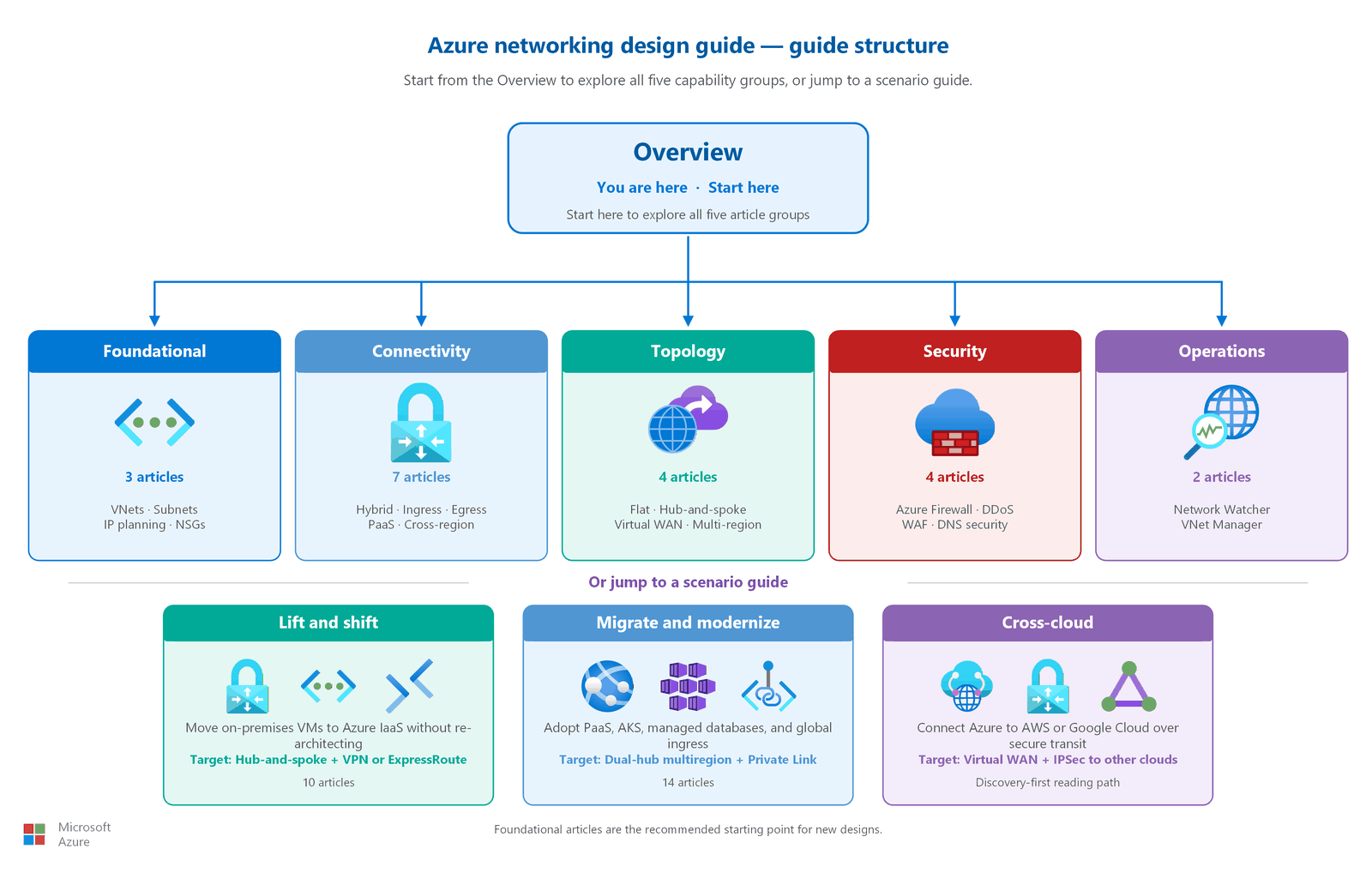
Where to start: For most projects, start with a scenario path. That's the recommended front door, and each path sequences your decisions in the right order. If you already know the capability you need, use the business-need navigator. If you're new to Azure networking, keep reading this overview or scope your inputs with the requirements assessment.
Gather your requirements first
Good network design starts with discovery, not deployment. Before you create a single virtual network, gather the inputs that drive your design decisions. Each input in the following table maps to a decision you make and to the article that helps you make it. Collect these inputs for every workload you plan to run in Azure, ideally for everything you expect to move or build over the next three to five years, so your address space and topology have room to grow.
| Input to gather | Design decision it drives | Where to go |
|---|---|---|
| Workload names and number of components (tiers) | Virtual network and subnet count: one virtual network per workload, one subnet per component | Virtual networks and subnets |
| Element count per component, now and projected | Address space and subnet sizing; whether you need a load balancer | IP address planning, Application delivery |
| Deployment regions | Region selection and whether you need a multi-region design | Multi-region networking |
| Traffic flows between components | Peering, network security group rules, and internal name resolution | Network security groups, DNS security |
| On-premises connectivity and bandwidth | VPN Gateway vs ExpressRoute; address ranges that avoid overlap | Hybrid connectivity, IP address planning |
| Developer and admin access needs | Azure Bastion or point-to-site VPN | Developer and admin access |
| Outbound internet requirements | NAT Gateway, Azure Firewall, or both; replace default outbound access | Outbound internet access |
| Inbound internet requirements | Application Gateway, Azure Front Door, Traffic Manager, WAF, and DDoS protection | Internet ingress, Application delivery |
| Azure PaaS dependencies | Private Link, private endpoints, or service endpoints | PaaS private access |
| Other clouds and cross-region interconnectivity | Hub-and-spoke vs Virtual WAN; cross-cloud transit | Hub-and-spoke topology, Virtual WAN, Cross-region and multicloud connectivity |
| Security level (isolation, inspection, encryption) | Segmentation, firewall inspection, and perimeter controls | Network security groups, Azure Firewall |
| Resiliency level (zonal vs regional) | Zone-redundant vs regional service SKUs | Multi-region networking |
| Monitoring and observability needs | Network Watcher and flow logs | Network monitoring and observability |
After you gather these inputs, use the business-need navigator to map each requirement to the article that addresses it. If you follow a scenario path, each guide sequences these decisions for you.
Start here: foundational articles
Before you explore specific capabilities, read the three foundational articles. These articles cover the building blocks that every Azure network uses, regardless of workload type or complexity.
| Article | What it covers | Why it's foundational |
|---|---|---|
| Azure virtual networks and subnets | Virtual network creation, subnet design, dedicated subnets, and address space decisions | Every Azure workload lives in a virtual network. You need this article before anything else. |
| IP address planning | Private and public IP allocation, RFC 1918 ranges, CIDR planning, and IPv6 decisions | IP addresses underpin every networking decision. Poor planning causes address conflicts that are expensive to fix later. |
| Network security groups and application security groups | Traffic filtering rules, security group assignment, service tags, and default-deny posture | Traffic control is active by default in Azure but only works correctly when you configure it intentionally. |
After you complete the foundational articles, move to whichever capability articles match your workload's needs. There's no required order. Each capability article is self-contained.
Business-need navigator
Use this table to find the right article based on what your workload needs. Each row maps a common business requirement to the article that addresses it.
| I need to... | Go to | Article code |
|---|---|---|
| Set up my core virtual network and subnets | Virtual networks and subnets | F1 |
| Plan and allocate my IP address space | IP address planning | F2 |
| Control traffic between my subnets and resources | Network security groups and ASGs | F3 |
| Connect my on-premises office or datacenter to Azure | Hybrid connectivity | C1 |
| Let internet users reach my application | Internet ingress | C2 |
| Optimize application delivery and performance globally | Application delivery and performance | C3 |
| Control what my Azure resources can reach on the internet | Outbound internet access | C4 |
| Connect Azure VMs to Azure Storage, databases, or other PaaS services without going over the public internet | PaaS private access | C5 |
| Let developers or admins securely access Azure VMs | Developer and admin access | C6 |
| Connect Azure resources across regions, or connect to AWS or Google Cloud | Cross-region and multicloud connectivity | C7 |
| Design a simple network for a single workload | Flat network topology | T1 |
| Host multiple workloads with shared services like a firewall or gateway | Hub-and-spoke topology | T2 |
| Manage networks across many branch offices and regions | Azure Virtual WAN | T3 |
| Deploy my workload across multiple Azure regions for high availability | Multi-region networking | T4 |
| Inspect and filter all traffic with a firewall | Azure Firewall | S1 |
| Protect my web application from HTTP-layer attacks | Web Application Firewall | S2 |
| Protect my public-facing resources from volumetric attacks | DDoS protection | S3 |
| Set up private name resolution or secure my DNS | DNS security and private name resolution | S4 |
| Monitor my network health and traffic | Network monitoring and observability | O1 |
| Manage virtual networks across multiple subscriptions centrally | Centralized network management with Azure Virtual Network Manager | O2 |
Tip
If you're not sure where to start, read the three foundational articles (F1–F3) first, then return to this table. Most workloads need at least one connectivity article (C1–C7) and one topology article (T1–T4) along with the foundations. For worked examples that show the full article set for common workloads, see Common workload patterns.
Design phases at a glance
The following phases outline the typical progression from planning to operations. Each phase builds on the previous one.
| Phase | Focus | Lift and shift | Cloud native | Key articles |
|---|---|---|---|---|
| Phase 1: Plan | Define virtual networks, address space, and traffic filtering | Map Azure VNets, subnets, and rules to existing network segments and ACLs | Design workload isolation boundaries, growth-friendly CIDR ranges, and tag-based filtering | Virtual networks and subnets, IP address planning, Network security groups |
| Phase 2: Build | Choose the network topology pattern | Start with the topology that best mirrors your centralized on-premises model, often hub-and-spoke | Start with the simplest topology that supports the workload, then add shared services as needed | Flat network topology, Hub-and-spoke topology, Azure Virtual WAN, Multi-region networking |
| Phase 3: Connect | Plan internet, hybrid, private, and cross-region connectivity | Prioritize hybrid connectivity and controlled ingress and egress for migrated workloads | Prioritize internet delivery, private PaaS access, and only add hybrid links when required | Hybrid connectivity, Internet ingress, Application delivery, Outbound internet access, PaaS private access, Developer and admin access, Cross-region and multicloud connectivity |
| Phase 4: Secure | Apply layered network protections | Recreate centralized inspection and perimeter controls in Azure | Push protections closer to the edge and private endpoints while preserving Zero Trust boundaries | Azure Firewall, Web Application Firewall, DDoS protection, DNS security and private name resolution |
| Phase 5: Operate | Monitor, troubleshoot, and manage the estate | Validate migrated traffic patterns and central operations early | Enable observability and centralized policy from the first production deployment | Network monitoring and observability, Centralized network management with Azure Virtual Network Manager |
Choose your security posture
Network security in Azure spans three goals (restrict, inspect, and encrypt the traffic), and you apply each at the level your workload requires. Use the following matrix to scope your design. Each level builds on the one before it, trading added cost or complexity for stronger protection.
| Goal | Basic | Medium | High |
|---|---|---|---|
| Restrict the traffic | Segment workloads into virtual networks and subnets, apply network security groups and ASGs, and disable default outbound access. | Add Azure Firewall with threat intelligence, DDoS Network Protection, and DNS security policies. | Add Azure Firewall Premium, Private Link for PaaS, Network Security Perimeter, and private-only Bastion. |
| Inspect the traffic | Use Azure Network Watcher for diagnostics. | Export virtual network flow logs to a SIEM and add a web application firewall on Application Gateway or Front Door. | Enable Azure Firewall Premium TLS inspection and IDPS, with full flow-log analytics. |
| Encrypt the traffic | Terminate TLS at the application; use VPN Gateway for hybrid traffic. | Use ExpressRoute for private connectivity that bypasses the public internet. | Add virtual network encryption and ExpressRoute Direct with MACsec. |
Most production workloads land at the medium level. Choose high for regulated or customer-facing workloads where security outweighs cost and latency. Every capability article also includes a security considerations section with specific guidance.
Related guidance
This guide focuses on networking design decisions. For broader architecture and adoption guidance, see:
- Network topology and connectivity in the Cloud Adoption Framework for enterprise-scale landing zone networking.
- Recommendations for networking and connectivity in the Well-Architected Framework for security, reliability, and cost trade-offs.
- Networking architecture design in the Azure Architecture Center for reference architectures and proven patterns.
Next steps
Start your lift-and-shift journey:
Lift-and-shift networking design path: A guided reading path for migrating on-premises workloads to Azure IaaS without re-architecting.
Start your modernization journey:
Migrate-and-modernize networking design path: A guided reading path for adopting PaaS services, containers, and managed databases in Azure.
Start your cross-cloud journey:
Cross-cloud networking design path: A guided reading path for connecting Azure to AWS or Google Cloud, or migrating from another cloud.