Note
Access to this page requires authorization. You can try signing in or changing directories.
Access to this page requires authorization. You can try changing directories.
This article explains how to design a network with Azure Virtual WAN. Virtual WAN provides Microsoft-managed hub infrastructure with automatic routing, native SD-WAN integration, and built-in global transit between hubs.
What this article covers
This article covers Virtual WAN hub architecture, automatic routing and route propagation, tier comparison between Basic and Standard, routing intent for traffic inspection, SD-WAN integration patterns, and the Virtual WAN cost model.
Who needs this article
Read this article if one or more of these conditions apply:
- You need managed transit across many branches, sites, remote users, or connected virtual networks.
- You want Microsoft-managed routing and branch connectivity instead of building and operating a custom transit hub yourself.
- You need to compare Azure Virtual WAN with hub-and-spoke before committing to a topology.
- You expect your network to grow beyond a small number of manually managed connectivity edges.
Tip
Following a scenario path? Select your scenario at the top of the page for tailored guidance. The core guidance that follows applies to all readers.
Lift-and-shift focus: Skip this article for a standard lift-and-shift migration. Most lift-and-shift environments have fewer than 30 branch connections and operate in one or two regions. A traditional hub-and-spoke topology with VPN Gateway provides sufficient connectivity. Consider Virtual WAN only if you have many branch sites or plan rapid expansion.
Modernization focus: This article becomes relevant when your modernization program includes branch-scale or many-region transit requirements. Dual hub-and-spoke with VPN Gateways in each region handles most modernization scenarios. Virtual WAN becomes relevant when you exceed the routing complexity that manual UDR management can sustain.
Cross-cloud focus: Virtual WAN is the recommended transit model when you have multiple virtual private clouds (VPCs), branches, regions, or cloud edges. Virtual WAN serves as Azure's equivalent to AWS Transit Gateway, providing centralized routing and connectivity management at scale. If you're migrating from an AWS environment that uses Transit Gateway, Virtual WAN maps directly to that model.
Azure services and features
The following table lists the Azure services and features that support a Virtual WAN topology:
| Service or feature | Role in Virtual WAN | Learn more |
|---|---|---|
| Azure Virtual WAN | Provides the managed global transit network and hub infrastructure | Virtual WAN overview |
| Virtual hub | Microsoft-managed virtual network that hosts routing and gateway services | Virtual hub routing |
| VPN Gateway (in hub) | Site-to-site and point-to-site VPN connectivity for branch offices | Virtual WAN VPN Gateway |
| ExpressRoute Gateway (in hub) | Private connectivity from on-premises datacenters through ExpressRoute circuits | Virtual WAN ExpressRoute |
| Azure Firewall Manager | Centralized security policy management for Secured Virtual Hubs | Firewall Manager overview |
| Routing intent | Automatic traffic steering through a security solution without custom route tables | Routing intent |
How it works
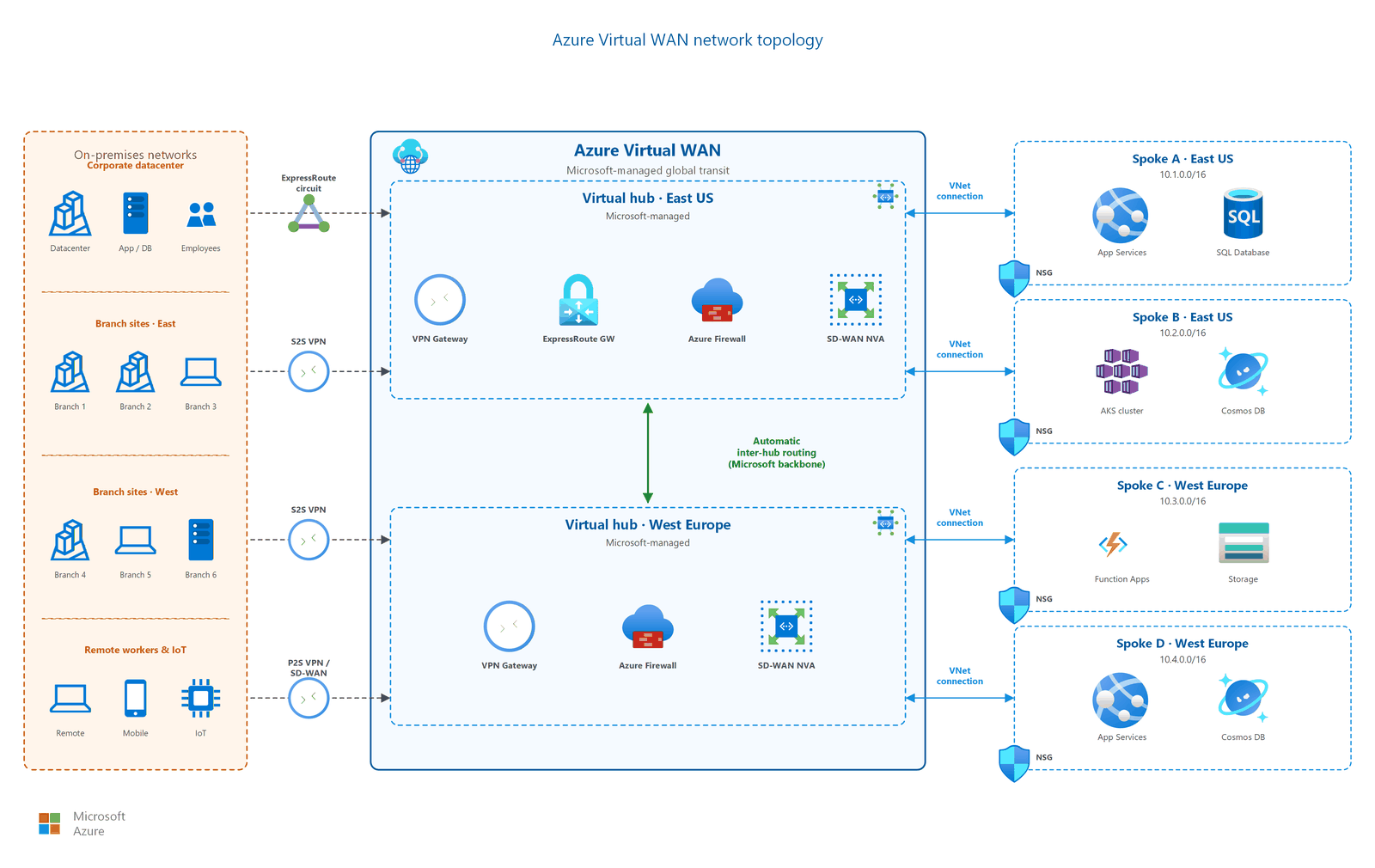
In a Virtual WAN topology:
- A Virtual WAN resource acts as the top-level container that groups one or more virtual hubs across regions.
- Each virtual hub is a Microsoft-managed virtual network. The hub contains service endpoints for VPN, ExpressRoute, and firewall services. You don't deploy or manage the hub virtual network directly.
- Spoke virtual networks connect to a virtual hub through VNet connections (similar to peering in traditional hub-spoke). The virtual hub router handles all routing automatically.
- Branch sites connect through site-to-site VPN or ExpressRoute gateways deployed inside the virtual hub.
- When you deploy multiple hubs, they interconnect automatically over the Microsoft backbone, which enables global transit without customer-managed routing.
Virtual hub routing
The virtual hub router manages all routing between connected virtual networks, branches, and other hubs. Key behaviors:
- Automatic transit: Virtual networks connected to the same hub can communicate without UDRs. The hub router propagates routes between all connections by default.
- Inter-hub transit: Routes automatically propagate between hubs in the same Virtual WAN. Traffic between regions flows over the Microsoft backbone.
- Route tables: For advanced isolation scenarios (such as isolating development from production), you can create custom route tables within the hub to control route propagation.
- Aggregate throughput: The virtual hub router supports up to 50 Gbps aggregate throughput when configured with the maximum 50 routing infrastructure units. The default deployment uses 2 routing infrastructure units (3 Gbps). You scale throughput by increasing routing infrastructure units in hub settings.
Note
Automatic routing applies to standard transit connectivity. Custom scenarios that route traffic through network virtual appliances (NVAs) in the hub might require custom route tables.
How to choose
This section helps you select the right topology and tier for your environment.
Hub-spoke compared to Virtual WAN
Use this table to determine whether a traditional hub-spoke topology or Virtual WAN is the right choice for your environment:
| Factor | Hub-and-spoke (traditional) | Azure Virtual WAN |
|---|---|---|
| Management | Customer-managed hub virtual network | Microsoft-managed hub infrastructure |
| Best for | Up to ~30 VPN branch connections | 30+ VPN branches or many Azure regions |
| Routing | Customer configures UDRs for spoke-to-spoke traffic | Automatic routing in the virtual hub |
| SD-WAN integration | Manual NVA deployment and configuration | Native SD-WAN partner integration |
| Global transit | Requires customer-managed inter-region routing | Built-in: all hubs interconnect automatically |
| Cost model | Hub VNet resources paid separately (Firewall, Gateway, Bastion) | Deployment-unit and scale-unit pricing |
Tip
Virtual WAN is a scale alternative to hub-spoke, not a replacement. Organizations with fewer than 30 branches, a single region, and a need for full control over hub resources should use a traditional hub-and-spoke topology.
Migration considerations: If you're moving from a traditional hub-spoke to Virtual WAN, plan for a parallel-run migration. Deploy a Virtual WAN hub alongside your existing hub, migrate spoke connections incrementally, and validate routing after each connection migration. Virtual WAN doesn't support importing existing UDR configurations, so you need to redesign routing to use the hub router's automatic propagation model.
When to stay with hub-spoke: Choose traditional hub-spoke if you need granular control over the hub virtual network (for example, deploying custom NVAs directly in the hub subnet), if your organization operates in a single region with fewer than 10 branches, or if compliance requirements mandate customer-managed routing infrastructure.
Standard compared to Basic tier
Virtual WAN offers two tiers. Choose the tier that fits your routing and connectivity needs:
| Feature | Basic | Standard |
|---|---|---|
| Site-to-site VPN | ✅ | ✅ |
| Point-to-site VPN | ❌ | ✅ |
| ExpressRoute | ❌ | ✅ |
| VNet-to-VNet transit | ❌ | ✅ |
| Inter-hub transit | ❌ | ✅ |
| Azure Firewall in hub | ❌ | ✅ |
| NVA in hub | ❌ | ✅ |
Important
You can upgrade from Basic to Standard tier, but you can't downgrade from Standard to Basic. Choose Standard if you need any transit routing, ExpressRoute connectivity, or security integration.
Cost model
Virtual WAN uses unit-based pricing that differs from traditional hub-spoke:
- Deployment units (hub): You pay a per-hour fee for the virtual hub itself. This fee is a fixed cost for the managed hub infrastructure.
- Scale units (gateways): VPN and ExpressRoute gateways are billed based on the number of scale units you provision. More scale units increase bandwidth capacity and cost proportionally.
- Routing infrastructure units: The hub router is billed per routing infrastructure unit. The default deployment includes two units (3 Gbps). You can scale up to 50 units (50 Gbps) for high-throughput environments.
- Data processing: You pay for data processed through the hub, including VNet-to-VNet, branch-to-VNet, and inter-hub traffic. Internet-bound traffic routed through Azure Firewall has separate data processing charges.
- Secured Virtual Hub add-on: When you deploy Azure Firewall through Firewall Manager, standard Azure Firewall charges also apply to Virtual WAN hub costs.
Compare costs against a traditional hub-spoke topology. For small deployments with minimal branches, a customer-managed hub might be more cost-effective. For large branch counts (30+), Virtual WAN's automation and managed infrastructure typically offset the per-unit pricing. For detailed pricing, see Virtual WAN pricing concepts.
Secured Virtual Hub: when to use Firewall Manager
A Secured Virtual Hub integrates Azure Firewall (or a supported NVA) with Firewall Manager for centralized policy:
| Configuration | Use when | Benefit |
|---|---|---|
| Standard Virtual Hub (no firewall) | Branch-to-VNet connectivity only, security handled at spoke level | Simplest deployment, lowest cost |
| Secured Virtual Hub with Firewall Manager | Centralized traffic inspection for private and internet traffic | Consistent policy, routing intent removes need for UDRs |
| Secured Virtual Hub with NVA partner | Existing third-party firewall investment, specific feature requirements | Use existing vendor tooling and expertise |
Routing intent
Routing intent simplifies traffic control in Virtual WAN by automatically steering traffic through a security solution (Azure Firewall or supported NVA) without custom route tables or UDRs.
When you enable routing intent, you declare policies for two traffic types:
- Internet traffic: All internet-bound traffic from connected virtual networks routes through the security solution in the hub.
- Private traffic: All traffic between virtual networks, branches, and other hubs routes through the security solution.
Routing intent removes the need to manage route tables manually. The Virtual WAN control plane configures all necessary routes automatically across all connected hubs and spoke virtual networks.
Note
Routing intent requires a Secured Virtual Hub with Azure Firewall or a supported NVA partner. It's only available on the Standard tier.
Warning
The route table modifications that routing intent makes are irreversible. You can remove routing intent, but removing it doesn't restore your previous defaultRouteTable configuration automatically. Save a snapshot of your configuration before you enable routing intent, because you need to manually restore any previous routes if you later remove it.
Connection limits and scalability
Virtual WAN supports large-scale deployments:
- Up to 1,000 site-to-site VPN connections per virtual hub.
- Multiple hubs per Virtual WAN (one per region, or multiple per region for isolation).
- Up to 50 Gbps aggregate throughput per hub router (requires maximum 50 routing infrastructure units. Default is 2 units at 3 Gbps).
- Any-to-any connectivity across all VNet connections, VPN branches, and ExpressRoute circuits within the same hub.
For organizations that exceed the limits of a single hub, deploy additional hubs in the same or different regions. The Virtual WAN automatically handles inter-hub routing.
SD-WAN partner integration
Virtual WAN provides native integration with SD-WAN partner devices. Partner devices can:
- Export branch device information to Azure programmatically.
- Download the Azure configuration automatically.
- Establish IPsec/IKE connectivity to the virtual hub without manual configuration.
This automation reduces branch deployment time from days to minutes at scale. For the current list of supported partners, see Virtual WAN partners.
How partner automation works
SD-WAN partners use the Virtual WAN connectivity automation API to programmatically manage branch device lifecycles:
- Device registration: The partner controller registers branch devices with the Virtual WAN resource, including device metadata and bandwidth requirements.
- Configuration download: The partner platform pulls hub gateway configuration (IP addresses, pre-shared keys, BGP settings) without manual portal interaction.
- Tunnel establishment: The partner device establishes IPsec tunnels to the virtual hub VPN gateway by using the downloaded configuration.
- Ongoing health monitoring: The partner platform monitors tunnel health and can reconnect if tunnels drop.
Partners like VMware SD-WAN, Fortinet SD-WAN, Cisco Viptela, and Versa Networks support this automation model. Each partner implements their own orchestration layer on top of the Virtual WAN API. Evaluate partner-specific capabilities such as application-aware routing, traffic optimization, and local internet breakout before selecting a partner.
Design considerations
For most lift-and-shift migrations, Virtual WAN isn't the starting topology. Evaluate when it becomes justified:
- When Virtual WAN becomes justified. If your lift-and-shift estate includes more than 30 branch sites, spans three or more Azure regions, or requires SD-WAN integration, Virtual WAN's automated routing reduces operational overhead compared to managing UDRs across many hub-spoke peerings.
- Hub-spoke suffices for smaller estates. A single hub with VPN Gateway handles up to 30 site-to-site connections and 500 spoke peerings. If your migration stays within these limits, traditional hub-spoke is simpler and more cost-effective.
- Migration path exists. If you start with hub-spoke and later need Virtual WAN, you can migrate by deploying a Virtual WAN hub alongside your existing hub and moving spoke connections incrementally.
Multiregion deployments don't automatically require Virtual WAN. Evaluate your routing complexity:
- Dual hub-spoke often suffices. For two-region active-active architectures, deploy a hub in each region with VNet peering between hubs. This pattern handles most modernization scenarios without Virtual WAN's per-unit pricing overhead.
- When complexity pushes toward Virtual WAN. If your modernization grows beyond two regions, adds branch connectivity across regions, or requires automatic inter-hub route propagation without manual UDR management, Virtual WAN simplifies operations.
- Don't conflate multiregion with Virtual WAN. The decision to use Virtual WAN depends on branch count, region count, and routing complexity. Multiregion alone isn't sufficient justification.
Virtual WAN provides the Azure equivalent of AWS Transit Gateway for centralized, scalable transit:
- Transit Gateway equivalence. Virtual WAN's virtual hub functions like AWS Transit Gateway: it routes traffic between connected virtual networks, branches, and cross-cloud VPN tunnels automatically. If you're migrating from AWS, this mapping simplifies your architecture translation.
- Secure virtual hub (Secured Virtual Hub). Deploy Azure Firewall through Firewall Manager in the virtual hub. Enable routing intent to steer all private and internet traffic through the firewall. This provides centralized inspection for cross-cloud traffic entering Azure.
- VPN connections to Google Cloud and AWS. Create site-to-site VPN connections from the Virtual WAN hub to Google Cloud VPN (HA VPN) and AWS Virtual Private Gateways. Virtual WAN supports up to 1,000 VPN connections per hub, providing room for growth as you migrate more workloads.
- Multiregion planning. Deploy virtual hubs in each Azure region where migrated applications land. Inter-hub routing propagates automatically over the Microsoft backbone, mirroring the Transit Gateway peering model in AWS.
Prerequisites
Before you implement a Virtual WAN topology:
- Understand hub-spoke concepts. Virtual WAN builds on the hub-spoke model. Review hub-and-spoke topology for foundational concepts.
- Inventory your branch sites. Document the number of branches, their geographic distribution, and current connectivity (VPN, MPLS, SD-WAN).
- Define your region strategy. Determine which Azure regions host workloads and where you need virtual hubs.
- Choose your tier. Decide between Basic (site-to-site VPN only) and Standard (full transit, ExpressRoute, firewall) based on the tier comparison table in this article.
- Evaluate security requirements. Determine whether centralized inspection (Secured Virtual Hub) or per-spoke security is appropriate.
Security considerations
- Secured Virtual Hub. Deploy Azure Firewall through Firewall Manager to apply consistent security policies across all connected virtual networks and branches. Firewall Manager provides centralized rule management across multiple secured hubs.
- Routing intent. Enable routing intent to automatically steer private and internet traffic through your security solution. This approach prevents traffic from bypassing inspection by eliminating manual routing configuration.
- NVA-in-hub limitations. Network virtual appliances deployed in the hub have different capabilities than Azure Firewall. Verify feature parity with your security requirements before choosing an NVA partner.
- SD-WAN security model. When you integrate SD-WAN partner devices, traffic security depends on the partner's implementation. Evaluate the partner's encryption, authentication, and traffic inspection capabilities.
- Inter-hub traffic isolation. Traffic between virtual hubs flows over the Microsoft backbone and doesn't traverse the public internet. The backbone is a private network, but traffic isn't encrypted at the network layer by default. Use application-layer TLS for sensitive inter-region data.
Related articles
- Hub-and-spoke topology: If you need full control over hub resources or have fewer than 30 branches.
- Multi-region networking: For multiregion Virtual WAN hub patterns and regional failover design.
- Cross-region and multicloud connectivity: Global transit across regions and hybrid connectivity patterns.
- VNets and subnets: Spoke virtual networks still connect to Virtual WAN hubs through VNet connections.
- ExpressRoute connectivity: ExpressRoute gateway configuration within a virtual hub.
- Azure Firewall and traffic inspection: Secured Virtual Hub firewall integration patterns.
Learn more
- What is Azure Virtual WAN?
- Virtual WAN routing overview
- Routing intent and routing policies
- Azure Firewall Manager secured virtual hub
- Virtual WAN pricing concepts
- Virtual WAN partners and locations
Next steps
Tip
Exploring on your own? Return to the overview navigator to find your next article by capability.
Next in your lift-and-shift journey:
Hybrid connectivity: Connect your migrated workloads back to on-premises through VPN Gateway or ExpressRoute.
Next in your modernization journey:
Plan your multi-region deployment: Extend your design across regions for active-active resiliency.
Next in your cross-cloud journey:
Design your Azure landing zone VNets: Build the Azure virtual network foundation for your connected and migrated workloads.