Note
Access to this page requires authorization. You can try signing in or changing directories.
Access to this page requires authorization. You can try changing directories.
This article explains how to design Azure networks that span multiple regions. A multiregion network provides high availability against regional outages, serves geographically distributed users with lower latency, and supports regulatory data residency requirements.
What this article covers
This article covers zone versus regional redundancy, cross-region routing strategies, hub topology choices for multiregion deployments, active-active versus active-passive failover patterns, and replication latency considerations.
Who needs this article
Read this article if your environment matches any of these conditions:
- Your workload requires disaster recovery protection against a full Azure region failure.
- You serve users in multiple geographies and need to minimize network latency.
- Regulatory or compliance requirements mandate that data stays within specific geographic boundaries.
- Your business continuity objectives define a recovery time objective (RTO) that a single region can't meet alone.
If your workload operates in a single region and zone-redundant deployments meet your availability requirements, you might not need a multiregion design yet. Start with a hub-and-spoke topology or Virtual WAN in one region and extend later.
Lift-and-shift focus: Legacy workloads often can't run active-active across regions. Plan disaster recovery with Azure Site Recovery and a hub in the recovery region rather than a full active-active design.
Modernize focus: Deploy customer-facing apps active-active across two regions with zone-redundant SKUs, using non-overlapping address space so regions can peer if needed.
Cross-cloud focus: Use Azure Virtual WAN to connect multiple regions and branches, and plan cross-region routing alongside your cross-cloud transit.
Azure services and features
The following table lists the Azure services and features that enable multiregion networking:
| Service or feature | Role in multiregion design | Learn more |
|---|---|---|
| Azure Traffic Manager | DNS-based traffic routing across regions for any protocol | Traffic Manager overview |
| Azure Front Door | HTTP/HTTPS global load balancing with CDN and WAF at the edge | Front Door overview |
| Global VNet Peering | Private, high-bandwidth connectivity between virtual networks in different regions | Virtual network peering |
| ExpressRoute Global Reach | Connects on-premises sites to each other through the Azure backbone | ExpressRoute Global Reach |
| Azure Virtual WAN (multi-hub) | Microsoft-managed global transit with automatic inter-hub routing | Virtual WAN global transit |
| Azure Virtual Network Manager (AVNM) | Automates cross-region peering topology and network group management | AVNM overview |
Why multiregion requires multiple virtual networks
A virtual network (VNet) spans a single region. Subnets within that VNet span all availability zones in the region, but the VNet itself can't extend across region boundaries. Multiregion networking therefore means deploying multiple VNets, one or more per region, and connecting them with cross-region services.
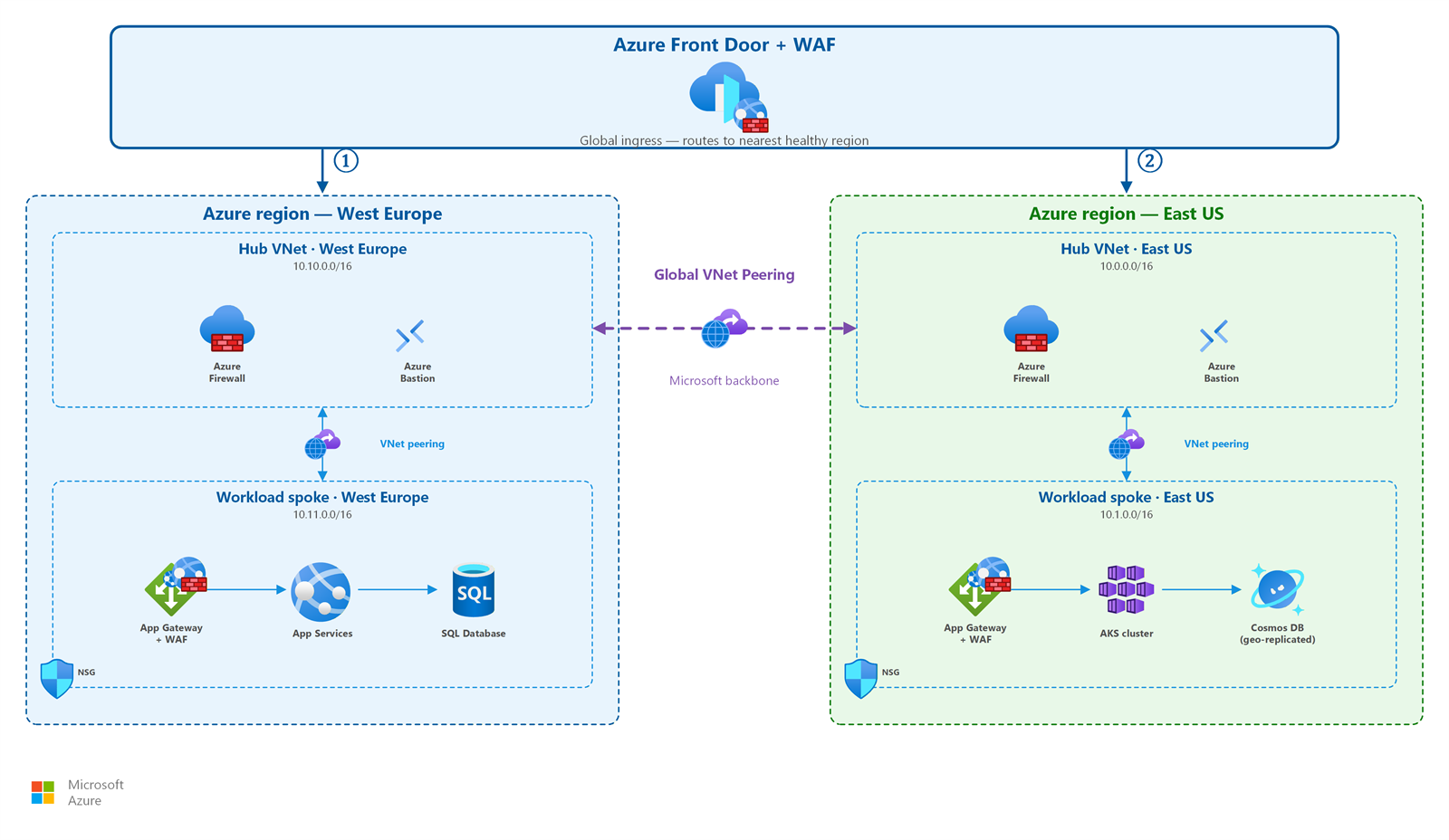
This fundamental constraint shapes every multiregion design:
- Each region needs its own VNet address space (non-overlapping with other regions for peering).
- Cross-region traffic requires an explicit connectivity mechanism: Global VNet Peering, Virtual WAN inter-hub, or gateway-based routing.
- Global load balancing services (Traffic Manager or Front Door) direct users to the correct regional deployment.
For subnet and address planning guidance, see IP address planning.
Availability zones versus regional redundancy
Before designing a multiregion topology, understand the two levels of infrastructure redundancy in Azure:
| Level | Protects against | Mechanism | Example |
|---|---|---|---|
| Availability zones | Single datacenter failure within a region | Physically separate datacenters with independent power, cooling, and networking | Zone-redundant Azure Firewall deployed across 3 zones |
| Regional redundancy | Full region failure (natural disaster, widespread outage) | Deploying workloads in two or more Azure regions | Active-active web application in East US and West US |
Start with zone redundancy. Zone-redundant deployments protect against the most common failure scenarios (single datacenter problems) without the complexity of multiregion routing. Add regional redundancy when your business requires protection against region-wide outages or when you need to serve geographically distributed users.
Zone-redundant network services reference
The following table shows zone-redundant deployment options for core network services. Deploy these in every region where you run workloads:
| Service | Zone-redundant option | Notes |
|---|---|---|
| Azure Firewall | Deploy across availability zones | Distributes across all 3 zones in the region |
| Standard Load Balancer | Zone-redundant frontend | Default behavior for Standard SKU |
| Application Gateway v2 | Zone-redundant deployment | Requires Standard_v2 or WAF_v2 SKU |
| VPN Gateway | Active-active with zone-redundant SKUs | Use AZ-suffix SKUs (VpnGw1AZ, VpnGw2AZ, etc.) |
| ExpressRoute Gateway | Zone-redundant SKUs | Use ErGw1AZ, ErGw2AZ, or ErGw3AZ |
| Azure Bastion | Zone-redundant (preview) | Basic, Standard, and Premium SKUs |
| NAT Gateway (StandardV2) | Zone-redundant | StandardV2 SKU required; Standard SKU is zonal only |
How to choose a cross-region traffic routing approach
Use the following decision table to select the right service for routing traffic between regions:
| Your requirement | Recommended service | How it works |
|---|---|---|
| Multi-region failover or load distribution for any protocol (HTTP, TCP, UDP) | Azure Traffic Manager | Returns the best endpoint IP through DNS resolution. Client connects directly to the endpoint. Failover speed depends on DNS TTL (typically 30–300 seconds). |
| Global HTTP/HTTPS load balancing with CDN, WAF, and fast failover | Azure Front Door | Terminates connections at edge points of presence (PoPs). Routes requests to the closest healthy backend. Provides connection-level failover (seconds, not DNS-TTL dependent). |
| Private backend traffic between regions (replication, internal APIs) | Global VNet Peering | Connects VNets across regions over the Microsoft backbone. Peering isn't transitive; each peering relationship is explicit. Per-GB data transfer charges apply. |
| On-premises site-to-site connectivity through Azure | ExpressRoute Global Reach | Connects two ExpressRoute circuits so on-premises locations communicate over the Microsoft backbone without traversing hub routers. |
Tip
Combine these services. For example, use Front Door for user-facing HTTP traffic and Global VNet Peering for backend replication between regions.
How to choose a multiregion hub topology
After you decide to extend your network across regions, choose a hub pattern for managing cross-region connectivity:
| Factor | Hub-per-region (traditional) | Virtual WAN multi-hub |
|---|---|---|
| Cross-region connectivity | Customer configures Global VNet Peering between regional hubs and manages UDRs | Automatic inter-hub routing: all Virtual WAN hubs interconnect by default |
| Management | Full customer control over routing, firewall rules, and peering | Microsoft-managed hub infrastructure with policy-based management |
| Best for | Organizations that need granular routing control, custom NVAs, or existing hub investments | Organizations with many regions, 30+ branch sites, or preference for managed infrastructure |
| Global transit | Requires explicit peering + UDR configuration between each hub pair | Built-in: traffic between any two hubs routes automatically |
| Scaling | Add hubs and peerings manually (AVNM can automate) | Add hubs through Virtual WAN configuration: routing updates automatically |
| Cost model | Hub VNet resources (firewall, gateway, peering) billed separately | Virtual WAN unit pricing plus connected resources |
For a detailed comparison of hub-and-spoke versus Virtual WAN in a single region, see Hub-and-spoke topology and Virtual WAN.
Design considerations
Lift-and-shift multi-region design focus
- For legacy workloads that can't span zones or regions, design for disaster recovery rather than active-active: replicate with Azure Site Recovery to a recovery region.
- Build a hub in the recovery region that mirrors the primary hub so failover traffic has the same shared services.
- Use Azure Traffic Manager or DNS failover to redirect users during a regional outage.
- Keep recovery-region address space non-overlapping with the primary region to avoid conflicts during failover and any later peering.
Modernize multi-region design focus
- Deploy customer-facing workloads active-active across two regions with zone-redundant SKUs for the highest resiliency posture.
- Assign non-overlapping address ranges to primary and backup regions so active-active spokes can use global VNet peering later without re-addressing.
- Choose your delivery layer by app type: Azure Front Door for web apps and Traffic Manager for non-web apps, distributing across regional public endpoints.
- Front each region's public endpoints with the hub firewall (SNAT and DNAT) so inbound traffic is inspected before reaching backends.
Cross-cloud multiregion design focus
- Use Azure Virtual WAN to interconnect multiple Azure regions, branches, and cloud edges with automatic any-to-any routing.
- Plan summarized, non-overlapping address ranges across regions and clouds so transit routing stays simple.
- Terminate cross-cloud IPsec connections on regional secured hubs, and let Virtual WAN handle inter-hub routing.
- Distribute public ingress across regions by using Front Door or Traffic Manager, and keep inspection on each regional hub firewall.
Prerequisites
Before designing a multiregion network, make sure you have:
- Deployed and tested a single-region topology. Start with hub-and-spoke or Virtual WAN.
- Defined high availability and disaster recovery requirements: RTO, recovery point objective (RPO), and compliance mandates.
- Created a non-overlapping IP address plan across all regions. See IP address planning.
- Identified which workloads need regional redundancy versus zone redundancy only.
Active-active versus active-passive deployment patterns
Your multiregion deployment model determines how traffic flows during normal operation and during a regional failure:
Active-active
Both regions serve traffic simultaneously. A global load balancer, such as Traffic Manager or Front Door, distributes requests across regions based on proximity, performance, or weight.
When to use active-active:
- Your application can handle requests in any region without region-specific state dependencies.
- You need the lowest possible RTO (failover is immediate because the healthy region already serves traffic).
- You want to use capacity in both regions during normal operation (cost efficiency).
Networking considerations:
- Both regions must have identical network infrastructure, including firewalls, gateways, and load balancers.
- Data replication between regions must keep both deployments current.
- DNS TTL and health probe intervals determine how quickly Traffic Manager shifts traffic. Front Door provides faster connection-level failover.
Active-passive
One region (primary) handles all traffic. The secondary region stays ready but doesn't serve user requests until a failover event.
When to use active-passive:
- Your application has strict write-region requirements or can't easily replicate state.
- Cost constraints prevent running full capacity in two regions simultaneously.
- Your RTO tolerance allows for the time needed to activate the secondary region.
Networking considerations:
- The passive region's network infrastructure can use smaller tiers or reduced capacity until failover.
- Automated failover requires health probes with appropriate thresholds (avoid flapping).
- Test failover regularly. Network configurations in the passive region can drift if not validated.
- Keep route tables and NSG rules synchronized between regions. Use infrastructure-as-code templates to make sure the passive region matches the primary region's security posture.
- Preprovision VPN or ExpressRoute gateways in the passive region. Gateway provisioning can take 20–45 minutes. That's too slow for most RTO targets.
Choosing between active-active and active-passive networking
The choice between active-active and active-passive networking affects network sizing, cost, and operational complexity:
| Consideration | Active-active | Active-passive |
|---|---|---|
| Network capacity | Full capacity in both regions | Reduced capacity in passive region (scale on failover) |
| Gateway provisioning | Always on in both regions | Pre-provisioned but can use smaller tiers |
| Cross-region data sync | Continuous, bidirectional replication traffic | One-directional async replication to standby |
| Firewall rules | Identical rule sets, both actively enforced | Identical rule sets, but passive set rarely exercised |
| IP addressing | Both regions advertise to global load balancer | Only primary region advertises until failover |
| Operational risk | Lower: both paths are continuously exercised | Higher: passive path might drift or have untested configurations |
Data replication and latency
Cross-region replication introduces network latency that affects application design. Azure regions within the same geography typically exhibit 1–10 ms round-trip latency for nearby pairs (for example, East US to East US 2) and 30–70 ms for distant pairs (for example, East US to West US). Transatlantic or transpacific region pairs can exceed 100 ms.
Key design considerations:
- Replication topology: Choose synchronous replication only for region pairs with low latency (< 10 ms). Use asynchronous replication for distant pairs to avoid application performance degradation.
- Bandwidth planning: Estimate replication throughput requirements and account for Global VNet Peering per-GB data transfer costs. High-volume replication between distant regions can generate significant egress charges.
- Conflict resolution: Active-active patterns with bidirectional writes require conflict resolution strategies at the application or database layer. The network provides connectivity, but applications must handle write conflicts.
- Private endpoints for PaaS replication: When replicating Azure SQL, Cosmos DB, or Storage across regions, use private endpoints in each region to keep replication traffic on the Microsoft backbone and avoid public internet exposure.
Cost considerations
Multiregion networking increases costs through duplicated infrastructure and cross-region data transfer. Plan your budget around these primary cost drivers:
- Cross-region data transfer: Global VNet Peering and Virtual WAN inter-hub traffic incur per-GB charges for data crossing region boundaries. Intra-region traffic between peered VNets in the same region is at no additional cost for same-zone and charged at a lower rate for cross-zone.
- Duplicated network appliances: Each region requires its own firewall, load balancer, and gateway instances. Active-active deployments double these costs. Active-passive deployments can reduce costs by using smaller tiers in the standby region and scaling up during failover.
- Global load balancing fees: Both Traffic Manager and Front Door charge based on DNS queries or requests processed. Front Door charges additionally for data transfer from edge PoPs to backends.
- ExpressRoute and VPN Gateway: Multiregion designs often require gateway instances in each region. ExpressRoute circuits connecting multiple regions add monthly port fees and per-GB metered data charges.
- Optimize with traffic locality: Design application tiers to minimize cross-region calls. Keep read replicas co-located with compute in each region to reduce replication bandwidth and latency-sensitive queries.
Security considerations
A multiregion network introduces security considerations beyond single-region deployments:
- Traffic stays on the Microsoft backbone. All inter-region traffic over Global VNet Peering or Virtual WAN inter-hub connectivity traverses the Microsoft backbone network, not the public internet.
- Deploy zone-redundant firewalls in every region. Each regional hub needs its own firewall instance for traffic inspection. Deploy firewalls across availability zones to keep security during zone failures.
- Front Door WAF provides edge security. When you use Front Door, its integrated Web Application Firewall inspects traffic before it reaches any regional deployment. This provides a first layer of defense at the network edge.
- Plan DNS failover carefully. Traffic Manager failover depends on DNS TTL. Shorter TTLs enable faster failover but increase DNS query volume. Front Door provides connection-level failover that doesn't depend on client DNS cache expiration.
- ExpressRoute Global Reach traffic stays private. Traffic between on-premises sites connected through Global Reach never touches the public internet. It stays on the Microsoft backbone between circuits.
- Secure cross-region replication channels. Backend replication traffic over Global VNet Peering is private by default, but apply network security groups and encryption for sensitive data in transit.
Related articles
If your multiregion design involves specific scenarios covered elsewhere in this guide, see:
- Hub-and-spoke topology: Hub-per-region design pattern for multiregion deployments.
- Virtual WAN: Virtual WAN multi-hub pattern with automatic inter-hub routing.
- Cross-region connectivity: Detailed guidance on peering, Global Reach, and inter-hub connectivity options.
- VNets and subnets: VNet-per-region design and subnet planning.
- IP address planning: Non-overlapping address spaces across regions.
- Azure Firewall and traffic inspection: Zone-redundant firewall deployment in each regional hub.
Learn more
For more information about the services and concepts discussed in this article, see the following resources:
- Traffic Manager overview
- Azure Front Door overview
- Virtual network peering overview
- ExpressRoute Global Reach
- Virtual WAN global transit network architecture
- Azure regions and availability zones
Next steps
Tip
Exploring on your own? Return to the overview navigator to find your next article by capability.
Next in your lift-and-shift journey:
Connect to your on-premises network: After planning for disaster recovery, establish VPN or ExpressRoute connectivity to on-premises.
Next in your modernization journey:
Design your internet ingress patterns: Determine how customer traffic reaches your applications across your primary and backup regions.
Next in your cross-cloud journey:
Set up encrypted tunnels to your other clouds: After multiregion planning, configure cross-cloud VPN connectivity.