Note
Access to this page requires authorization. You can try signing in or changing directories.
Access to this page requires authorization. You can try changing directories.
Azure Firewall is a managed, cloud-native network security service that provides centralized traffic inspection and filtering for your Azure virtual networks. Unlike network security groups that operate at Layer 4, Azure Firewall inspects traffic at Layers 3 through 7. This capability enables fully qualified domain name (FQDN) filtering, threat intelligence, intrusion detection and prevention (IDPS), and TLS inspection. You deploy Azure Firewall in a dedicated subnet within your hub virtual network and route traffic from spoke workloads through the firewall for inspection before it reaches its destination.
This article explains how to select the right Azure Firewall SKU, position the firewall in a hub-spoke topology, configure rule types, and integrate with complementary services like NAT Gateway and Route Server.
What this article covers
This article covers centralized network traffic inspection using Azure Firewall. You learn about:
- SKU tier selection based on security requirements and workload sensitivity.
- Hub placement and user-defined route (UDR) patterns that force traffic through the firewall.
- Rule processing logic for DNAT, network, and application rules.
- Forced tunneling for environments that require on-premises inspection.
- TLS inspection and IDPS capabilities in the Premium tier.
- Integration with NAT Gateway for SNAT port scaling and Route Server for BGP-based routing.
Who needs this article
Deploy Azure Firewall when your workloads require one or more of the following capabilities:
- Centralized egress control: You need to restrict which external FQDNs and URLs your workloads can reach, beyond what NSG IP-based rules provide.
- East-west inspection: Traffic between spoke virtual networks must pass through a stateful inspection point before the firewall allows it.
- Compliance-mandated logging: Regulatory frameworks require full Layer 7 visibility into allowed and denied connections with FQDN-level granularity.
- Threat protection: You need signature-based intrusion detection and prevention to identify malicious traffic patterns including command-and-control callbacks, exploit attempts, and lateral movement.
- TLS inspection: You must decrypt and inspect encrypted traffic (HTTPS) for threats before it reaches workloads or leaves the network.
Organizations that need only Layer 4 packet filtering without FQDN awareness should consider NSGs and ASGs as a simpler, lower-cost alternative.
Lift-and-shift focus: Translate your on-premises firewall rule base into Azure Firewall policy. Start with network rules for non-HTTP/S traffic and application rules for FQDN-based filtering. Begin with broad allow policies during migration, then tighten rules after you review Azure Firewall logs.
Modernize focus: Use Azure Firewall as the centralized SNAT and DNAT point in the hub. Inspect traffic between application spokes and between spokes and the internet, use application rules and FQDN tags for AKS and Azure PaaS egress, and plan TLS inspection where application tiers exchange sensitive traffic.
Cross-cloud focus: Deploy Azure Firewall in a secured virtual hub to inspect cross-cloud transit traffic. Configure network rules for IPSec tunnel traffic from AWS or Google Cloud, and use IDPS to watch for anomalous traffic patterns between connected clouds.
Azure Firewall SKU tiers
Azure Firewall is available in three SKU tiers. Each tier builds on the capabilities of the previous tier.
| Capability | Basic | Standard | Premium |
|---|---|---|---|
| Stateful packet inspection | ✔ | ✔ | ✔ |
| FQDN filtering (outbound) | ✔ | ✔ | ✔ |
| Network rules (IP, port, protocol) | ✔ | ✔ | ✔ |
| Application rules (FQDN, URL) | ✔ | ✔ | ✔ |
| NAT rules (DNAT) | ✔ | ✔ | ✔ |
| Threat intelligence filtering | Alert only | ✔ (Alert + Deny) | ✔ (Alert + Deny) |
| DNS proxy | ✗ | ✔ | ✔ |
| Web categories | ✗ | ✔ | ✔ |
| IDPS (intrusion detection and prevention) | ✗ | ✗ | ✔ |
| TLS inspection | ✗ | ✗ | ✔ |
| URL filtering (full path) | ✗ | ✗ | ✔ |
| Explicit proxy | ✗ | ✔ | ✔ |
| Region availability | Limited regions | All regions | All regions |
| Best for | Dev/test, small workloads | Standard production | High-security, compliance-driven |
How to choose your SKU
Use the following decision criteria:
- Choose Basic when you have dev/test environments or small workloads that need FQDN-based egress filtering without threat intelligence filtering (deny mode) or advanced inspection. Basic SKU includes threat intelligence in alert-only mode but doesn't support deny mode, DNS proxy, or web categories. Basic SKU requires a dedicated
AzureFirewallManagementSubnet(/26 minimum) alongside theAzureFirewallSubnetand is available in limited regions. - Choose Standard for production workloads that need threat intelligence–based filtering, DNS proxy for FQDN rule resolution, web category filtering, and centralized policy management through Azure Firewall Manager. Standard provides the full stateful inspection engine with threat intelligence feeds that block connections to known malicious IP addresses and domains.
- Choose Premium when regulatory or security requirements mandate TLS inspection of encrypted traffic, signature-based IDPS with continuously updated rules (over 67,000 signatures across more than 50 categories, updated in real time), or full URL path filtering beyond FQDN. Premium is required for industries like financial services, healthcare, and government where encrypted traffic inspection is mandatory.
Note
Upgrade from Standard to Premium without redeploying the firewall. Downgrading from Premium to Standard requires redeployment.
Hub placement and UDR routing pattern
Deploy Azure Firewall in a dedicated subnet named exactly AzureFirewallSubnet within your hub virtual network. This subnet requires a minimum size of /26 (59 usable IP addresses).
Routing architecture
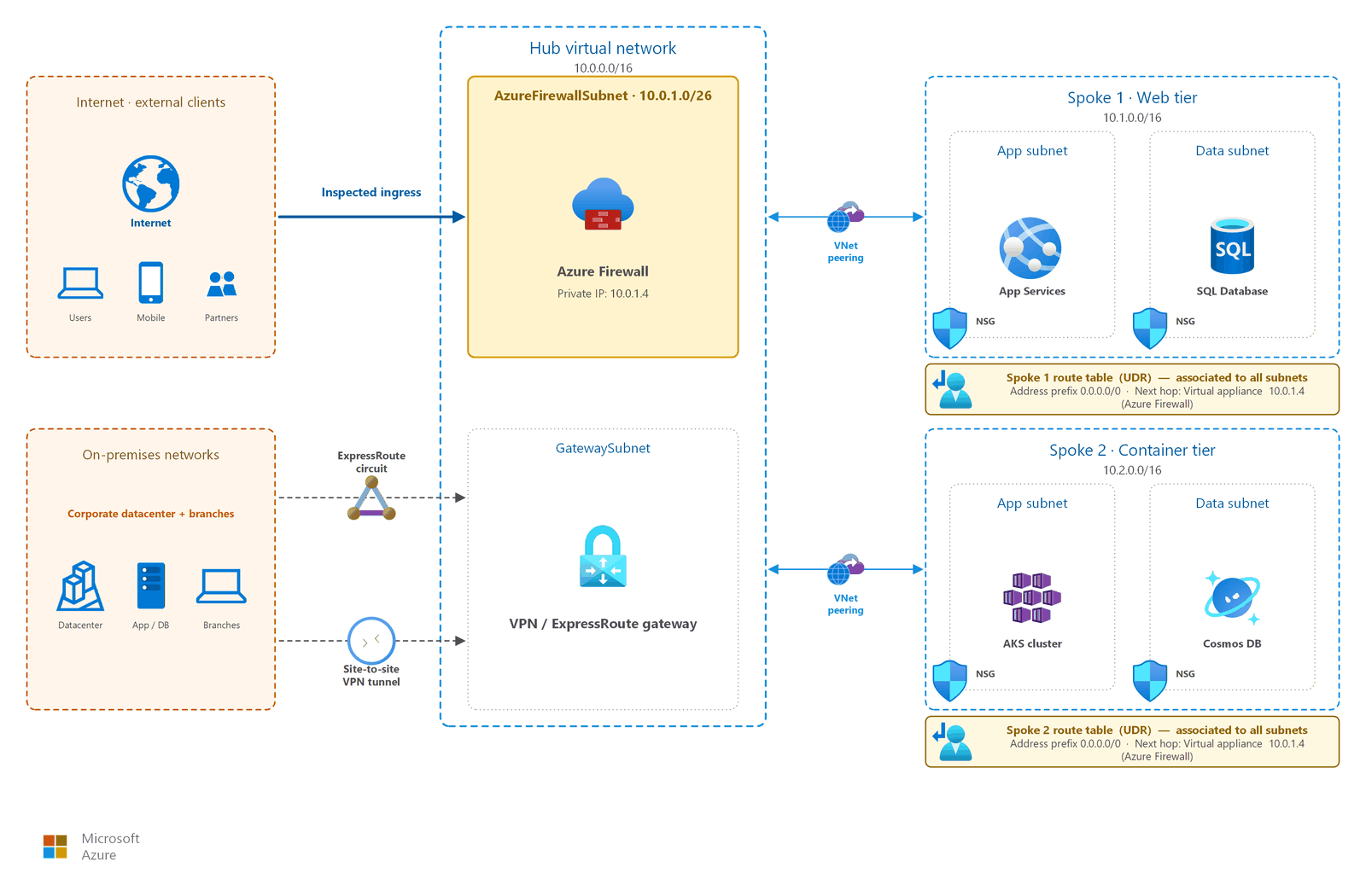
In a hub-spoke topology, spoke workload subnets don't route traffic directly to the internet or to other spokes. Instead, UDRs on each spoke subnet set the default route (0.0.0.0/0) to the Azure Firewall private IP address. This pattern ensures all traffic, both north-south (internet-bound) and east-west (spoke-to-spoke), passes through the firewall for inspection.
UDR configuration pattern:
| Route table (applied to) | Address prefix | Next hop type | Next hop address |
|---|---|---|---|
| Spoke subnet A | 0.0.0.0/0 | Virtual appliance | Firewall private IP |
| Spoke subnet A | 10.1.0.0/16 (other spoke) | Virtual appliance | Firewall private IP |
| Spoke subnet B | 0.0.0.0/0 | Virtual appliance | Firewall private IP |
| Spoke subnet B | 10.0.0.0/16 (other spoke) | Virtual appliance | Firewall private IP |
The AzureFirewallSubnet itself doesn't require UDRs in most scenarios because the firewall uses system routes to reach spoke networks through VNet peering. When you integrate with Azure Route Server, the firewall subnet learns routes through BGP. This approach removes the need for manual route maintenance as your network grows.
Tip
Azure Virtual Network Manager can automate the configuration of route tables to use Azure Firewall as the next hop, reducing manual UDR management across many spoke subscriptions.
Subnet requirements
| Subnet | Minimum size | Purpose | Notes |
|---|---|---|---|
AzureFirewallSubnet |
/26 | Hosts Azure Firewall instances | Must be named exactly AzureFirewallSubnet |
AzureFirewallManagementSubnet |
/26 | Management traffic (Basic SKU only) | Required for Basic SKU; optional for forced tunneling in other SKUs |
For more information about hub virtual network design and subnet planning, see Hub-spoke topology.
Rule types and processing logic
Azure Firewall processes rules through Azure Firewall Policy. Rules are organized into rule collections, which are grouped into rule collection groups. The firewall evaluates rules in the following priority order:
- DNAT rules (Destination Network Address Translation): Processed first. Translate inbound traffic from a public IP to a private IP behind the firewall.
- Network rules: Processed second. Allow or deny traffic based on source IP, destination IP, port, and protocol (Layer 3/4).
- Application rules: Processed last. Allow or deny outbound traffic based on FQDN, URL, or web category (Layer 7).
Within each rule type, rule collection groups are evaluated by priority (lowest number = highest priority). Within a group, rule collections are evaluated by priority. The first matching rule determines the action (Allow or Deny) and stops further evaluation.
DNAT rules
Use DNAT rules to publish internal services through the firewall's public IP address. The firewall translates the destination address from its public IP to the private IP of the backend service. Common scenarios include:
- Exposing an internal web server through the firewall's public IP on port 443
- Providing controlled RDP or SSH access to a jump box without assigning a public IP to the VM
- Publishing non-HTTP/S services that require inbound access from the internet
Example: Translate inbound TCP 443 on firewall public IP → 10.1.2.4:443 (internal web server)
DNAT rules implicitly add a corresponding network rule to allow the translated traffic. Once a DNAT rule matches, the traffic is translated and allowed without further network rule processing. For security, restrict the source IP address in your DNAT rules to specific internet sources rather than using wildcards.
Network rules
Network rules filter traffic at Layer 3 and Layer 4. Use network rules when you need to allow or deny traffic based on source IP address, destination IP address, destination port, and protocol. Network rules don't perform FQDN resolution. They operate strictly on IP addresses. Common use cases include:
- Allowing spoke-to-spoke communication for specific ports (for example, SQL Server on TCP 1433).
- Permitting NTP (UDP 123) to specific time servers.
- Blocking traffic to known malicious IP ranges by using deny rules.
- Allowing ICMP for network diagnostics between specific subnets.
Network rules support TCP, UDP, ICMP, and Any protocol types. You can specify IP addresses, IP ranges, service tags, and IP groups as source and destination.
Application rules
Application rules filter outbound HTTP/S and MSSQL traffic based on FQDNs, URLs, and web categories. Application rules require the DNS proxy feature for FQDN resolution. Use application rules when:
- You need to allow access to specific FQDNs (for example,
*.microsoft.comorstorage.blob.core.windows.net). - You want to filter by URL path (Premium SKU only), such as allowing
github.com/myorg/*but blocking other GitHub paths. - You need to allow or block entire web categories (for example, allow "Developer Tools" and block "Gambling").
Application rules provide FQDN tags for common Azure services (such as Windows Update, Azure Backup, and HDInsight) that simplify rule creation by grouping the required FQDNs into a single tag.
Important
When you enable the DNS proxy on Azure Firewall, the firewall acts as the DNS resolver for workloads. Configure your VNet DNS settings to point to the firewall's private IP so FQDN-based rules resolve correctly. For DNS architecture details, see DNS security and private name resolution.
SNAT behavior
By default, Azure Firewall applies SNAT (Source Network Address Translation) to outbound traffic destined for public IP addresses. The firewall doesn't SNAT traffic when the destination is a private IP range (RFC 1918) or shared address space (RFC 6598). The firewall translates the source IP of internet-bound connections to one of its public IP addresses. Each public IP provides 2,496 SNAT ports per backend instance.
For workloads with high outbound connection rates, integrate with NAT Gateway to scale to 64,512 ports per public IP (up to 16 public IPs, approximately one million SNAT ports total).
When you associate NAT Gateway with the AzureFirewallSubnet, all outbound internet traffic automatically uses the NAT Gateway public IP addresses. The firewall continues to inspect traffic, but NAT Gateway handles the SNAT translation. No double NAT occurs.
Note
NAT Gateway with zone-redundant Azure Firewall requires StandardV2 NAT Gateway SKU. NAT Gateway isn't supported in Virtual WAN secured hub architectures.
Firewall Manager and policy inheritance
Azure Firewall Manager provides centralized security policy and route management across multiple Azure Firewall instances. Key capabilities include:
- Policy hierarchy: Create a base (parent) policy with organization-wide rules and allow child teams to create child policies that inherit from the parent. Parent rules always take precedence regardless of child priority values.
- Cross-region management: A firewall policy is a global resource that you can associate with firewalls in any region or subscription.
- Multi-firewall governance: Apply a consistent security posture across hub firewalls in different regions or across secured Virtual WAN hubs.
NAT rules are firewall-specific and aren't inherited from parent policies. Threat intelligence mode is inherited but can only be overridden with a stricter mode in child policies. A policy with zero or one firewall association is included at no extra cost. Additional associations incur billing.
Forced tunneling
In some regulatory environments, all internet-bound traffic must first route through an on-premises inspection point before reaching the internet. Azure Firewall supports forced tunneling to accommodate this requirement.
When you enable forced tunneling:
- The
AzureFirewallManagementSubnetcarries the firewall management traffic directly to the internet. This subnet must have a route to 0.0.0.0/0 with next hop Internet. You can't force management traffic through on-premises inspection. - The
AzureFirewallSubnetroutes internet-bound workload traffic to an on-premises firewall or third-party NVA through ExpressRoute or VPN Gateway. - DNAT rules aren't supported in forced tunneling mode because inbound traffic can't reach the firewall public IP directly.
- The firewall doesn't require a public IP on the
AzureFirewallSubnetwhen you configure forced tunneling, because all outbound traffic exits through the on-premises path.
Use forced tunneling when compliance mandates require on-premises visibility of all internet-bound traffic, or when you need to chain Azure Firewall with an existing on-premises security stack. Common scenarios include financial services environments subject to data residency regulations and government networks with centralized internet breakout requirements.
Important
In forced tunneling mode, the AzureFirewallManagementSubnet requires its own public IP and a UDR with 0.0.0.0/0 pointing to internet as next hop. This configuration ensures Azure can keep the management channel to the firewall.
TLS inspection (Premium)
Azure Firewall Premium intercepts outbound HTTPS connections, decrypts the traffic, inspects it against IDPS signatures and application rules, then re-encrypts and forwards it. This process requires an intermediate CA certificate stored in Azure Key Vault.
Certificate requirements
| Requirement | Specification |
|---|---|
| Certificate type | Intermediate CA |
| Key size | RSA 2048-bit minimum |
| CA flag | TRUE |
| Key usage | KeyCertSign |
| Validity | At least 1 year forward |
| Storage | Azure Key Vault (must be exportable) |
The firewall uses the intermediate CA certificate to dynamically generate server certificates for intercepted connections. End-user browsers and applications must trust the organization's root CA or intermediate CA in their certificate store to avoid trust warnings.
IDPS
The Premium SKU includes a fully managed IDPS engine with over 67,000 rules across 50+ categories. Signatures update continuously with 20–40+ new rules released daily. IDPS operates in two modes:
- Alert mode: Logs signature matches without blocking traffic. Use during initial deployment and tuning.
- Alert and Deny mode: Logs and blocks traffic that matches IDPS signatures. Use in production after tuning.
IDPS categories cover malware command-and-control, phishing, trojans, botnets, exploit kits, vulnerabilities, and SCADA/ICS protocols.
Caution
TLS inspection introduces latency and has privacy implications. Ensure your organization's legal and compliance teams approve inspection of encrypted traffic. Exclude sensitive categories (healthcare, banking) as needed by using bypass rules.
AKS egress filtering
When Azure Kubernetes Service (AKS) clusters require controlled egress, Azure Firewall provides FQDN-based outbound filtering for cluster nodes. Without egress filtering, AKS nodes can reach any internet endpoint, which increases the attack surface for supply chain and data exfiltration attacks.
To implement this pattern:
- Deploy AKS with
outboundTypeset touserDefinedRoutingand a custom route table on the node subnet. - Set the default route (0.0.0.0/0) to the Azure Firewall private IP.
- Create application rules in the firewall policy that allow the required AKS FQDNs (container registries, API server endpoints, Microsoft package repositories).
- Create network rules for required non-HTTP/S endpoints (NTP, DNS, tunnel connectivity).
This pattern gives security teams visibility into and control over what external endpoints AKS nodes can reach, while allowing the cluster to function correctly. Required FQDNs vary by AKS feature set. Clusters that use GPU nodes, Azure Monitor, or Azure Policy require extra approved-list entries.
For detailed FQDN requirements and rule examples, see Use Azure Firewall to protect AKS deployments.
Note
AKS egress filtering with Azure Firewall requires careful coordination between platform and application teams. Missing FQDN rules cause pod scheduling failures and image pull errors. Start with a permissive policy and tighten after you observe traffic patterns in firewall logs.
Design considerations
Lift-and-shift firewall design focus
- Translate on-premises firewall rules into Azure Firewall policy: use network rules for non-HTTP/S protocols and application rules for HTTP/S or MSSQL destinations that need FQDN filtering.
- Start with broad allow rules that mirror your current security posture, then tighten them after migration by using Azure Firewall logs to identify the required destinations and ports.
- Use IP Groups to model source and destination zones so rule maintenance follows your existing segmentation boundaries.
- Enable diagnostic settings on day one so you can compare Azure traffic patterns with your on-premises baseline before you narrow access.
Modernize firewall design focus
- Use the hub firewall as the centralized SNAT and DNAT point for application spokes so ingress and egress policy stays in the IT-managed hub.
- Enable Azure Firewall Premium when east-west TLS inspection or production IDPS enforcement is required between application tiers.
- Use FQDN tags and application rules to allow AKS and Azure PaaS dependencies without maintaining large destination IP lists.
- Review DNAT requirements with your Front Door or Application Gateway design so inbound flows reach backend spokes only through approved inspection paths.
Cross-cloud firewall design focus
- Deploy Azure Firewall in a secured virtual hub when Azure is the transit point for branch, Azure, and other cloud networks.
- Use network rules to inspect IPSec tunnel traffic from AWS Transit Gateway, AWS virtual private gateways, or Google Cloud VPN attachments after routes arrive in Azure.
- Enable IDPS to detect anomalous east-west and cross-cloud traffic patterns that can indicate lateral movement between cloud environments.
- Turn on threat intelligence filtering to block known malicious destinations across all connected clouds with a single policy surface.
Prerequisites
Before you deploy Azure Firewall:
- AzureFirewallSubnet: Your hub virtual network must include a dedicated subnet named
AzureFirewallSubnetwith a minimum size of /26. See Virtual network and subnet design for subnet planning guidance. - Hub-spoke or Virtual WAN topology: Deploy Azure Firewall in a central hub that routes traffic from spoke networks. See Hub-spoke topology or Virtual WAN for topology options.
- IP address plan: Reserve address space for the firewall subnet, management subnet (if using forced tunneling), and any public IP addresses. See IP address planning.
- Azure Firewall Manager: Use Azure Firewall Manager if you need a policy hierarchy that shares base rules across multiple firewall instances.
- Log Analytics workspace: Create a workspace for firewall diagnostic logs before deployment so you can monitor traffic and troubleshoot rules from day one.
Security considerations
- Logging: Enable diagnostic settings to send Azure Firewall logs to a Log Analytics workspace. Structured logs provide FQDN-level visibility into every allowed and denied connection, supporting audit and forensic analysis.
- Availability: Deploy Azure Firewall across availability zones to maximize its availability SLA. For current SLA percentages, see SLA for Azure Firewall.
- Layered defense: Azure Firewall complements, but doesn't replace, NSGs. Apply NSGs at the subnet and NIC level for microsegmentation. Use the firewall for centralized policy, threat intelligence, and Layer 7 inspection.
- Right-size what you inspect: Forcing every flow through the firewall, including intra-application tiers such as web-to-app and app-to-database, adds latency and per-gigabyte processing cost. Use NSGs and ASGs for east-west traffic between trusted tiers, and reserve firewall inspection for traffic that crosses a trust boundary: internet-bound, cross-spoke, hybrid, or cross-cloud. This approach keeps the firewall focused on the traffic that benefits from inspection and avoids unnecessary cost.
- DDoS protection: Protect public IPs associated with Azure Firewall by using Azure DDoS Protection. See DDoS protection.
- ExpressRoute traffic: When you use ExpressRoute, configure UDRs to direct private peering traffic through Azure Firewall for inspection of hybrid traffic flows.
Related articles
- Hub-spoke network topology: Hub virtual network where you deploy Azure Firewall.
- Outbound internet access: Egress control patterns with Azure Firewall and NAT Gateway.
- Web Application Firewall: Layer 7 HTTP/S protection that complements the Azure Firewall network-level inspection.
- DNS security and private name resolution: DNS proxy configuration that enables FQDN-based rules.
Learn more
- Azure Firewall documentation
- Azure Firewall features
- Azure Firewall Premium features
- Azure Firewall Manager overview
- Deploy and configure Azure Firewall
- Azure Firewall pricing
Next steps
Tip
Exploring on your own? Return to the overview navigator to find your next article by capability.
Next in your lift-and-shift journey:
Set up monitoring for your migrated network: Validate connectivity and performance with Network Watcher after you configure your firewall.
Next in your modernization journey:
Protect your web applications with WAF: Add Web Application Firewall on Front Door or Application Gateway for your customer-facing web apps.
Next in your cross-cloud journey:
Set up cross-cloud monitoring: Cross-cloud estates are operationally harder to troubleshoot. Monitoring is essential, not optional.