Note
Access to this page requires authorization. You can try signing in or changing directories.
Access to this page requires authorization. You can try changing directories.
This article helps you choose and plan the right connectivity option for connecting your on-premises network to Azure virtual networks (VNets).
What this article covers
This article covers the design decisions for connecting on-premises networks to Azure VNets by using Azure VPN Gateway or Azure ExpressRoute. You learn when to use each option, how they work together, and how to plan your gateway deployment.
Who needs this article
Read this article if one or more of these conditions apply:
- Your Azure workloads must communicate with on-premises systems, users, or datacenters.
- You need to choose between VPN Gateway and ExpressRoute based on bandwidth, latency, resiliency, or cost.
- You need a private or encrypted path for identity, data, management, or application dependencies that stay outside Azure.
- You need to plan gateway topology, redundancy, or coexistence between VPN and ExpressRoute.
Tip
Following a scenario path? Select your scenario at the top of the page for tailored guidance. The core guidance that follows applies to all readers.
Lift-and-shift focus: Your migrated workloads need to communicate with on-premises systems. Hybrid connectivity is your most critical migration dependency. Without a VPN or ExpressRoute connection, migrated VMs in Azure can't reach on-premises databases, file shares, or identity services that the applications depend on.
Modernization focus: Your modernized apps might still need on-premises connectivity during the transition period. As you migrate workloads to PaaS services, some dependencies remain on-premises until the full migration completes. Plan hybrid connectivity as a bridge that you can scale down or remove as on-premises dependencies are eliminated.
Cross-cloud focus: You need IPSec VPN tunnels between Azure and AWS or Google Cloud for encrypted cross-cloud transit. Applications with cross-cloud dependencies require secure, reliable network paths between cloud providers. This connectivity model uses Azure VPN Gateway to terminate tunnels from AWS Virtual Private Gateways and Google Cloud VPN endpoints.
Azure services and features
Azure provides several services for hybrid connectivity. Each service addresses different bandwidth, latency, cost, and security requirements.
| Service | What it provides | When to use it |
|---|---|---|
| Azure VPN Gateway (Site-to-Site) | Encrypted IPsec/IKE tunnel over the public internet. Connects on-premises VPN devices to Azure. | Smaller organizations, dev/test environments, backup connectivity path, or budget-constrained hybrid scenarios. |
| Azure VPN Gateway (Point-to-Site) | Individual client connections to an Azure VNet. Supports OpenVPN, SSTP, and IKEv2 protocols. | Remote administrators or developers who need individual access to Azure resources. See the remote access article for detailed P2S guidance. |
| Azure ExpressRoute | Private dedicated connection through a connectivity provider. Traffic doesn't traverse the public internet. | Production hybrid workloads, latency-sensitive applications, large data transfers, and regulatory or compliance requirements. |
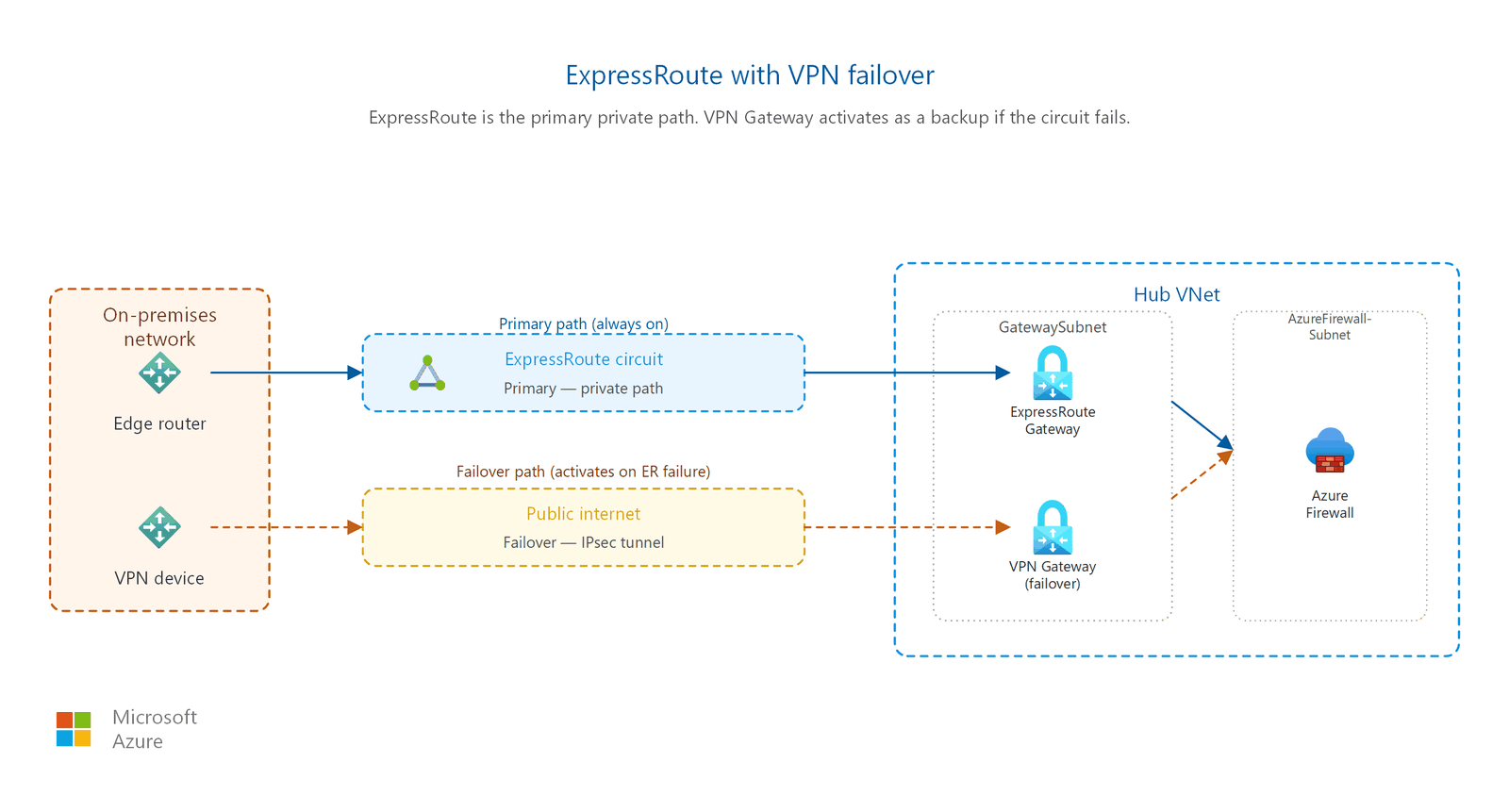
| ExpressRoute with VPN failover | ExpressRoute as the primary path with VPN Gateway as a failover backup. | High-availability requirements where ExpressRoute downtime isn't tolerable. |
| ExpressRoute Global Reach | Connects two on-premises locations to each other through the Azure backbone, using their respective ExpressRoute circuits. | Multi-site enterprise networks that use Azure as a transit backbone. See the multi-cloud and cross-region article for details. |
| ExpressRoute Direct | 10 Gbps, 100 Gbps, or 400 Gbps dedicated connectivity direct to Microsoft's network edge. Supports MACsec Layer 2 encryption. | Highest bandwidth needs, MACsec encryption requirements, or when you need to bypass connectivity provider overhead. The 400 Gbps option is available in limited locations and requires enrollment. |
Note
Point-to-Site (P2S) VPN provides individual client access, which overlaps with the scope of the remote access article. This article focuses on P2S as part of the hybrid connectivity landscape. For P2S deployment guidance, identity integration, and client configuration, refer to the remote access for developers and admins article.
How VPN Gateway works
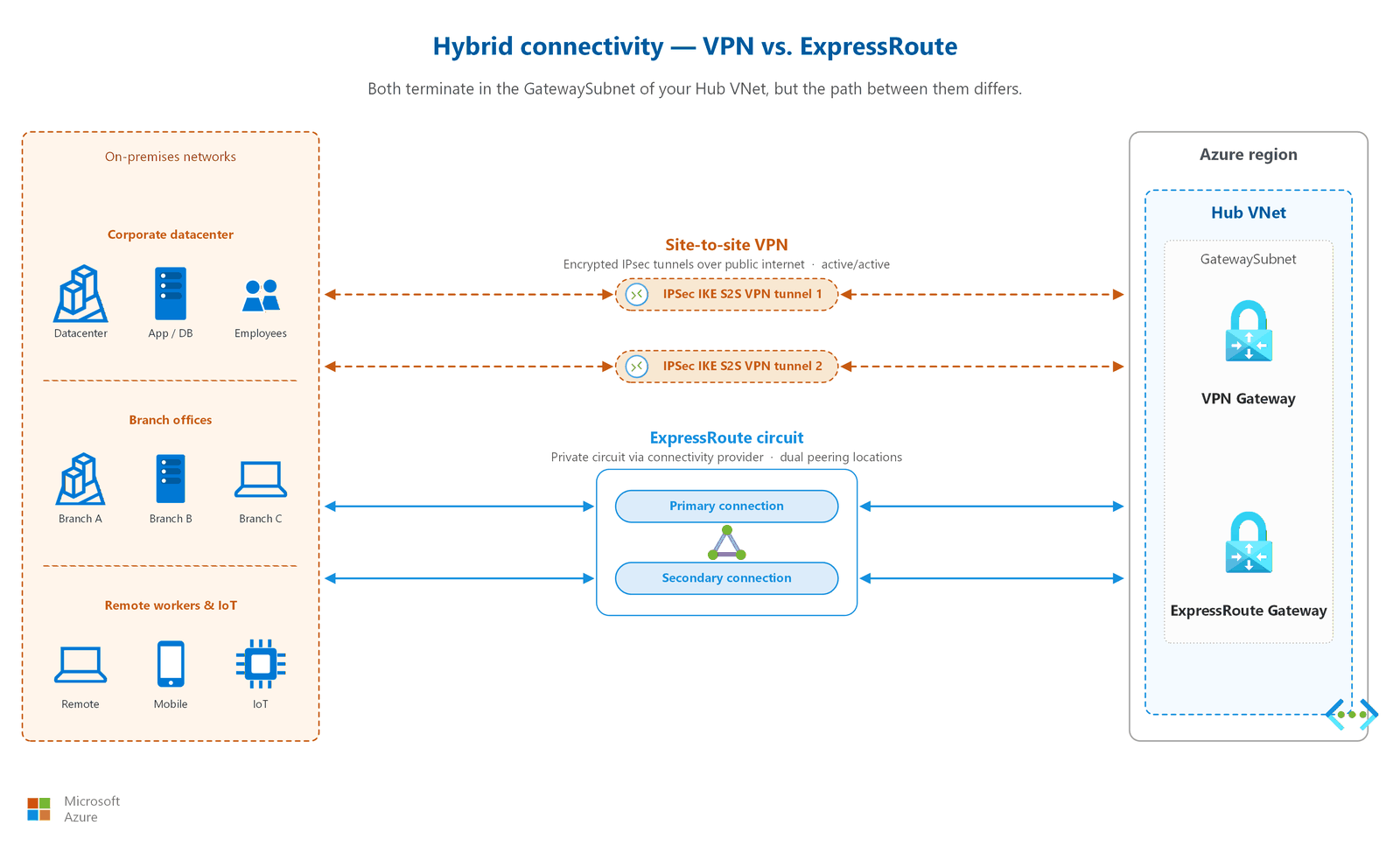
Azure VPN Gateway creates an encrypted IPsec/IKE tunnel between your on-premises VPN device and an Azure virtual network gateway. The following steps describe the Site-to-Site (S2S) tunnel setup process:
- Gateway provisioning: You deploy a VPN Gateway resource into the GatewaySubnet of your hub VNet. Azure provisions two or more gateway instances (depending on SKU and active-active configuration). Provisioning takes about 30–45 minutes.
- Local network gateway definition: You create a local network gateway resource in Azure that represents your on-premises network. This resource specifies the public IP address of your on-premises VPN device and the on-premises address ranges that Azure should route through the tunnel.
- Connection resource creation: You create a connection resource that links the VPN Gateway to the local network gateway. You specify the shared key (pre-shared key) and IPsec/IKE parameters for the tunnel.
- IKE Phase 1 (Main Mode): The Azure gateway and your on-premises device negotiate a secure channel. They exchange proposals for encryption algorithms, integrity algorithms, Diffie-Hellman groups, and authentication methods. The result is an IKE Security Association (SA).
- IKE Phase 2 (Quick Mode): Using the secure channel from Phase 1, both sides negotiate the IPsec SA parameters: encryption algorithm, integrity algorithm, and key lifetime. This process establishes the IPsec tunnel.
- Traffic flows: Once both phases complete, the tunnel is active. Traffic matching the defined address ranges is encrypted, encapsulated in IPsec ESP packets, and sent across the public internet to the remote endpoint.
For active-active configurations, Azure provisions two gateway instances, each with its own public IP. Your on-premises device establishes tunnels to both instances, providing automatic failover if one instance becomes unavailable.
How ExpressRoute works
Azure ExpressRoute creates a private connection between your on-premises network and Azure through a connectivity provider. Unlike VPN, traffic never goes over the public internet. The connectivity model involves three network edges:
- Customer edge (CE): Your on-premises router at your datacenter or colocation facility. This device peers with the provider edge router by using BGP.
- Provider edge (PE): The connectivity provider's router at their meet-me location (peering facility). The provider sets up a Layer 2 or Layer 3 connection between your CE and their PE.
- Microsoft edge (MSEE): Microsoft Enterprise Edge routers at the peering facility. The provider connects their PE to the MSEE, completing the private path into Azure.
When you provision an ExpressRoute circuit, the provider sets up redundant connections between all three edges. Azure advertises your VNet address prefixes to your CE router by using BGP, and your CE advertises on-premises routes back to Azure. This bidirectional route exchange enables traffic to flow over the private path.
ExpressRoute supports two peering types:
- Azure private peering: Connects to Azure VNets (IaaS and PaaS with Private Endpoints). This peering type is the most common for hybrid connectivity.
- Microsoft peering: Connects to Microsoft 365 and Azure public services (such as Azure Storage public endpoints). Requires route filters to select specific service prefixes.
ExpressRoute SKU comparison
| Feature | Local | Standard | Premium |
|---|---|---|---|
| Peering locations | One or two designated metro locations | All peering locations in a geopolitical region | All peering locations globally |
| VNet connections per circuit | Depends on gateway SKU | 10 | 100 |
| Route prefixes (Microsoft peering) | N/A | 4,000 | 10,000 |
| Cross-region connectivity | Same metro area only | Same geopolitical region | Any Azure region worldwide |
| Global Reach support | No | Yes | Yes |
| Data transfer pricing | Unlimited inbound and outbound (metered plan); included with unlimited | Inbound free; outbound metered by zone | Inbound free; outbound metered by zone |
| Best for | High-bandwidth, single-region workloads near a peering location | Multi-site within one geopolitical region | Global enterprise with workloads across multiple Azure regions |
Tip
The Local SKU offers significant cost savings because both inbound and outbound data transfer are included in the circuit price. Choose Local when your Azure region is at or near the same metro as the peering location.
VPN Gateway SKU comparison
| SKU | Max S2S tunnels | Max P2S connections | Aggregate throughput benchmark | Zone-redundant |
|---|---|---|---|---|
| VpnGw1 / VpnGw1AZ | 30 | 250 | 650 Mbps | AZ variant only |
| VpnGw2 / VpnGw2AZ | 30 | 500 | 1.0 Gbps | AZ variant only |
| VpnGw3 / VpnGw3AZ | 30 | 1,000 | 2.0 Gbps | AZ variant only |
| VpnGw4 / VpnGw4AZ | 100 | 5,000 | 5.0 Gbps | AZ variant only |
| VpnGw5 / VpnGw5AZ | 100 | 10,000 | 10.0 Gbps | AZ variant only |
Note
Throughput benchmarks are aggregate across all tunnels and connections. Actual throughput depends on traffic patterns, packet sizes, and the number of active tunnels. Always select the AZ variant for production deployments to get zone-redundant availability.
How to choose
Use the following decision tables to select the right connectivity option and determine where to place your gateway.
VPN Gateway vs. ExpressRoute
| Consideration | Choose VPN Gateway | Choose ExpressRoute |
|---|---|---|
| Budget | Lower cost. Per-hour gateway fee plus data transfer charges. | Higher cost. Provider circuit fee, gateway fee, and data transfer charges. |
| Bandwidth needed | Up to 10 Gbps aggregate throughput (VpnGw5 SKU). Individual tunnel throughput is lower. | Up to 100 Gbps per circuit. ExpressRoute Direct supports up to 400 Gbps. |
| Latency tolerance | Higher latency acceptable. Traffic traverses the public internet. | Low, predictable latency required. Traffic follows a private path. |
| Reliability SLA | Higher with an active-active gateway configuration. | Higher for the circuit, and highest with a zone-redundant gateway deployment (AZ SKU). See Azure service-level agreements. |
| Privacy and compliance | Traffic is encrypted but traverses the public internet. | Traffic never traverses the public internet. |
| Implementation speed | Hours to days. Gateway provisioning takes about 45 minutes. | Weeks to months. Provider circuit procurement requires physical infrastructure provisioning. |
| Existing ExpressRoute circuit | Use VPN Gateway as a backup path alongside ExpressRoute. | Use as the primary connectivity path. |
Where does the gateway live?
| Topology | Gateway placement | Rationale |
|---|---|---|
| Hub-and-spoke | Gateway in the hub VNet | All spoke workloads route on-premises traffic through the hub. Centralizes connectivity management. See the hub-and-spoke article. |
| Single workload (flat) | Gateway in the workload VNet | Simpler architecture for standalone workloads that don't share connectivity with other VNets. |
ExpressRoute resilience options
The following table summarizes how to increase ExpressRoute availability. For current SLA percentages, see Azure service-level agreements.
| Resilience level | Configuration | SLA |
|---|---|---|
| Standard | Single ExpressRoute circuit with redundant cross-connections. | Circuit-level SLA |
| Zone-redundant gateway | Deploy an ExpressRoute gateway using an AZ SKU (ErGw1AZ, ErGw2AZ, or ErGw3AZ). Instances span availability zones. | Gateway-level SLA |
| Maximum | Dual circuits in different peering locations with zone-redundant gateways, plus VPN failover. | Highest composite availability |
Deployment decision: gateway placement example
Consider an enterprise with a hub-and-spoke network that has three spoke VNets for production, staging, and development. The production workloads require ExpressRoute for low-latency database replication, while development uses VPN Gateway for cost efficiency.
Recommended placement:
- Deploy both an ExpressRoute gateway and a VPN Gateway in the hub VNet's GatewaySubnet (requires /26 subnet for coexistence).
- Connect production and staging spokes via VNet peering to the hub, with gateway transit enabled. These spokes use the ExpressRoute path for on-premises connectivity.
- Connect the development spoke to the hub with gateway transit enabled. Configure route tables so that development traffic preferentially uses the VPN tunnel, reducing ExpressRoute data transfer costs.
- Configure the VPN connection as a failover path for production in case the ExpressRoute circuit experiences a provider outage.
This approach centralizes gateway management in a single hub, minimizes the number of gateway resources needed, and allows each spoke to use the appropriate connectivity tier for its workload requirements.
Cost considerations
VPN Gateway and ExpressRoute have different pricing models. Understanding these models helps you optimize spending.
| Cost component | VPN Gateway | ExpressRoute |
|---|---|---|
| Gateway hourly fee | Charged per hour based on SKU (VpnGw1 is the least expensive) | Charged per hour based on gateway SKU (ErGw1AZ is the least expensive) |
| Circuit/connection fee | No circuit fee; only the gateway and data transfer | Monthly port fee paid to Microsoft, plus provider charges for the physical circuit |
| Data transfer: inbound | Free | Free |
| Data transfer: outbound | Charged per GB at standard Azure egress rates | Metered plan: charged per GB. Unlimited plan: flat monthly rate. Local SKU: included |
| Provider charges | None (uses public internet) | Monthly fee to the connectivity provider for port and cross-connect |
| Typical monthly range | $140–$2,500 (gateway only; data transfer varies) | $500–$15,000+ (gateway + circuit + provider; depends on bandwidth and SKU) |
Cost optimization tips:
- Use the Local SKU for ExpressRoute when your workloads are in the same metro area as the peering location. This choice eliminates outbound data transfer charges.
- Choose the metered plan for ExpressRoute if your outbound data transfer is less than approximately 10 TB/month. Use the unlimited plan for higher-volume workloads.
- Deploy VPN Gateway as a failover rather than a second ExpressRoute circuit if budget is constrained but you still need redundancy.
- Right-size your VPN Gateway SKU. Start with VpnGw2AZ for most production workloads and scale up only if you observe consistent throughput saturation.
- Review your gateway utilization monthly. Azure Monitor metrics show tunnel throughput and connection counts, helping you identify over-provisioned gateways.
Design considerations
For lift-and-shift migrations, VPN Gateway in the hub VNet is typically the first connectivity resource you deploy:
- VPN Gateway in the hub VNet. Deploy VPN Gateway into the hub's GatewaySubnet. All spoke workloads access on-premises resources through gateway transit. Site-to-site VPN is the typical first choice because it deploys in hours rather than the weeks required for ExpressRoute circuit provisioning.
- Bandwidth sizing from application requirements. Gather bandwidth requirements from each migrating workload. Sum the peak concurrent throughput needs and select a VPN Gateway SKU that supports the aggregate. Start with VpnGw2AZ for most production workloads. If your aggregate exceeds 1 Gbps, evaluate ExpressRoute or a higher VPN Gateway tier.
- Plan for ExpressRoute as a follow-up. Many organizations start with VPN during initial migration waves, then add ExpressRoute for production workloads that require predictable latency or higher bandwidth. The hub GatewaySubnet supports both gateway types simultaneously.
For modernized architectures with multi-region deployments, plan zone-redundant gateways in both regions:
- Zone-redundant VPN Gateways in both regions. Deploy VPN Gateway with an AZ SKU (VpnGw2AZ or higher) in both the primary and backup region hubs. Zone-redundant deployment distributes gateway instances across availability zones, providing a higher availability SLA for the gateway component. For specific SLA percentages, see Azure service-level agreements.
- Capacity for single-region failure. Size each regional gateway to handle the full traffic load independently. If one region fails, all hybrid traffic routes through the surviving region's gateway. Avoid under-provisioning the backup region gateway.
- Transition planning. Hybrid connectivity in a modernization scenario is often temporary. As PaaS services replace on-premises dependencies, you can reduce gateway capacity or remove gateways once all workloads are cloud-native.
For cross-cloud connectivity, VPN Gateway establishes encrypted tunnels to other cloud providers:
- VPN connections to AWS Virtual Private Gateway. Create site-to-site VPN connections from Azure VPN Gateway to AWS Virtual Private Gateways. Configure BGP for dynamic route exchange between Azure VNets and AWS VPCs. Each AWS VPN tunnel supports up to 1.25 Gbps (AWS-side limit); use multiple tunnels or ECMP for higher aggregate throughput.
- VPN connections to Google Cloud VPN. Create site-to-site VPN connections from Azure VPN Gateway to Google Cloud VPN (HA VPN). Google Cloud HA VPN provides two tunnel endpoints for redundancy. Configure BGP peering for automatic route propagation between Azure and Google Cloud.
- Deploy within Virtual WAN or hub. If you chose Virtual WAN as your transit model, deploy VPN connections from the Virtual WAN hub rather than a standalone VPN Gateway. If you chose traditional hub-spoke, deploy in the hub's GatewaySubnet. Either approach supports the same IPSec/IKE tunnels to AWS and Google Cloud.
Prerequisites
Before you implement hybrid connectivity, confirm the following requirements are in place:
- Virtual network with a GatewaySubnet: Your VNet must include a dedicated subnet named
GatewaySubnetwith a minimum size of /27 (or /26 if you plan to coexist ExpressRoute and VPN gateways). For VNet and subnet planning guidance, see the VNets and subnets article. - On-premises VPN device (for VPN Gateway): A compatible VPN device that supports IKEv2 and IPsec. Microsoft maintains a list of validated VPN devices.
- Connectivity provider relationship (for ExpressRoute): A contract with an ExpressRoute connectivity provider, or ExpressRoute Direct port allocation. Provider provisioning requires a service key exchange and physical cross-connection setup.
- IP address planning: Non-overlapping address spaces between on-premises and Azure networks. Plan gateway subnet addresses as part of your overall IP strategy. See the IP planning article.
- Border Gateway Protocol (BGP) support: BGP is required for ExpressRoute and recommended for VPN Gateway dynamic routing. Confirm your on-premises equipment supports BGP.
Security considerations
Hybrid connectivity introduces security boundaries that require careful planning. Each connectivity type has different threat profiles and mitigation strategies.
ExpressRoute traffic isn't encrypted by default
ExpressRoute provides a private path, but traffic isn't encrypted at the network layer by default. This means that anyone with physical access to the provider's infrastructure could theoretically intercept traffic. Consider the following encryption options based on your risk profile:
- MACsec (Layer 2): Available only on ExpressRoute Direct. Encrypts traffic on the physical link between your edge routers and Microsoft's edge. MACsec must be explicitly enabled after port provisioning. This option provides wire-speed encryption with minimal latency overhead.
- IPsec over ExpressRoute (Layer 3): Run a VPN tunnel over the ExpressRoute private peering connection for end-to-end encryption. This approach works with any ExpressRoute circuit and encrypts traffic across both the provider network and the Microsoft backbone. Throughput is limited by the VPN Gateway SKU.
- Application-layer encryption: Use TLS/HTTPS at the application level. This approach is independent of the connectivity type and protects data regardless of the underlying transport. It's the most common and recommended minimum encryption for all hybrid workloads.
For most organizations, the combination of the ExpressRoute private path plus application-layer TLS provides sufficient protection. Add MACsec or IPsec over ExpressRoute only when regulatory requirements mandate network-layer encryption for data in transit.
Asymmetric routing breaks stateful firewalls
When you use multiple connectivity paths, such as ExpressRoute and VPN, traffic can follow different inbound and outbound paths. Stateful firewalls drop return traffic that arrives on a different interface than the original request. Plan your routing to ensure symmetric paths, or use route tables and BGP attributes to control traffic flow.
Mitigation strategies include:
- Set BGP AS path prepending on the backup path to make it less preferred.
- Use route tables (UDRs) on subnets to force traffic through a specific gateway.
- Configure BGP communities and local preference to influence route selection deterministically.
- Test failover scenarios to verify that traffic returns via the same path it arrived on.
GatewaySubnet NSG caution
Caution
Don't apply Network Security Groups (NSGs) to the GatewaySubnet unless you fully understand the impact. Misconfigured NSG rules on the GatewaySubnet can disconnect all hybrid connectivity. The gateway requires specific control-plane communication that NSG rules can inadvertently block.
If you must apply NSGs to the GatewaySubnet, allow traffic from the GatewayManager service tag and the AzureLoadBalancer service tag at minimum. Review the gateway documentation for the complete list of required rules before making changes.
Site-to-Site VPN encryption
Site-to-Site VPN traffic is always encrypted in transit using IKEv2/IPsec. You configure the encryption algorithms and key strengths as part of the IPsec/IKE policy on the connection. Use custom policies to enforce specific cryptographic algorithms rather than relying on defaults.
Recommended custom policy settings for production workloads:
- IKE Phase 1: AES-256 encryption, SHA-256 integrity, DH Group 14 or higher
- IKE Phase 2 (IPsec): AES-256-GCM encryption, PFS Group 14 or higher
- Default SA lifetime: 28,800 seconds (IKE), 3,600 seconds (IPsec)
Avoid using deprecated algorithms (DES, 3DES, MD5, SHA-1, DH Group 1/2) even though Azure still supports them for backward compatibility.
Point-to-Site VPN authentication
P2S VPN supports Microsoft Entra ID authentication with multifactor authentication (MFA) integration. This option provides identity-based access control for individual clients connecting to Azure. Certificate-based and RADIUS authentication are also supported.
Choose the authentication method based on your requirements:
| Method | Best for | Security posture |
|---|---|---|
| Microsoft Entra ID | Organizations already using Microsoft Entra ID with Microsoft Entra Conditional Access | Strongest: supports MFA, device compliance, and risk-based policies |
| Certificate-based | Environments without Microsoft Entra ID or for machine-to-machine connections | Strong: requires PKI infrastructure and certificate lifecycle management |
| RADIUS | Integration with existing on-premises identity systems (NPS, third-party) | Varies: depends on the RADIUS server configuration and backend authentication |
Related articles
- VNets and subnets: GatewaySubnet sizing and VNet prerequisites for hybrid connectivity.
- Forced tunneling and egress control: How forced tunneling routes internet-bound traffic from Azure back to on-premises.
- Private access to PaaS services: Making Private Endpoints reachable from on-premises networks through hybrid connectivity.
- Remote access for developers and admins: Point-to-Site VPN deployment, identity integration, and client configuration details.
- Multi-cloud and cross-region connectivity: ExpressRoute Global Reach and cross-cloud connectivity scenarios.
- Hub-and-spoke topology: Gateway placement in the hub VNet and spoke routing configuration.
Learn more
- What is Azure VPN Gateway?
- What is Azure ExpressRoute?
- About ExpressRoute Direct
- About VPN Gateway configuration settings
- Designing for high availability with ExpressRoute
- Use S2S VPN as a backup for ExpressRoute private peering
- About encryption for ExpressRoute
Next steps
Tip
Exploring on your own? Return to the overview navigator to find your next article by capability.
Next in your lift-and-shift journey:
Set up secure admin access to your VMs: Deploy Azure Bastion in your hub VNet so admins can RDP/SSH to migrated VMs without public IP exposure.
Next in your modernization journey:
Design your internet ingress patterns: Determine how customer-facing traffic reaches your Front Door, Traffic Manager, and Application Gateway endpoints.
Next in your cross-cloud journey:
Plan DNS cutover and name resolution: Map your existing DNS records, lower TTLs, and configure Private DNS Resolver for cross-cloud name resolution.