Note
Access to this page requires authorization. You can try signing in or changing directories.
Access to this page requires authorization. You can try changing directories.
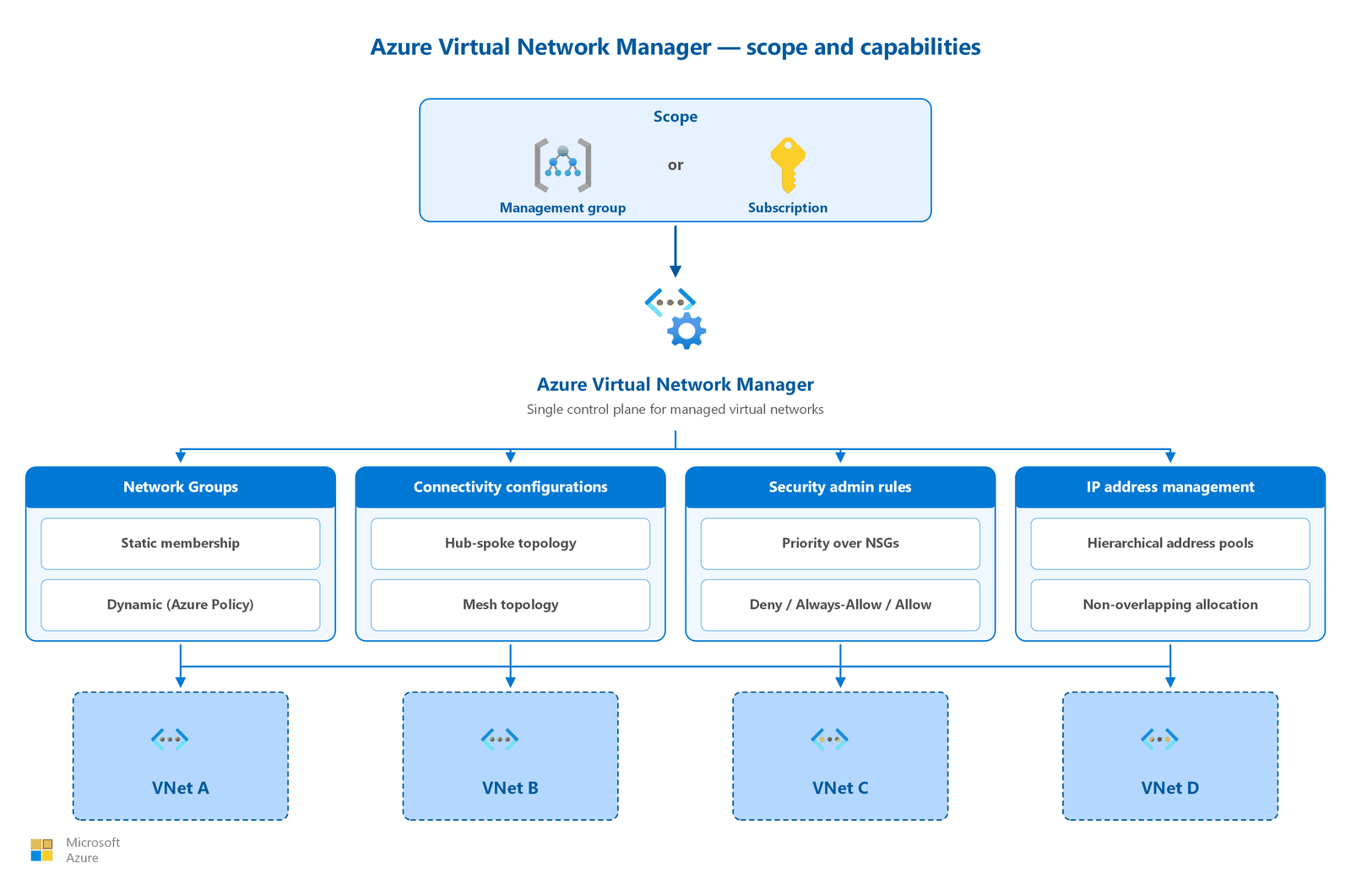
Azure Virtual Network Manager groups, configures, deploys, and manages virtual networks at scale across subscriptions. Instead of configuring each virtual network individually, define management intent centrally, and Azure Virtual Network Manager applies it consistently across your environment. Scope an Azure Virtual Network Manager instance to a management group or subscription, and manage all virtual networks within that scope through a single control plane.
This article explains the four core capabilities of Azure Virtual Network Manager: network groups, connectivity configurations, security admin rules, and IP address management (IPAM). It also describes how to use them together to govern network topology, enforce security baselines, and prevent IP address conflicts across your organization.
What this article covers
This article covers centralized network governance using Azure Virtual Network Manager. You learn about:
- Network groups that organize virtual networks by static or dynamic membership.
- Connectivity configurations that automate hub-spoke and mesh topologies.
- Security admin rules that enforce organization-wide security policies and take precedence over NSG rules.
- IPAM that allocates non-overlapping IP address ranges across subscriptions.
- The commit-and-deploy model that controls when configurations take effect.
- How to decide when Azure Virtual Network Manager is the right management approach for your environment.
Who needs this article
Use Azure Virtual Network Manager when your organization has one or more of the following requirements:
- Scale beyond manual management: You manage more than 10 virtual networks and need to automate peering, topology changes, and security baselines instead of configuring each virtual network individually.
- Consistent security policy: You need to enforce organization-wide security rules that local teams can't override, such as blocking high-risk ports or mandating traffic flow through a firewall.
- Cross-subscription governance: Your virtual networks span multiple subscriptions or management groups and you need a unified view of network topology and IP address usage.
- IP address conflict prevention: Teams independently create virtual networks and you need a central allocation mechanism that guarantees non-overlapping address spaces.
- Automated topology maintenance: You deploy new virtual networks frequently and need them to automatically join the correct topology (hub-spoke or mesh) without manual peering.
Organizations with fewer than 10 virtual networks in a single subscription can typically manage peering, NSG rules, and IP addresses manually. These environments don't usually require the added complexity of a centralized management tool.
Lift-and-shift focus: Small rehosting projects can manage peering and NSGs manually. Adopt AVNM once your migrated estate grows past roughly 10 virtual networks.
Modernize focus: Use AVNM to apply consistent connectivity and security configurations across many spokes and subscriptions as you scale active-active PaaS workloads.
Cross-cloud focus: Use AVNM to enforce consistent network groups and security admin rules across the Azure footprint that connects to your other clouds and branches.
Azure Virtual Network Manager capabilities
Azure Virtual Network Manager provides four capabilities that work together to deliver centralized network governance.
Network groups
Network groups are logical containers that organize virtual networks for policy application. You define which virtual networks belong to a group. You then apply configurations (connectivity or security) to the entire group at once.
Network groups support two membership methods:
| Method | How it works | Best for |
|---|---|---|
| Static membership | You manually add individual virtual network resource IDs. Changes take effect immediately. | Small environments, exceptions, or pilot deployments |
| Dynamic membership | Azure Policy evaluates conditions (name patterns, tags, subscription, or resource group) and automatically adds or removes virtual networks. Uses Microsoft.Network.Data policy mode with the addToNetworkGroup effect. |
Large environments where virtual networks are created and deleted frequently |
Combine both methods in a single network group. Dynamic membership doesn't require redeployment when virtual networks join or leave the group because Azure Policy continuously evaluates conditions and updates membership.
Note
Dynamic membership policies persist in Azure Policy even if you delete the Azure Virtual Network Manager instance. Remove these policies manually to avoid orphaned policy assignments.
Connectivity configurations
Connectivity configurations define the network topology for a group of virtual networks. Azure Virtual Network Manager supports two topologies:
- Hub-and-spoke topology: A central hub virtual network connects to all spoke virtual networks in the group. Spoke-to-spoke traffic routes through the hub by default. You can optionally enable direct connectivity between spokes, which creates a mesh within the spoke group and removes the hub hop for spoke-to-spoke traffic. The hub can serve as a gateway for VPN and ExpressRoute transit.
- Mesh topology: All virtual networks in the group connect bidirectionally without a central hub. Azure Virtual Network Manager uses connected groups (not traditional peerings) to establish mesh connectivity. Regional mesh connects virtual networks within a region. Global mesh extends connectivity across regions.
Deploy multiple connectivity configurations simultaneously in a region. They're additive. You can also reuse existing manual peerings without disrupting current connectivity during migration.
Security admin rules
Security admin rules provide organization-wide security enforcement that takes precedence over network security group (NSG) rules. You define these rules centrally. Azure Virtual Network Manager then applies them to all virtual networks in the target network group.
Azure Virtual Network Manager evaluates security admin rules before NSG rules. The behavior depends on the action type:
| Action | Evaluation behavior | Use case |
|---|---|---|
| Deny | Blocks traffic immediately. NSG rules are never evaluated. | Enforce organization-wide blocks (for example, block inbound SSH from the internet) |
| Always Allow | Allows traffic immediately. NSG rules are never evaluated. | Guarantee access for critical management traffic regardless of local NSG configuration |
| Allow | Passes traffic to NSG evaluation. NSGs can still deny the traffic. | Permit traffic categories while allowing teams to apply additional restrictions |
Security admin rules use a priority range of 1 to 4,096 (lower number equals higher priority). Only one security admin configuration can be active per region per network manager instance.
Important
Security admin rules don't apply to private endpoints in managed virtual networks. Certain subnets are also exempt, including Azure Application Gateway, Azure Bastion, Azure Firewall, Azure Route Server, VPN Gateway, Virtual WAN, and ExpressRoute gateway subnets.
Security admin rules use an eventual consistency model: a short delay occurs before rules apply to newly created resources within the scope.
IP address management (IPAM)
IPAM provides centralized IP address planning and allocation. You create address pools, and Azure Virtual Network Manager automatically assigns non-overlapping CIDR blocks to virtual networks. This approach prevents the address space conflicts that occur when teams allocate addresses independently. Users can create or modify virtual networks outside of IPAM pool allocations, for example, when they assign address space directly. In those cases, use Azure Policy to enforce IPAM compliance and help prevent unauthorized address assignment.
Key IPAM features:
- Hierarchical pools: Create root pools and up to seven layers of child pools for organizational structure (for example, by region, business unit, or environment).
- Automatic non-overlapping allocation: When a virtual network requests an address range from a pool, IPAM guarantees no overlap with other allocations in the same pool hierarchy.
- IPv4 and IPv6 support: Manage both address families in a unified allocation model.
- Cross-region pools: A single pool can allocate addresses to virtual networks in multiple regions.
- Released CIDR recycling: When you delete a resource, its allocated CIDR returns to the pool for reuse.
- Delegatable permissions: Grant the IPAM Pool User role to teams that need to consume addresses without managing pool definitions.
IPAM is always available on any Azure Virtual Network Manager instance regardless of whether you enable connectivity or security features.
How to choose your management approach
Use the following decision criteria to determine whether Azure Virtual Network Manager is appropriate for your environment:
| Environment scale | Recommended approach |
|---|---|
| Fewer than 10 VNets in a single subscription | Manual management: configure peering, NSGs, and IP addresses individually |
| 10–50 VNets across subscriptions | Azure Virtual Network Manager with connectivity configurations and network groups for topology automation |
| 50+ VNets across management groups | Full Azure Virtual Network Manager: all four capabilities (network groups, connectivity, security admin rules, and IPAM) |
| Security governance required regardless of scale | Add security admin rules when NSGs alone don't provide sufficient protection against local override |
With versus without Azure Virtual Network Manager
| Management area | Without AVNM | With AVNM |
|---|---|---|
| Peering | Manually create bidirectional peerings for each VNet pair | Connectivity configurations automate peering for entire groups |
| Topology changes | Update each peering individually when topology changes | Modify configuration and redeploy. All VNets in the group are updated. |
| Security baselines | Apply NSG rules per subnet; local admins can modify or remove | Enforce security admin rules centrally and can't be overridden (Deny/Always Allow) |
| IP address planning | Use a spreadsheet or manual tracking; risk of overlap | Use IPAM pools with automatic non-overlapping CIDR allocation |
| New VNet onboarding | Manually create peerings, apply NSGs, assign IPs | Dynamic membership adds VNet to group automatically; configs apply on next deployment |
| Cross-subscription visibility | Limited to per-subscription views | Unified view across all VNets in scope (management group or subscription) |
Design considerations
Lift-and-shift AVNM design focus
- For a small rehosted estate (under about 10 virtual networks in one subscription), manual peering and NSG management is usually sufficient.
- Adopt AVNM once migration waves push you past that threshold, so new spokes join the hub topology automatically instead of through manual peering.
- Use AVNM IP address management to track allocations as you carve subnets from your landing-zone CIDR.
- Introduce AVNM security admin rules gradually so they complement, not conflict with, existing per-subnet NSGs.
Modernize AVNM design focus
- Use AVNM network groups and connectivity configurations to apply hub-and-spoke or mesh topology consistently across many modernized spokes.
- Enforce organization-wide security admin rules (which app teams can't override) to guarantee traffic flows through the hub firewall.
- Combine dynamic group membership with subscription and RBAC separation so new app-team spokes inherit platform policy automatically.
- Use IPAM pools to guarantee non-overlapping address space across primary and backup regions.
Cross-cloud AVNM design focus
- Use AVNM to maintain a unified view of topology and IP usage across the Azure networks that interconnect your clouds and branches.
- Apply security admin rules centrally so cross-cloud and branch traffic consistently routes through inspected hubs.
- Use IPAM to keep Azure address space non-overlapping with AWS VPCs and Google Cloud networks across all regions.
- Automate topology membership so new Azure regions you add during cloud migration join the correct Virtual WAN or hub design.
Prerequisites
Before you deploy Azure Virtual Network Manager:
- Scope selection: Create an Azure Virtual Network Manager instance scoped to a management group or subscription. The scope defines the boundary of resources that the instance can manage. When you select a management group, you automatically include all child subscriptions.
- Permissions: Assign the Network Contributor role at the appropriate scope (management group or subscription) to users who manage Azure Virtual Network Manager configurations.
- Region support: Verify that your target virtual networks are in regions that support Azure Virtual Network Manager.
- Deployment workflow: Understand the commit-and-deploy model: configurations don't take effect until you explicitly deploy them to a target region. When you deploy, include all desired configurations for that region. Deployment uses a goal state model where only explicitly included configurations remain active.
- Conflict avoidance: Don't create multiple Azure Virtual Network Manager instances with overlapping scopes that manage the same features. In cases of conflict, the higher-scope network manager takes precedence.
Note
The commit-and-deploy model provides a safety mechanism. Review configuration changes, validate with Network Verifier, and then deploy when ready. If a network manager's region experiences an outage, already-deployed configurations remain in effect on target virtual networks.
Security considerations
Security admin rules create a separation of duties between central network governance and local workload teams:
- Enforce-by-default model: Use Deny rules to block traffic that you should never allow, regardless of workload requirements. Common examples include blocking inbound RDP or SSH from the internet and blocking traffic to known malicious IP ranges.
- Guaranteed access paths: Use Always Allow rules to make sure that critical management traffic (such as Azure platform health probes or monitoring agents) reaches resources even if a local NSG misconfiguration would otherwise block it.
- Layered defense: Use Allow rules for traffic categories where you want to permit the traffic class but allow workload teams to apply additional NSG restrictions based on their specific requirements.
- Audit trail: Azure logs all security admin rule deployments as resource operations. Review deployment history and configuration changes through Azure Activity Log.
- Deployment validation: Use Network Verifier to validate connectivity between resources within your Azure Virtual Network Manager scope before deploying configuration changes to production.
Related articles
- Hub-spoke network topology: Azure Virtual Network Manager automates hub-spoke peering and supports hub as gateway for transit connectivity.
- Virtual WAN network topology: Azure Virtual Network Manager provides an alternative for organizations that prefer custom hub-spoke over Azure Virtual WAN.
- IP address planning: IPAM extends centralized IP planning with automatic non-overlapping allocation across subscriptions.
- Network security groups and ASGs: Security admin rules apply organization-wide security baselines that take precedence over network security group rules.
- Network monitoring and observability: Pair centralized management with centralized monitoring across your virtual network estate.
Learn more
Next steps
Tip
Exploring on your own? Return to the overview navigator to find your next article by capability.
You completed the lift-and-shift networking path. Your Azure network is fully designed, secured, and managed.
Return to the overview: Explore other capabilities, review another scenario, or get more detail on specific services.
You completed the modernization networking path. Your Azure network is fully designed, secured, and managed.
Return to the overview: Explore other capabilities, review another scenario, or get more detail on specific services.
You completed the cross-cloud networking path. Your Azure network is fully designed, secured, and managed.
Return to the overview: Explore other capabilities, review another scenario, or get more detail on specific services.