Note
Access to this page requires authorization. You can try signing in or changing directories.
Access to this page requires authorization. You can try changing directories.
This article explains how to design DNS for Azure networks using private DNS zones, Azure DNS Private Resolver, and DNS security controls. It covers private name resolution patterns, hybrid DNS forwarding, Private Endpoint DNS integration, and DNS-layer threat protection.
What this article covers
DNS is the foundation of network connectivity: every connection begins with a name resolution query. In Azure, DNS design determines how workloads discover each other across virtual networks, how on-premises systems resolve Azure-hosted names, and how Private Endpoints become reachable by their fully qualified domain names (FQDNs). Beyond resolution, DNS is also an attack surface. DNS tunneling, exfiltration, and queries to malicious domains represent real threats that require DNS-layer security controls.
This article addresses three DNS concerns:
- Private name resolution: How virtual machines, containers, and platform services resolve names within Azure without exposing DNS queries to the public internet.
- Hybrid DNS forwarding: How on-premises networks resolve Azure private names and how Azure workloads resolve on-premises names.
- DNS security: How to block malicious DNS queries, prevent DNS exfiltration, and enable FQDN-based network filtering.
Who needs this article
Read this article if you:
- Deploy Private Endpoints (if applicable to your scenario) and need workloads to resolve
privatelink.*DNS zones correctly. - Operate hybrid environments where on-premises systems must resolve Azure private names (or vice versa).
- Use Azure Firewall and need FQDN-based filtering in network rules.
- Want to block DNS queries to known malicious domains at the resolution layer.
- Manage multi-VNet environments where centralized DNS resolution simplifies operations.
- Plan DNS architecture for hub-spoke topologies with shared services.
Lift-and-shift focus: Preserve existing DNS naming behavior during migration. Use bidirectional forwarding between on-premises DNS and Azure, configure conditional forwarders for split-horizon resolution, and host Azure private names in Private DNS zones so applications keep their current DNS configuration.
Modernize focus: Centralize name resolution as you replatform workloads. Use Azure DNS Private Resolver with forwarding rulesets for hybrid resolution, integrate Private DNS zones with Private Endpoints for PaaS services, and enable the Azure Firewall DNS proxy so FQDN-based rules and DNS resolution share a single cached path.
Cross-cloud focus: Plan DNS cutover across clouds before workload migration. Use Azure DNS Private Resolver for cross-cloud name resolution, configure conditional forwarding with AWS Route 53 Resolver or Google Cloud DNS, and lower TTL values before cutover to reduce stale-cache risk.
Azure services and features
The following table describes the Azure services and features involved in DNS security and private name resolution.
| Service / Feature | Purpose | Key capability | When to use |
|---|---|---|---|
| Azure DNS (public zones) | Authoritative hosting for public domain names | Global anycast network, Azure RBAC integration, alias records for Azure resources | You own a public domain and want to host DNS records in Azure with high availability. |
| Azure Private DNS zones | Name resolution within virtual networks without public exposure | VNet linking, auto-registration of VM hostnames, privatelink zone hosting | Internal name resolution for Azure workloads. Required for Private Endpoint DNS integration. |
| Azure DNS Private Resolver | DNS forwarding between Azure and external networks | Inbound endpoint (on-premises → Azure resolution), outbound endpoint (Azure → on-premises forwarding), forwarding rulesets | Hybrid environments needing bidirectional DNS resolution without deploying custom DNS VMs. |
| Azure Firewall DNS proxy | Centralized DNS interception for FQDN filtering | Caches DNS responses, enables FQDN-based network rules, provides single DNS endpoint for spoke VNets | You deploy Azure Firewall and need FQDN filtering in network rules. Required for consistent FQDN resolution. |
| DNS security policy | Threat protection at the DNS layer | Blocks resolution of known malicious domains using Microsoft Threat Intelligence feed | You want to prevent workloads from connecting to command-and-control or malware distribution domains. |
Private DNS zone concepts
Private DNS zones provide name resolution for linked virtual networks without exposing records to the internet. Key behaviors:
- VNet linking: You can link a private DNS zone to multiple VNets. All resources in linked VNets can resolve records in the zone.
- Auto-registration: When enabled on a VNet link, Azure automatically creates A records for virtual machines deployed in that VNet. Azure removes records when you deallocate or delete VMs. Auto-registration works only for VMs (primary NIC only). A VNet can auto-register to only one private DNS zone, but you can link multiple VNets to the same zone.
- Private Endpoint DNS: Azure services accessed through Private Endpoints require specific privatelink DNS zones (for example,
privatelink.blob.core.windows.netfor Azure Blob Storage). Without the correct zone, clients resolve the public IP instead of the private endpoint address.
DNS Private Resolver architecture
Azure DNS Private Resolver replaces the need for custom DNS virtual machines in hybrid forwarding scenarios. The following diagram shows the hybrid DNS resolution flow from on-premises through Azure DNS Private Resolver to a Private Endpoint IP address.
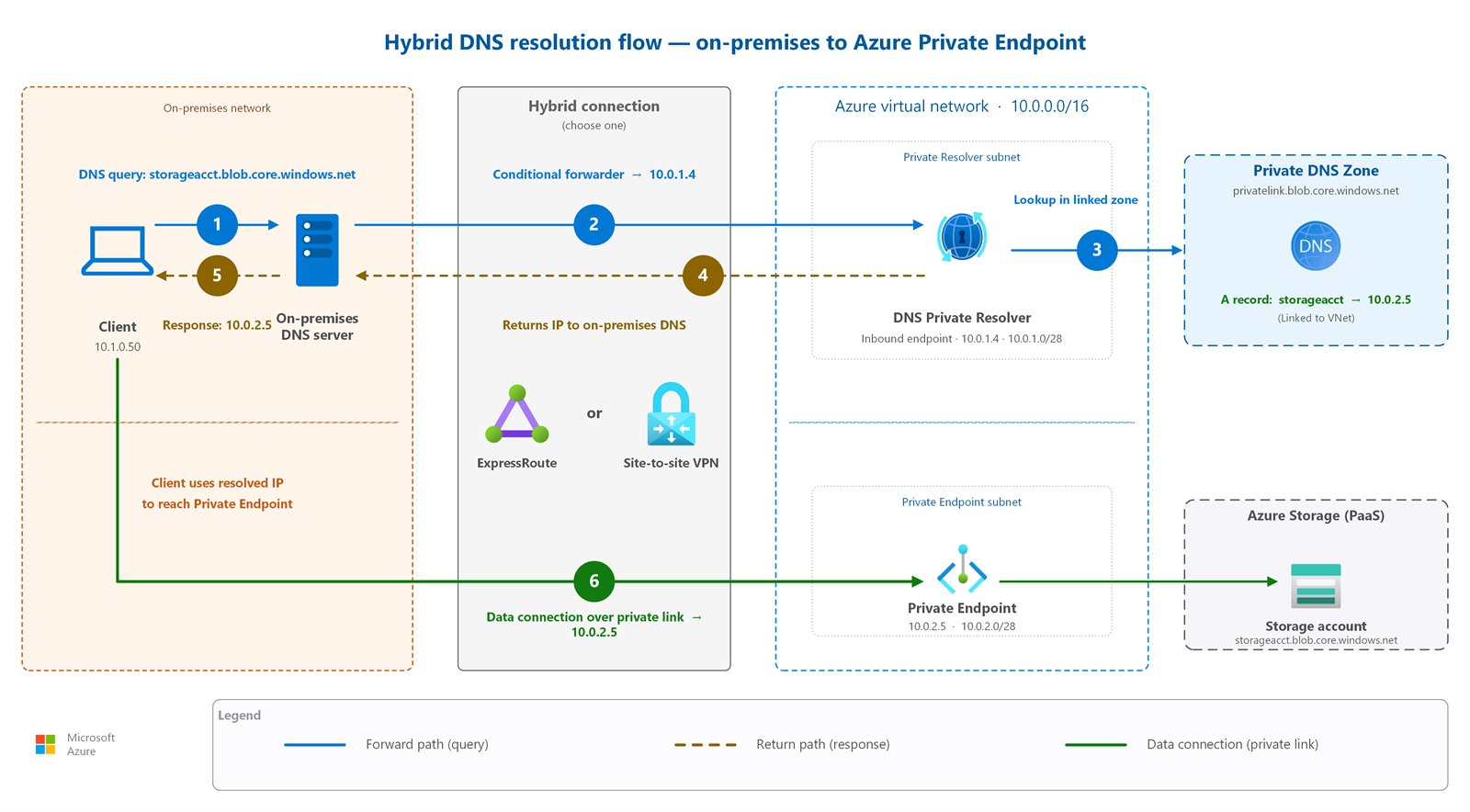
The resolver uses two endpoint types:
- Inbound endpoint: Provides an IP address that on-premises DNS servers can target as a conditional forwarder. Azure DNS resolves queries sent to this IP (including linked Private DNS zones). Requires a dedicated subnet delegated to
Microsoft.Network/dnsResolvers. - Outbound endpoint: Enables Azure workloads to forward DNS queries to on-premises DNS servers, other cloud providers, or external resolvers. Also requires a dedicated subnet. Forwarding rulesets attached to the outbound endpoint define which domain suffixes to forward and which target DNS servers to use.
Important
Inbound and outbound endpoints each require their own dedicated subnet. You can't deploy other resources in these subnets. A VNet linked to a forwarding ruleset doesn't need to be peered with the resolver VNet. Ruleset links work independently of VNet peering.
How to choose
Use the following decision tree to select the right DNS components for your environment.
Decision tree
Do you use Private Endpoints?
- Yes → Deploy Private DNS zones with the appropriate
privatelink.*zone names. Link zones to VNets that need to resolve private endpoint addresses.
- Yes → Deploy Private DNS zones with the appropriate
Do on-premises systems need to resolve Azure private names?
- Yes → Deploy DNS Private Resolver with an inbound endpoint. Configure on-premises DNS servers with conditional forwarders pointing to the inbound endpoint IP.
Do Azure workloads need to resolve on-premises names?
- Yes → Deploy DNS Private Resolver with an outbound endpoint. Create forwarding rulesets for on-premises domain suffixes (for example,
corp.contoso.com).
- Yes → Deploy DNS Private Resolver with an outbound endpoint. Create forwarding rulesets for on-premises domain suffixes (for example,
Do you deploy Azure Firewall and need FQDN filtering in network rules?
- Yes → Enable the Firewall DNS proxy. Configure spoke VMs to use the firewall private IP as their DNS server.
Do you want to block DNS queries to known malicious domains?
- Yes → Enable DNS security policy with Microsoft Threat Intelligence feed on the target VNets.
Common patterns
| Pattern | Components | Use case |
|---|---|---|
| Private Endpoint resolution only | Private DNS zones + VNet links | Cloud-only workloads accessing PaaS services through private endpoints. No hybrid connectivity. |
| Hybrid bidirectional resolution | Private DNS zones + DNS Private Resolver (inbound + outbound) | On-premises resolves Azure private names; Azure resolves on-premises Active Directory names. |
| Centralized hub DNS | DNS Private Resolver in hub VNet + forwarding rulesets linked to spokes | Hub-spoke topology where all DNS resolution routes through the hub for centralized logging and control. |
| Firewall-mediated DNS | Azure Firewall DNS proxy + Private DNS zones | Environments using Firewall for FQDN filtering. Firewall intercepts DNS, enabling consistent FQDN-to-IP resolution for network rules. |
| Full security stack | All preceding options, plus DNS security policy | Enterprise environments requiring hybrid resolution, FQDN filtering, and DNS-layer threat protection. |
Private Endpoint DNS zone examples
The following table lists common Azure services and their required Private DNS zone names.
| Azure service | Private DNS zone name |
|---|---|
| Azure Blob Storage | privatelink.blob.core.windows.net |
| Azure SQL Database | privatelink.database.windows.net |
| Azure Key Vault | privatelink.vaultcore.azure.net |
| Azure Files | privatelink.file.core.windows.net |
| Azure Container Registry | privatelink.azurecr.io |
| Azure Cosmos DB (SQL API) | privatelink.documents.azure.com |
Note
For the complete list of Private DNS zone names for all Azure services, see Azure Private Endpoint DNS configuration.
Prerequisites
Before you implement DNS security and private name resolution, make sure you have:
- A virtual network: All DNS features operate within or across virtual networks. See Virtual networks and subnets for foundational guidance. (F1)
- Network connectivity for hybrid scenarios: DNS Private Resolver inbound endpoints require network reachability from on-premises (ExpressRoute or VPN) to the resolver VNet.
- Dedicated subnets for DNS Private Resolver: Each endpoint (inbound and outbound) requires its own subnet delegated to
Microsoft.Network/dnsResolvers. Plan at least a /28 for each endpoint subnet. - Private Endpoints deployed (if using privatelink zones): Private DNS zones for
privatelink.*names only provide value when Private Endpoints exist. See Private PaaS access with Private Endpoints for deployment guidance. (C5) - Azure Firewall deployed (if using DNS proxy): The DNS proxy feature requires an existing Azure Firewall instance. See Azure Firewall and traffic inspection. (S1)
- Permissions: DNS Zone Contributor role for managing Private DNS zones. Network Contributor for DNS Private Resolver deployment.
Security considerations
DNS introduces specific attack vectors that require dedicated controls. The following sections cover exfiltration risks, threat intelligence-based blocking, firewall DNS proxy behavior, and DNSSEC limitations.
DNS exfiltration risks
DNS tunneling encodes data in DNS queries to exfiltrate information through an otherwise unrestricted protocol. Because most networks allow outbound DNS (UDP/TCP 53), attackers use DNS as a covert channel. Mitigate this risk by:
- Enabling Azure Firewall DNS proxy and routing all DNS traffic through the firewall. The firewall logs all DNS queries, making tunneling detectable through analytics.
- Applying DNS security policy to block resolution of domains associated with known exfiltration tools and command-and-control infrastructure.
- Monitoring DNS query patterns in Azure Monitor for anomalies such as unusually long subdomain labels, high query volumes to a single domain, or queries to recently registered domains.
DNS security policy
DNS security policy with Microsoft Threat Intelligence blocks DNS resolution to known malicious domains at the VNet level. When a workload attempts to resolve a domain flagged by Microsoft Security Response Center (MSRC), the policy blocks resolution before any network connection occurs. This control operates independently of Azure Firewall and doesn't require changes to individual workload configurations.
Key characteristics:
- Uses Microsoft Threat Intelligence feed sourced from MSRC.
- Operates at the DNS resolution layer: blocks the query, not the traffic.
- Applied per VNet: enable on all VNets containing workloads that access the internet.
- Distinct from Firewall FQDN filtering: DNS security policy blocks malicious domains globally without requiring firewall deployment.
Firewall DNS proxy and FQDN filtering
Azure Firewall DNS proxy is required for FQDN-based filtering in network rules. Without DNS proxy, DNS requests from client VMs might resolve at different times than the firewall's resolution, causing inconsistent IP-to-FQDN mapping and rule mismatches.
When you enable DNS proxy:
- Configure spoke VMs to use the firewall private IP as their DNS server.
- The firewall resolves queries on behalf of clients and caches results (positive cache up to 1 hour, negative cache up to 30 minutes).
- FQDN-to-IP mappings refresh every 15 seconds. The firewall removes stale entries after 15 minutes.
- Application rules (L7) use Server Name Indication (SNI) for FQDN matching and don't require DNS proxy. Network rules (L4) require DNS proxy for FQDN resolution.
- FQDN filtering in network rules supports exact domain matches only. Wildcard patterns aren't supported in network rule FQDNs. Use application rules for wildcard FQDN matching.
Note
If all configured upstream DNS servers become unavailable, Azure Firewall DNS proxy doesn't fall back to an alternative resolver. DNS resolution fails until at least one upstream server recovers. Plan for DNS server redundancy in your upstream configuration.
Caution
If you enable DNS proxy but don't configure client VMs to use the firewall as their DNS server, FQDN-based network rules won't function correctly. Clients and firewall might resolve different IPs for the same FQDN, causing unexpected traffic drops.
DNSSEC limitations
Azure DNS doesn't currently support DNSSEC validation for private zones. Public zones hosted in Azure DNS support DNSSEC signing for authoritative responses, but recursive resolution within Azure virtual networks doesn't perform DNSSEC validation. If your security requirements mandate DNSSEC validation, evaluate using a custom DNS resolver that supports validation or implement application-layer verification.
Design considerations
Lift-and-shift DNS design focus
- Configure bidirectional DNS forwarding between on-premises DNS servers and Azure DNS Private Resolver.
- Use conditional forwarders so on-premises queries for Azure-hosted names resolve in Azure, and Azure queries for on-premises names resolve through your existing DNS infrastructure.
- Create Private DNS zones for each Azure service that migrated workloads use, especially Private Endpoint-backed services.
- Preserve application DNS behavior during migration by using alias records or CNAME mappings instead of changing client resolver settings.
Modernize DNS design focus
- Centralize DNS resolution in the hub by using Azure DNS Private Resolver with forwarding rulesets shared across spoke virtual networks.
- Link Private DNS zones for each Private Endpoint-backed PaaS service so re-platformed workloads resolve privatelink names automatically.
- Enable the Azure Firewall DNS proxy so FQDN-based network rules and workload DNS resolution use a consistent, cached resolution path.
- Use auto-registration and Azure RBAC on Private DNS zones to reduce manual record management as you adopt infrastructure-as-code.
Cross-cloud DNS design focus
- Use Azure DNS Private Resolver as the forwarding control point for cross-cloud name resolution.
- Configure conditional forwarding between Azure private DNS, AWS Route 53 Resolver, and Google Cloud DNS for each private namespace that must resolve across environments.
- Plan DNS cutover in phases: lower TTL values, validate forwarding paths, change CNAME or A records, and monitor query latency and cache behavior.
- Apply DNSSEC on authoritative zones where the connected platforms support it, and document where private resolution paths don't validate DNSSEC.
Related articles
- Private PaaS access with Private Endpoints: Deploying Private Endpoints and configuring privatelink DNS zones.
- Azure Firewall and traffic inspection: Firewall DNS proxy configuration and FQDN filtering.
- Virtual networks and subnets: VNet fundamentals including subnet planning for DNS resolver endpoints.
- Hub-spoke network topology: Centralized DNS resolution in hub-spoke architectures.
- Design phases at a glance: Phase-based summary across planning, connectivity, security, and operations decisions.
Learn more
- Azure DNS overview
- Azure Private DNS zones overview
- Azure DNS Private Resolver overview
- Private endpoint DNS configuration
- Azure Firewall DNS settings
- Name resolution for resources in Azure virtual networks
Next steps
Tip
Exploring on your own? Return to the overview navigator to find your next article by capability.
Next in your lift-and-shift journey:
Control outbound internet traffic: Centralize all outbound communication through Azure Firewall and turn off default outbound access.
Next in your modernization journey:
Set up production monitoring: Enable Network Watcher and Network Performance Monitor for production readiness from day one.
Next in your cross-cloud journey:
Secure your cross-cloud transit path: Deploy Azure Firewall in your secure virtual hub to inspect all cross-cloud, branch, and internet-bound traffic.