Note
Access to this page requires authorization. You can try signing in or changing directories.
Access to this page requires authorization. You can try changing directories.
This article helps you choose the right Azure service to make your application reachable from the internet. It compares Public IP addresses, Azure Load Balancer, Application Gateway, Azure Front Door, and Azure Traffic Manager. Pick the option that fits your workload's protocol, scale, and security requirements.
What this article covers
Every Azure workload that serves external users needs an ingress path: a way for internet traffic to reach your application securely and reliably. Choosing the wrong ingress service leads to overprovisioning, security gaps, or unnecessary complexity. This article helps you evaluate seven Azure services that accept inbound connections from external users and route those connections to your backend resources inside a virtual network. You can select the combination that matches your protocol, scale, geography, and security posture.
Note
This article focuses on how traffic enters your Azure network from the internet. For how to balance and deliver that traffic across your application backends (including detailed comparisons of Azure Load Balancer, Application Gateway, and Azure Front Door), see Application delivery and performance.
Who needs this article
Read this article if one or more of these conditions apply:
- Your application must accept inbound connections from users or systems on the internet.
- You need to choose among Public IP, Load Balancer, Application Gateway, Front Door, or Traffic Manager based on protocol and scope.
- You need to design a secure public entry point for web, API, or TCP/UDP workloads.
- You need to combine internet exposure with WAF, DDoS protection, TLS termination, or regional and global traffic distribution.
Tip
Following a scenario path? Select your scenario at the top of the page for tailored guidance. The core guidance that follows applies to all readers.
Lift-and-shift focus: Your migrated app must be reachable from the internet. Evaluate whether you need Application Gateway, Front Door, or a simpler public IP approach. Many lift-and-shift workloads are internal-only, so you might skip this article entirely if your migrated apps don't serve external users.
Read this article if you:
- Are migrating an on-premises web application to Azure and need to decide how to expose it publicly.
- Need to evaluate whether internet ingress is required at all for your migrated workloads.
- Want to understand the simplest production-ready ingress option for a lifted application.
Modernization focus: Customer-facing traffic patterns determine the external shape of your architecture. Front Door handles web apps, Traffic Manager handles mobile and API apps. Your modernized PaaS workloads (App Service, AKS) need a well-defined ingress path that integrates with your hub-spoke security model.
Read this article if you:
- Deploy a public-facing application that external users access over the internet.
- Need to choose between Azure Front Door for web applications and Traffic Manager for mobile or API workloads.
- Want to understand how ingress integrates with your hub firewall as a DNAT target.
- Need to protect internet-facing endpoints with a web application firewall (WAF) or DDoS protection.
Cross-cloud focus: Only include internet ingress if the migrated app is public-facing. Many cross-cloud applications are internal-only, communicating between clouds over private transit paths. If your workload is public-facing (for example, a customer-facing web app migrated from another cloud), you need an ingress path in Azure.
Read this article if you:
- Are migrating a public-facing application from AWS or Google Cloud to Azure.
- Need Application Gateway with WAF in a spoke VNet for the migrated workload.
- Want to avoid direct public IP assignment to VMs during cross-cloud migration.
Azure services and features
Azure provides several services for internet ingress. Each service operates at a different layer of the networking stack and serves a different use case.
| Service | Layer | Scope | What it provides | When to use it |
|---|---|---|---|---|
| Public IP address (Standard SKU) | 3 | Regional | Directly assigned routable IPv4 or IPv6 address. Zone-redundant by default. | Simple, low-traffic scenarios. Not recommended for production without a load balancer. |
| Azure Load Balancer (Standard, public) | 4 (TCP/UDP) | Regional | Distributes inbound TCP/UDP traffic across backend VMs. Zone-redundant frontend. Health probes remove unhealthy instances. | Non-HTTP/S workloads requiring high availability. Gaming servers, IoT endpoints, or other TCP/UDP services. |
| Azure Load Balancer (Standard, internal) | 4 (TCP/UDP) | Regional | Layer 4 load balancing within a virtual network. No public IP. Routes traffic between internal tiers. | Multi-tier apps where a public frontend distributes to backend VMs. Hub-and-spoke east-west traffic. Not directly internet-facing but commonly paired with a public ingress service. |
| Azure Application Gateway | 7 (HTTP/S) | Regional | HTTP/S load balancing with URL-based routing, SSL/TLS termination, session affinity, and autoscaling. | Single-region HTTP/S apps requiring path-based routing, cookie-based affinity, or SSL offload. |
| Application Gateway + WAF | 7 (HTTP/S) | Regional | Application Gateway with Web Application Firewall. Protects against OWASP top 10 attacks using the Default Rule Set (DRS), including Microsoft Threat Intelligence rules. | Public-facing web apps requiring Layer 7 load balancing and WAF protection in a single region. |
| Azure Front Door | 7 (HTTP/S) | Global | Global HTTP/S load balancer with integrated CDN, WAF, and traffic routing. Terminates TCP/TLS at edge PoPs near users by using Split TCP acceleration. | Multi-region apps with a global user base. Workloads requiring CDN caching, global WAF, and automatic failover. |
| Azure Traffic Manager | DNS | Global | DNS-based traffic routing. Returns a CNAME to the nearest or healthiest regional endpoint. Clients connect directly. Traffic Manager never sees application traffic. | Multi-region DNS-level failover. Non-HTTP/S protocols where Front Door doesn't apply. Routing by geography, performance, or priority. |
Note
Basic SKU public IPs are retired (September 2025). Existing Basic IPs remain operational but are unsupported with no SLA. Use Standard SKU for all new deployments.
How each service works
Understanding the internal architecture of each service helps you predict performance, troubleshoot problems, and plan subnet sizing.
Public IP address
A Standard SKU public IP is a software-defined resource that maps a routable IPv4 or IPv6 address directly to a network interface, load balancer frontend, or gateway. The address is zone-redundant by default in supported regions, meaning the platform handles failover across availability zones without any change on your part. Public IPs have no traffic processing. Packets flow directly to the attached resource with no health checking or distribution logic.
Azure Load Balancer (Standard, public)
Standard Load Balancer uses a hash-based distribution algorithm across 5-tuple flows (source IP, source port, destination IP, destination port, protocol). It operates entirely in the data path at Layer 4, so it never terminates connections or inspects payloads. Health probes (TCP, HTTP, or HTTPS) continuously poll backend instances and remove unhealthy instances from the rotation within seconds. Load Balancer scales automatically. There's no capacity planning or instance sizing.
Azure Load Balancer (Standard, internal)
Internal Load Balancer works the same as its public counterpart but uses a private frontend IP from the virtual network subnet. It distributes traffic between internal tiers, such as a web tier sending traffic to a middle-tier API cluster. Because it has no public IP, it's invisible to the internet. Pair it with a public ingress service, like Front Door, Application Gateway, or a public Load Balancer, that handles the external boundary.
Azure Application Gateway
Application Gateway is a dedicated virtual appliance deployed into your virtual network subnet. It terminates TLS connections at the gateway, inspects HTTP headers and URLs, and routes requests to backend pools based on path rules, host headers, or custom health probes. The v2 SKU supports autoscaling (0 to 125 instances) and zone-redundancy. Because it's VNet-resident, it can reach private backends without requiring public IPs on those backends.
Application Gateway with WAF
When you add the WAF tier, you enable the OWASP Core Rule Set and Microsoft Threat Intelligence rules directly in the Application Gateway processing pipeline. Every HTTP request passes through the WAF engine before reaching routing rules. The WAF supports per-site policies, so you can have different rule configurations for different listener or host combinations on the same gateway. WAF operates in either Detection (log-only) or Prevention (block-and-log) mode.
Azure Front Door
Front Door operates from the Microsoft global edge network (190+ points of presence). When a user connects, the TCP handshake and TLS negotiation happen at the nearest point of presence by using Split TCP. The point of presence maintains a persistent warm connection to your origin, so it eliminates the cold-start latency that users would experience connecting directly. Front Door performs Layer 7 routing, WAF inspection, caching, and compression at the edge before forwarding the request to the nearest healthy origin over the Microsoft backbone network.
Azure Traffic Manager
Traffic Manager is a DNS-based service with no data-path involvement. When a client resolves your Traffic Manager hostname, it returns a CNAME that points to the healthiest or nearest endpoint based on your routing method (priority, weighted, performance, geographic, multivalue, or subnet). Traffic Manager continuously probes endpoint health and updates DNS responses accordingly. Because it never sees application traffic, it works with any protocol: HTTP, TCP, UDP, or proprietary protocols.
Cost model comparison
Each ingress service follows a different billing model. Use this table to estimate costs at your expected traffic volume.
| Service | Billing model | Key cost drivers | Free tier or included features |
|---|---|---|---|
| Public IP address | Per-hour (attached) + per-GB outbound | Number of hours attached; egress charges | First 100 GB outbound per month free (global) |
| Standard Load Balancer | Per-hour per rule + per-GB processed | Number of load-balancing rules; data processed through the LB | None |
| Application Gateway | Per-hour per instance + capacity units consumed | Instance hours; compute, connection, and throughput capacity units | None |
| Application Gateway + WAF | Per-hour per instance (WAF tier pricing) + capacity units | Same as Application Gateway but with WAF tier hourly rate | None |
| Azure Front Door | Per-request + per-GB transfer + WAF requests | Routing requests, data transfer from edge to client, WAF rule evaluations | Standard tier includes some base routing |
| Azure Traffic Manager | Per-million DNS queries + per-health-check endpoint | Volume of DNS queries; number of monitored endpoints | First 1 billion queries have tiered pricing |
Tip
For low-traffic workloads (under 1 million requests per month), the per-request model of Front Door can be more economical than the per-hour fixed cost of Application Gateway. As traffic grows, per-hour models become more predictable. Run the Azure Pricing Calculator with your expected throughput to compare.
How to choose
Use the following decision tables to select the right ingress service for your workload. Start with the high-level decision table, then use the detailed comparison to confirm your choice.
Application Gateway vs. Front Door vs. Traffic Manager
This table helps you choose between the three most common HTTP and HTTPS ingress services.
| Your need | Recommended service | Why |
|---|---|---|
| HTTP/S traffic, single region, WAF protection | Application Gateway with WAF | Regional Layer 7 service with path-based routing and WAF. Runs inside your virtual network. |
| HTTP/S traffic, multi-region, global users, CDN + WAF | Azure Front Door | Global Layer 7 service that terminates at edge PoPs. Built-in CDN, WAF, and automatic failover. |
| Multi-region routing for non-HTTP/S protocols, or DNS-level routing only | Azure Traffic Manager | DNS-based routing that works with any protocol. No connection termination. |
| Multi-region HTTP/S with regional VNet-bound processing requirements | Application Gateway + Traffic Manager | Valid for workloads that require deep VNet integration or regional data sovereignty with regional WAF inspection. For most multi-region HTTP/S scenarios, prefer Front Door instead. |
Tip
For most multiregion HTTP and HTTPS workloads, Front Door is the preferred choice over Application Gateway combined with Traffic Manager. Front Door provides built-in WAF, CDN, and automatic failover without requiring you to manage multiple regional Application Gateway instances. The Application Gateway + Traffic Manager combination remains valid for workloads that require regional VNet-bound processing, Private Link origins accessible only within a VNet, or regulatory requirements mandating regional data sovereignty.
Ingress services comparison
Use this detailed comparison when you need to understand the capabilities of each service.
| Service | Layer | Global or regional | Connection termination | WAF available | Health probes | Best for |
|---|---|---|---|---|---|---|
| Public IP address | 3 | Regional | No (direct to VM) | No | No | Dev/test, single-instance workloads with no HA requirement |
| Standard Load Balancer (public) | 4 | Regional | No (pass-through) | No | Yes (TCP, HTTP, HTTPS) | Non-HTTP workloads: gaming, IoT, custom TCP/UDP |
| Standard Load Balancer (internal) | 4 | Regional | No (pass-through) | No | Yes (TCP, HTTP, HTTPS) | Internal tier behind a public ingress service |
| Application Gateway | 7 | Regional | Yes (TLS termination) | No (add WAF tier) | Yes (HTTP/S custom) | Single-region HTTP/S with path routing |
| Application Gateway + WAF | 7 | Regional | Yes (TLS termination) | Yes (DRS ruleset) | Yes (HTTP/S custom) | Single-region web apps needing WAF |
| Azure Front Door | 7 | Global | Yes (Split TCP at PoP) | Yes (built-in) | Yes (HTTP/S) | Multi-region HTTP/S with global acceleration |
| Azure Traffic Manager | DNS | Global | No (DNS only) | No | Yes (HTTP/S, TCP) | Multi-region DNS-level failover, any protocol |
Internet ingress architecture
The following diagram shows common service-chaining patterns for inbound traffic to Azure workloads. Each pattern combines Layer 7 and Layer 4 services to match a specific protocol, regional scope, and security posture.
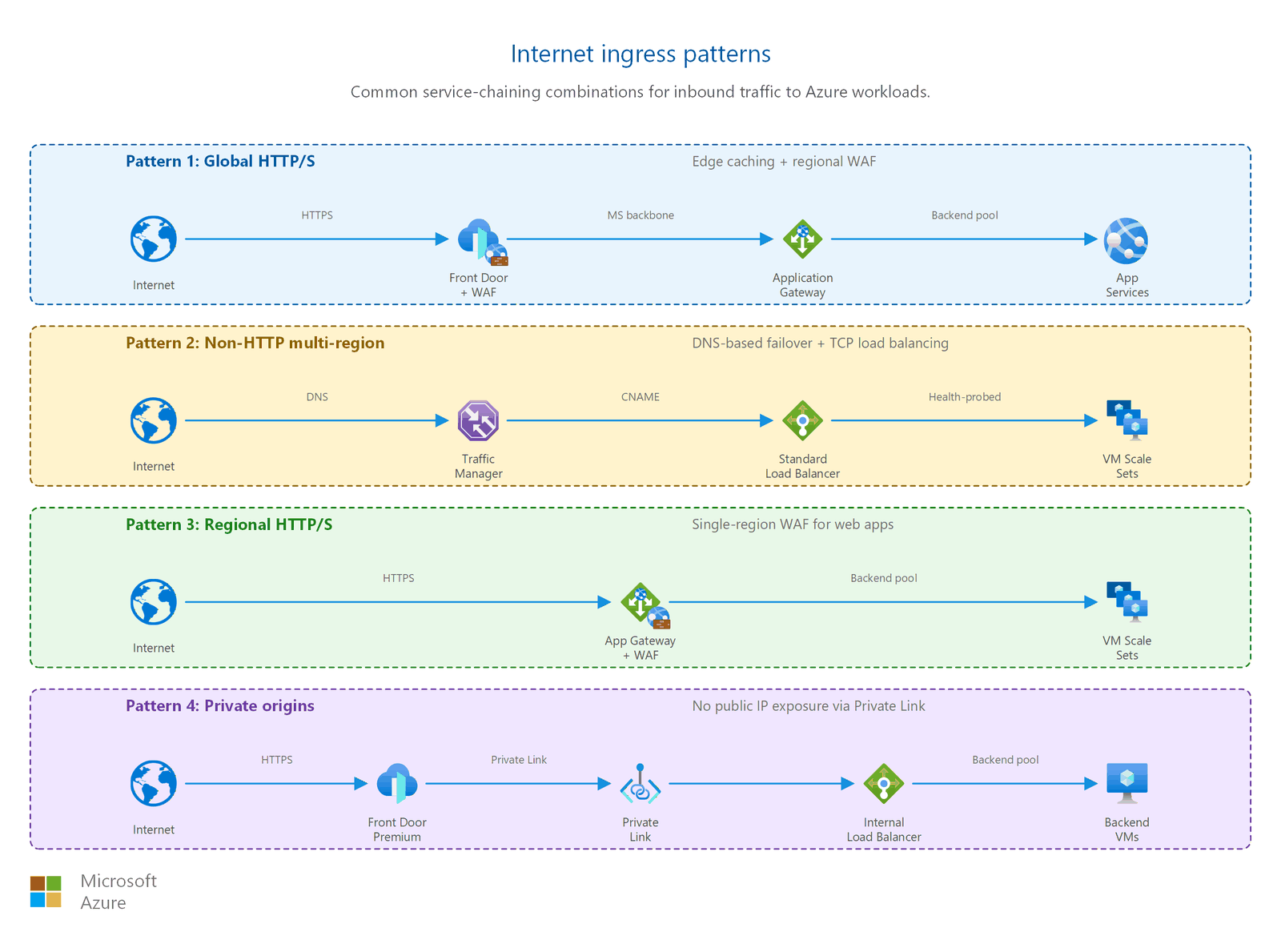
Common ingress patterns
The following patterns combine multiple services for a complete ingress architecture. Choose the pattern that matches your protocol requirements, regional scope, and security posture.
Pattern 1: Global web application with edge security
Services: Front Door → Application Gateway (with WAF) → VMs/containers
Scenario: A SaaS application serving customers across North America, Europe, and Asia needs global acceleration, DDoS protection at the edge, and regional path-based routing to different microservices.
Front Door terminates user connections at the nearest point of presence (PoP), applies global WAF rules, and caches static content. Traffic routes over the Microsoft backbone to the regional Application Gateway, which performs URL-based routing (for example, /api/* to the API pool, /static/* to a storage backend). This pattern provides two layers of WAF inspection: one at the edge and one at the region.
Pattern 2: Multi-region non-HTTP with DNS failover
Services: Traffic Manager → Standard Load Balancer (per region) → VMs
Scenario: A gaming company runs dedicated game servers on UDP port 7777 across three regions. Players connect to the nearest healthy region automatically.
Traffic Manager uses the performance routing method to return the DNS record for the lowest-latency region. Each region has a Standard Load Balancer distributing UDP traffic across a Virtual Machine Scale Set. If health probes detect a regional failure, Traffic Manager updates DNS to route players to the next-nearest region.
Pattern 3: Simple regional web app with WAF
Services: Application Gateway (with WAF) → VMs
Scenario: An internal line-of-business application being exposed to external partners. Single region, moderate traffic, needs OWASP protection and TLS termination.
Application Gateway provides path-based routing, cookie affinity for session management, and WAF protection, all from a single regional resource within the virtual network. This pattern avoids the complexity and cost of a global service when traffic is geographically concentrated.
Pattern 4: Front Door with locked-down private origins
Services: Front Door Premium → Private Link → internal Load Balancer → VMs
Scenario: A financial services application with strict requirements that the origin must have no public IP exposure. All traffic must traverse the Microsoft backbone network with no public internet hops.
Front Door Premium connects to the origin through a Private Link endpoint. The origin backend has no public IP address and no exposure to the internet. This pattern provides the security of a fully private origin combined with the performance benefits of Front Door's global edge network.
Multi-region ingress with Front Door
The following diagram shows Azure Front Door as a global entry point, routing users to the nearest healthy regional origin with automatic failover.
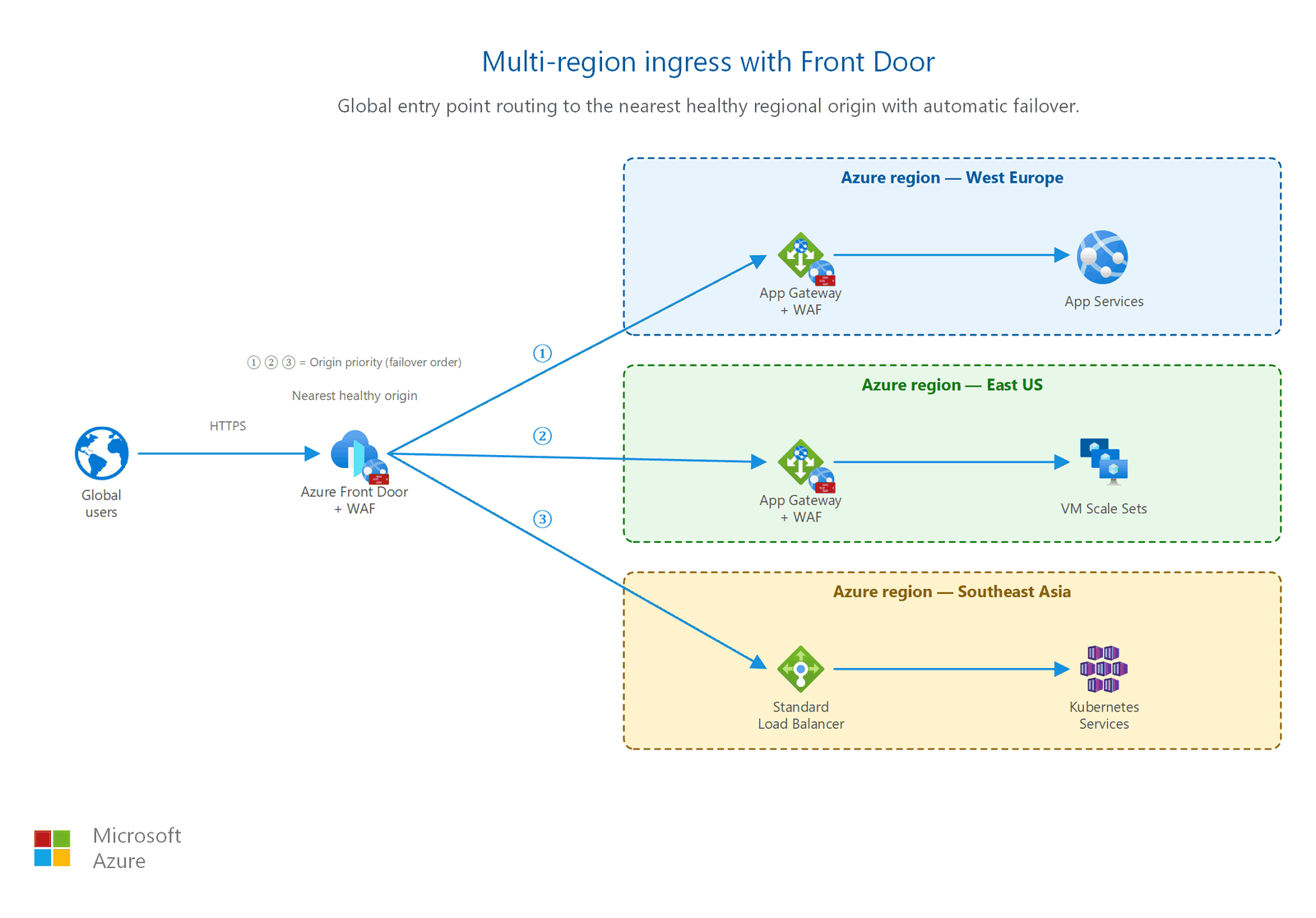
Prerequisites
Before you expose your application to the internet, make sure you have the following components in place:
- Virtual network deployed: Your backend resources must run inside an Azure virtual network with properly sized subnets. See Design your virtual network and subnets for subnet planning guidance.
- Running workload: You need at least one backend resource (virtual machine, container, or platform service) ready to serve traffic.
- DNS name: A public DNS name that external users use to reach your application. You can use Azure DNS or a third-party DNS provider.
- Subnet planning for ingress services: Application Gateway requires a dedicated subnet (minimum /24 recommended for production). Standard Load Balancer backend instances can share a subnet with other resources.
Design considerations
Evaluate whether internet ingress is needed for your lifted workloads. Many on-premises applications are internal-only and stay that way after migration. If ingress is required, keep the architecture simple:
- Application Gateway with WAF provides single-region Layer 7 ingress with TLS termination and OWASP protection. This approach is the most common for lifted web apps that were previously behind an on-premises reverse proxy.
- Public IP with NSG is acceptable for low-traffic, non-HTTP workloads (for example, a TCP service that partners connect to). Restrict the NSG to known source IPs.
- Avoid assigning public IPs directly to VMs. Place a load balancer or Application Gateway between the internet and your backend.
If your lifted applications don't serve external users, skip this article and continue to Outbound internet access.
Your modernized workloads have distinct ingress patterns based on application type:
- Azure Front Door for customer-facing web applications (for example, ContosoBiz). Front Door provides global acceleration, built-in WAF, CDN caching, and automatic failover across regions. Use weighted routing for active-active deployments.
- Azure Traffic Manager for mobile and API applications (for example, ContosoCare). Traffic Manager provides DNS-based routing for non-HTTP protocols or when clients need direct regional connectivity.
- Hub firewall as DNAT target: All ingress traffic passes through the hub Azure Firewall before reaching application tiers. The firewall performs destination NAT (DNAT) to route scrubbed traffic to the correct spoke. This pattern ensures that no unscrubbed internet traffic bypasses your centralized security controls.
Combine Front Door with Application Gateway in each region for two-layer WAF inspection: one at the global edge and one at the regional boundary.
For public-facing applications migrated from AWS or Google Cloud, deploy Application Gateway with WAF in the spoke VNet where the workload resides:
- Application Gateway + WAF in spoke VNet: Deploy a regional Application Gateway with WAF enabled in Prevention mode. This approach keeps ingress close to the workload without requiring traffic to traverse the hub for HTTP inspection.
- No direct public IPs on VMs: Never assign public IPs directly to migrated VMs. All internet-facing traffic enters through Application Gateway.
- Lock down origins: If the application was previously behind an AWS Application Load Balancer (ALB) or Google Cloud Load Balancing, map that ingress pattern to Application Gateway for regional workloads or Front Door for global workloads.
If your cross-cloud workload is internal-only (communicating between clouds over private transit), skip this article and continue to Azure Firewall and traffic inspection.
Security considerations
Internet ingress is your application's front door. It's the boundary where untrusted internet traffic enters your Azure environment. Follow these practices to secure your ingress path.
Never expose VMs directly with public IPs
Don't assign a public IP address directly to a virtual machine's network interface for serving application traffic on ports 80 or 443. Instead, place a load balancer or Application Gateway between the internet and your VMs. This approach gives you:
- Health probes to remove failed instances from rotation
- A single point for SSL or TLS termination
- A place to apply WAF rules and rate limiting
- Centralized logging of all inbound traffic
Caution
A public IP directly on a VM exposes every open port to the internet. If the VM's network security group has a misconfigured rule, attackers gain direct access to the operating system.
Enable WAF in Prevention mode
If you deploy Application Gateway with WAF or Azure Front Door with WAF, set the WAF to Prevention mode for production workloads. Prevention mode blocks malicious requests before they reach your application. Detection mode only logs threats without blocking them. Use Detection mode only during initial testing to tune rules and identify false positives.
The WAF Default Rule Set (DRS) protects against OWASP top 10 attacks including SQL injection, cross-site scripting, and remote code execution. DRS also includes Microsoft Threat Intelligence rules that detect known malicious IPs and payloads.
Enable DDoS protection
All virtual networks with public-facing resources should have DDoS protection enabled. Azure DDoS Network Protection provides adaptive tuning, attack telemetry, and cost protection for your public IPs. Without DDoS protection, a volumetric attack can saturate your ingress bandwidth and make your application unreachable.
For details, see DDoS protection for your network.
Use NSGs for defense in depth
Even when you use a load balancer or Application Gateway, configure network security group rules on your backend subnets to restrict which traffic sources can reach your VMs. A correctly configured NSG:
- Allows traffic only from the load balancer's subnet or service tag
- Denies direct inbound traffic from the internet to backend VMs
- Logs denied traffic for security monitoring
For NSG planning, see Network security groups and application security groups.
Enforce TLS 1.2 or later
Configure all ingress services to accept only TLS 1.2 or TLS 1.3. Disable TLS 1.0 and 1.1, which have known vulnerabilities. Both Application Gateway and Front Door support minimum TLS version configuration through their TLS policy settings. Use predefined policies, such as AppGwSslPolicy20220101 for Application Gateway, rather than custom cipher configurations unless you have specific compliance requirements.
Lock down origins for Front Door
When you use Azure Front Door, restrict your origin servers to accept traffic only from Front Door. If your origin accepts traffic from any source, bad actors can bypass Front Door's WAF by connecting directly to the origin IP, rendering your entire WAF investment ineffective.
Origin lockdown uses two independent verification mechanisms. Apply both for defense in depth:
Service tag restriction (network layer)
Configure your origin's NSG or Azure Firewall to allow inbound HTTP/HTTPS traffic only from the AzureFrontDoor.Backend service tag. This service tag contains all IP ranges used by Front Door to connect to origins. Apply this rule on the subnet or NIC where your origin resides:
- NSG rule: Priority 100, Source = Service Tag
AzureFrontDoor.Backend, Destination = your backend subnet, Ports = 80, 443, Action = Allow. - Default deny: Ensure no other rule allows inbound traffic on ports 80/443 from the internet. The NSG's default DenyAllInbound rule handles this unless you add a broader Allow rule.
The service tag alone is insufficient because all Front Door instances across all Azure customers share the same service tag IP ranges. A bad actor could create their own Front Door profile and route it to your origin IP, bypassing your WAF rules.
X-Azure-FDID header validation (application layer)
Every request from Front Door includes an X-Azure-FDID header containing the unique identifier (GUID) of the Front Door instance that sent the request. Validate this header in your application or reverse proxy to confirm the request came from your Front Door profile, not a bad actor's:
- Find your Front Door ID in the Azure portal under your Front Door profile's Overview page (the "Front Door ID" field).
- In your application code or web server configuration, reject any request where
X-Azure-FDIDdoesn't match your expected GUID. - Return HTTP 403 for requests with a missing or incorrect header value.
Combining the service tag (blocks non-Front Door traffic at the network) with header validation (blocks other customers' Front Door traffic at the application) ensures only your Front Door instance can reach your origin.
Private Link origins (strongest lockdown)
For workloads requiring the highest level of origin isolation, Front Door Premium supports Private Link origins. Your origin needs no public IP address. Front Door connects through a private endpoint over the Microsoft backbone. This approach eliminates the need for service tag rules or header validation because the origin is unreachable from the public internet entirely.
Related articles
- Design your virtual network and subnets: Subnet sizing for Application Gateway and Load Balancer backends
- Network security groups and application security groups: NSG rules to restrict backend access after ingress
- Application delivery and performance: Performance tuning after your ingress path is established
- Outbound internet access: Control egress, the outbound counterpart to ingress
- Secure administrative access: Admin access patterns, distinct from internet ingress for application users
- Web application firewall: Detailed WAF configuration and rule tuning
- DDoS protection for your network: DDoS protection planning for all public-facing resources
Learn more
- What is Azure Load Balancer?
- What is Azure Application Gateway?
- What is Azure Front Door?
- What is Azure Traffic Manager?
- Public IP addresses in Azure
- Azure Web Application Firewall on Application Gateway
- Azure DDoS Network Protection overview
Next steps
Tip
Exploring on your own? Return to the overview navigator to find your next article by capability.
Next in your lift-and-shift journey:
Application delivery and performance: Add Layer 7 load balancing and global delivery for your migrated workload.
If your lifted workload doesn't need Layer 7 load balancing, skip ahead to Outbound internet access.
Next in your modernization journey:
Application delivery and performance: Optimize global delivery and performance for your customer-facing PaaS workloads.
Next in your cross-cloud journey:
Web Application Firewall: Protect public-facing applications from HTTP-layer attacks across your cloud estate.
If your workload doesn't use HTTP/HTTPS, skip ahead to Azure Firewall and traffic inspection.