Note
Access to this page requires authorization. You can try signing in or changing directories.
Access to this page requires authorization. You can try changing directories.
Secure remote access to Azure virtual machines (VMs) lets you manage workloads without exposing management ports to the internet. This article compares Azure Bastion, Point-to-Site VPN, and Just-in-Time VM access to help you choose the right approach.
What this article covers
This article explains how to securely access Azure virtual machines for administration without exposing management ports to the internet.
Who needs this article
Read this article if you:
- Need to use SSH or RDP to connect to Azure VMs for development or administration.
- Want to remove public IP addresses on VMs while retaining management access.
- Manage a hub-and-spoke network and need centralized remote access for your team.
- Need to comply with security policies that prohibit direct internet-facing management ports.
Lift-and-shift focus: Deploy Azure Bastion in the hub so admins reach migrated VMs over SSH or RDP without public IPs, replacing on-premises jump-box workflows.
Modernize focus: Combine Bastion with subscription and RBAC separation so platform and app teams get scoped access, and deploy Bastion per region for active-active estates.
Cross-cloud focus: Provide admin access through a secured hub (Bastion or point-to-site VPN) and avoid exposing management ports on workloads migrated from other clouds.
Azure services and features
The following table lists the Azure services that provide secure remote access to virtual machines.
| Service | What it provides | When to use it |
|---|---|---|
| Azure Bastion (Basic) | Browser-based SSH and RDP through the Azure portal. No public IP required on the VM. Two dedicated host instances with 40 concurrent RDP or 80 concurrent SSH sessions. | Any VM that administrators need to access without exposing a public port. |
| Azure Bastion (Standard) | Everything in Basic plus native client support, file transfer, shareable links, IP-based connections, custom inbound ports, and scalable host instances (2–50). | Teams needing richer admin workflows such as file uploads or connections through the Azure CLI. |
| Azure Bastion (Premium) | Everything in Standard plus private-only deployment (no public IP on the Bastion resource itself) and session recording. | High-security environments where even the Bastion host must not have a public IP address. |
| Point-to-Site (P2S) VPN | Individual client VPN connection into the virtual network. Provides full network-level access to all VNet resources, not just VMs. | Administrators who need access to many resources beyond RDP and SSH, such as databases, storage, or internal web apps. |
| Just-in-Time (JIT) VM access | Opens management ports only when explicitly requested, for a limited time window. Creates temporary NSG or Azure Firewall allow rules. | Reducing attack surface for VMs that still retain public IP addresses. |
How to choose
The right service depends on whether you need browser-based access, full network connectivity, or temporary port openings.
How to access VMs securely
Use this table to pick the right approach based on your requirements.
| Requirement | Recommended service | Why |
|---|---|---|
| Browser-based RDP or SSH with no client software to install | Azure Bastion (Basic or Standard) | Bastion provides portal-based access directly from the browser. No VPN client or public IP is needed on the VM. |
| Private-only access with zero public IP addresses, including on the Bastion resource | Azure Bastion (Premium) | Premium supports private-only deployment, which eliminates the public IP on Bastion itself. |
| Full virtual network access for an admin team, not just RDP and SSH | Point-to-Site VPN | P2S VPN gives the client an IP address on the VNet so all network resources are reachable. |
| Reduce attack surface for VMs that still have public IPs | Just-in-Time VM access | JIT keeps management ports closed by default and opens them only for approved users during a limited time window. |
Admin access patterns
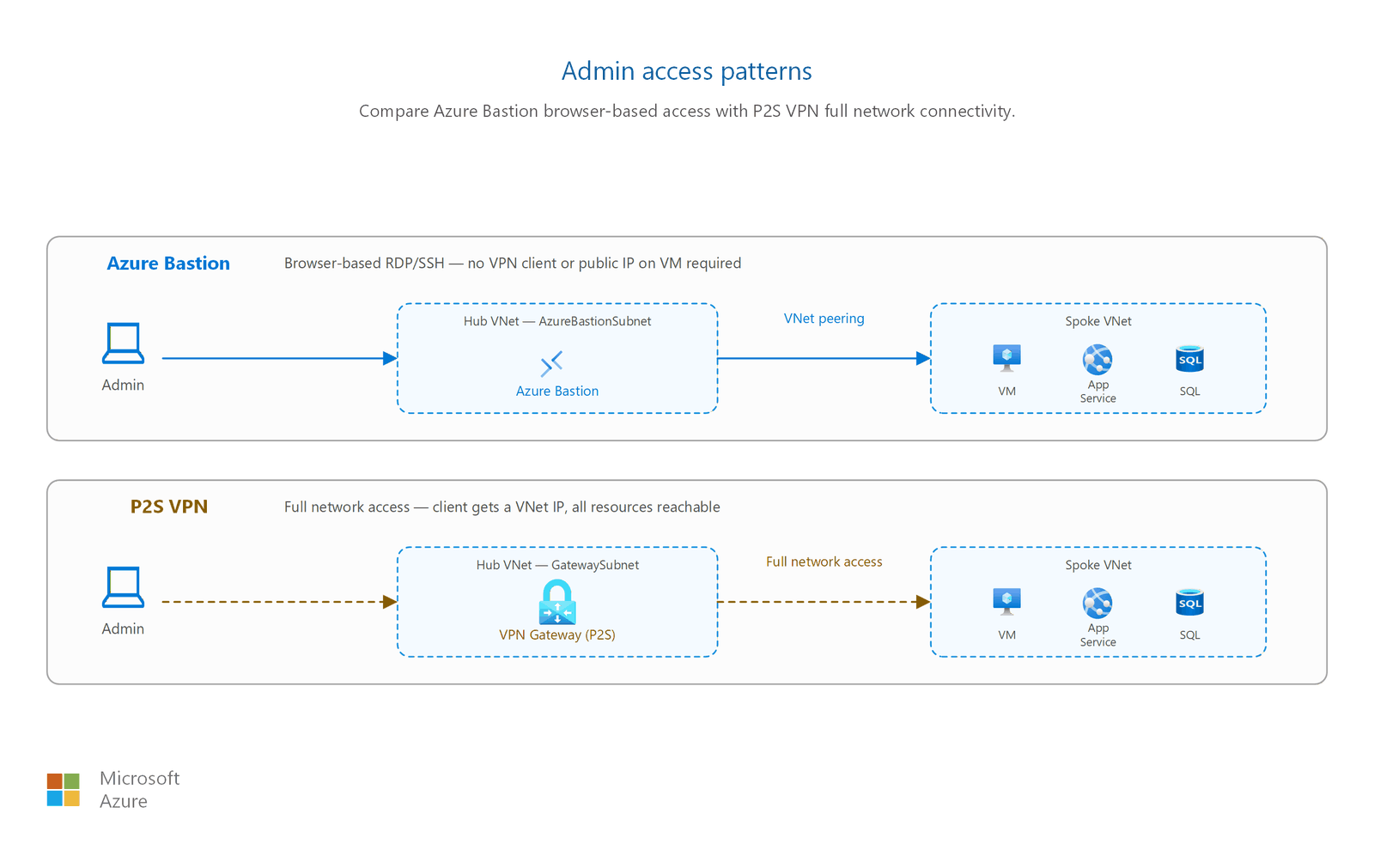
Bastion SKU comparison
| Feature | Basic | Standard | Premium |
|---|---|---|---|
| Browser-based SSH and RDP | ✅ | ✅ | ✅ |
| VNet peering support (hub-spoke) | ✅ | ✅ | ✅ |
| Native client (Azure CLI) | ❌ | ✅ | ✅ |
| File upload and download | ❌ | ✅ | ✅ |
| Shareable links | ❌ | ✅ | ✅ |
| IP-based connections | ❌ | ✅ | ✅ |
| Custom inbound port | ❌ | ✅ | ✅ |
| Scalable host instances (2–50) | ❌ | ✅ | ✅ |
| Private-only deployment (no public IP) | ❌ | ❌ | ✅ |
| Session recording | ❌ | ❌ | ✅ |
Tip
The cost difference between Standard and Premium is marginal. Use Bastion Premium for production workloads.
Point-to-site VPN protocols
P2S VPN supports three tunnel protocols:
- OpenVPN: TLS-based, works on Windows, macOS, Linux, iOS, and Android. Supports Microsoft Entra ID authentication and multifactor authentication (MFA).
- IKEv2: Standards-based IPsec, works on Windows and macOS.
- SSTP (Secure Socket Tunneling Protocol): Proprietary TLS-based, Windows only.
Important
SSTP is being retired in phases. As of March 31, 2026, you can no longer enable SSTP on VPN gateways. Existing SSTP-enabled gateways stop accepting connections on March 31, 2027. Use OpenVPN or IKEv2 for all new deployments. Microsoft Entra ID authentication and MFA are only supported with the OpenVPN tunnel type.
Design considerations
Lift-and-shift admin access design focus
- Deploy Azure Bastion in the hub VNet so every peered spoke can reach its VMs over SSH or RDP without public IP addresses, replacing on-premises jump-box workflows.
- Remove public IPs from migrated VMs once Bastion is in place to shrink the attack surface.
- Use point-to-site VPN when admins need to reach many resources beyond individual VMs.
- Keep admin access patterns consistent across migrated workloads to simplify operations.
Modernize admin access design focus
- Pair Bastion with subscription and RBAC separation so platform teams manage the hub and connectivity while app teams get scoped access to their spokes.
- Deploy Bastion in each region for active-active designs so admins reach resources in both primary and backup regions.
- Use a Bastion SKU that matches your needs, such as a private-only deployment or native client support.
- Integrate Microsoft Entra ID authentication and MFA for point-to-site VPN where you use it (OpenVPN tunnel type).
Cross-cloud admin access design focus
- Centralize admin access in a secured Virtual WAN hub so operators reach Azure workloads migrated from other clouds without per-workload public endpoints.
- Don't attach public management IPs to virtual machines; route SSH or RDP through Bastion in the hub.
- Where teams manage resources across clouds, standardize on point-to-site VPN or Bastion so access methods stay consistent.
- Route admin traffic through the inspected hub firewall so it follows the same cross-cloud security policy as your workload traffic.
Prerequisites
Before you set up secure remote access, make sure you have:
- A virtual network with your VMs deployed (see Virtual networks and subnets)
- For Azure Bastion: A subnet named
AzureBastionSubnetwith a minimum size of /26 (64 addresses). This subnet can't host other resources. - For P2S VPN: A gateway subnet and a VPN gateway resource (see VPN and ExpressRoute connectivity for gateway planning)
- For JIT VM access: Microsoft Defender for Servers Plan 2 enabled on the subscription
Security considerations
Caution
Never create an NSG rule that allows RDP (TCP 3389) or SSH (TCP 22) inbound from 0.0.0.0/0 (any source on the internet). This configuration exposes VMs to brute-force attacks and is a common cause of security incidents.
Follow these security practices for remote VM access:
- Use Bastion or P2S VPN instead of public IPs. Both approaches keep management traffic off the public internet. Remove public IP addresses from VMs when you no longer need them.
- Deploy Bastion in the hub VNet. A single Bastion instance in the hub virtual network can reach VMs in all peered spoke VNets. You don't need a Bastion deployment in each spoke. Use Standard or Premium SKU for hub-spoke topologies.
- Enable MFA for P2S VPN. Configure Microsoft Entra ID authentication with Microsoft Entra Conditional Access to require multifactor authentication. MFA requires the OpenVPN tunnel type and the Azure VPN Client application.
- Set short JIT time windows. When you use Just-in-Time access, limit the duration to the minimum time needed. After the window expires, the NSG rules revert to their previous deny state. Existing connections aren't interrupted, but the system blocks new connections.
- Apply NSG rules to the AzureBastionSubnet. Follow the guidance on securing Bastion for required inbound and outbound rules on the Bastion subnet.
Note
JIT VM access creates temporary NSG allow rules by default. JIT can also work with Azure Firewall, but only when the firewall uses classic rules. Firewalls managed through Azure Firewall Manager (Firewall policies) don't support JIT integration.
Related articles
- Virtual networks and subnets: AzureBastionSubnet sizing guidance
- Network security groups and application security groups: NSG rules for management ports
- VPN and ExpressRoute connectivity: P2S VPN scope and gateway planning
- Hub-and-spoke topology: Centralized Bastion deployment pattern
Learn more
- Azure Bastion documentation
- About Point-to-Site VPN
- Just-in-Time VM access in Microsoft Defender for Cloud
- Enable Microsoft Entra ID MFA for P2S VPN users
- Bastion SKU comparison
Next steps
Tip
Exploring on your own? Return to the overview navigator to find your next article by capability.
Next in your lift-and-shift journey:
Plan DNS for legacy name resolution: Preserve legacy DNS naming behavior during migration using Azure Private DNS zones and alias records.
Next in your modernization journey:
Set up private connectivity to PaaS services: Create Private Link subnets in each spoke for your PaaS service connectivity.
Next in your cross-cloud journey:
Plan DNS cutover and name resolution: Map DNS records, lower TTLs, and configure cross-cloud name resolution before migration cutover.