Note
Access to this page requires authorization. You can try signing in or changing directories.
Access to this page requires authorization. You can try changing directories.
This article explains how to connect to Azure platform as a service (PaaS) resources over private network connections instead of the public internet. You learn the differences between service endpoints, private endpoints, and Private Link so you can choose the approach that fits your security and connectivity requirements.
What this article covers
Private PaaS access removes the public internet from the data path between your Azure virtual network and Azure PaaS services like Azure Storage, Azure SQL Database, and Azure Key Vault. This article covers the connectivity options, their trade-offs, and how to decide which approach to use for each workload.
Note
Private Endpoints require DNS integration to resolve service FQDNs to private IP addresses. This article covers the DNS requirements inline, but for the full DNS architecture, including hybrid forwarding, Azure DNS Private Resolver, and DNS security, see DNS security and private name resolution.
Who needs this article
Read this article if one or more of these conditions apply:
- Your workloads must reach Azure PaaS services over private network paths instead of public endpoints.
- You need to decide between Service Endpoints and Private Endpoints based on security, cost, and manageability.
- You need to restrict access to specific PaaS resources to reduce data exfiltration risk.
- You need to plan DNS, subnet capacity, or hybrid reachability for private PaaS connectivity.
Tip
Following a scenario path? Select your scenario at the top of the page for tailored guidance. The core guidance that follows applies to all readers.
Lift-and-shift focus: Skip this article unless parts of your migrated app already use Azure PaaS services. Most lift-and-shift workloads stay on IaaS (VMs, managed disks, standard networking) and don't need Private Link in the initial migration phase. Return to this article later when you begin adopting PaaS services for individual workload components.
Read this article if you:
- Have migrated workloads that already consume Azure PaaS services (for example, Azure SQL Database or Azure Storage).
- Want to understand when to start using Private Link as part of a phased modernization after lift and shift.
- Need to plan subnet capacity for future Private Endpoint adoption.
Modernization focus: Private Link subnets in each spoke VNet are essential. Your AKS, App Service Environment (ASE), and managed database workloads need private PaaS connectivity to meet compliance requirements and prevent data exfiltration over the public internet.
Read this article if you:
- Store sensitive or regulated data in Azure PaaS services and must restrict access to private network paths.
- Need to create dedicated Private Link subnets in each spoke VNet for app team use.
- Want to prevent data exfiltration by ensuring PaaS connectivity scopes to specific resource instances.
- Are designing production workloads where PaaS services must be reachable from on-premises networks over VPN or ExpressRoute.
- Need to understand the cost, DNS, and security trade-offs between Service Endpoints and Private Endpoints.
Cross-cloud focus: This article becomes relevant after you establish cross-cloud transit and connectivity, unless the target architecture already includes Azure PaaS with private endpoints. Return to this article during optimization when you're ready to secure PaaS access paths.
Read this article if you:
- Are using Azure Migrate with Private Endpoint support during the migration process.
- Plan to adopt Azure PaaS services as part of the post-migration target architecture.
- Need to understand how Private Endpoints work before integrating them with your cross-cloud design.
Azure services and features
The following table describes the services and features available for private PaaS connectivity in Azure.
| Service or feature | What it provides | When to use it |
|---|---|---|
| Public endpoint (default) | Access Azure PaaS services over the internet at their public fully qualified domain name (FQDN). No extra configuration needed. | Dev/test environments only. Not recommended for production workloads with sensitive data. |
| Service Endpoints | Extends your virtual network identity to Azure PaaS services. Traffic stays on the Microsoft backbone. The PaaS service sees the VNet as the traffic source. Doesn't create a private IP address. | Low exfiltration risk. Simpler setup than Private Link. Useful when Private Link isn't available for a specific service. Free. |
| Private Endpoint / Azure Private Link | Creates a network interface with a private IP address inside your virtual network that maps to a specific PaaS resource instance. Traffic stays on the Microsoft backbone and never traverses the public internet. Requires DNS integration. | Production workloads. Sensitive data. Regulatory compliance. Data exfiltration prevention. Preferred over Service Endpoints for new designs. |
| Private Link Service | Expose your own service privately to consumers in other virtual networks or Microsoft Entra tenants. Consumers create a Private Endpoint in their own VNet to reach your service, without requiring VNet peering. | ISVs or internal platform teams publishing services to consumers who shouldn't have network-level access to the host virtual network. |
| VNet Integration (App Service, Functions) | Lets App Service or Azure Functions route outbound traffic through a virtual network. Outbound-only: doesn't provide inbound private connectivity. | When App Service or Azure Functions needs to reach VNet-private resources such as databases or internal APIs through Private Endpoints. |
How to choose
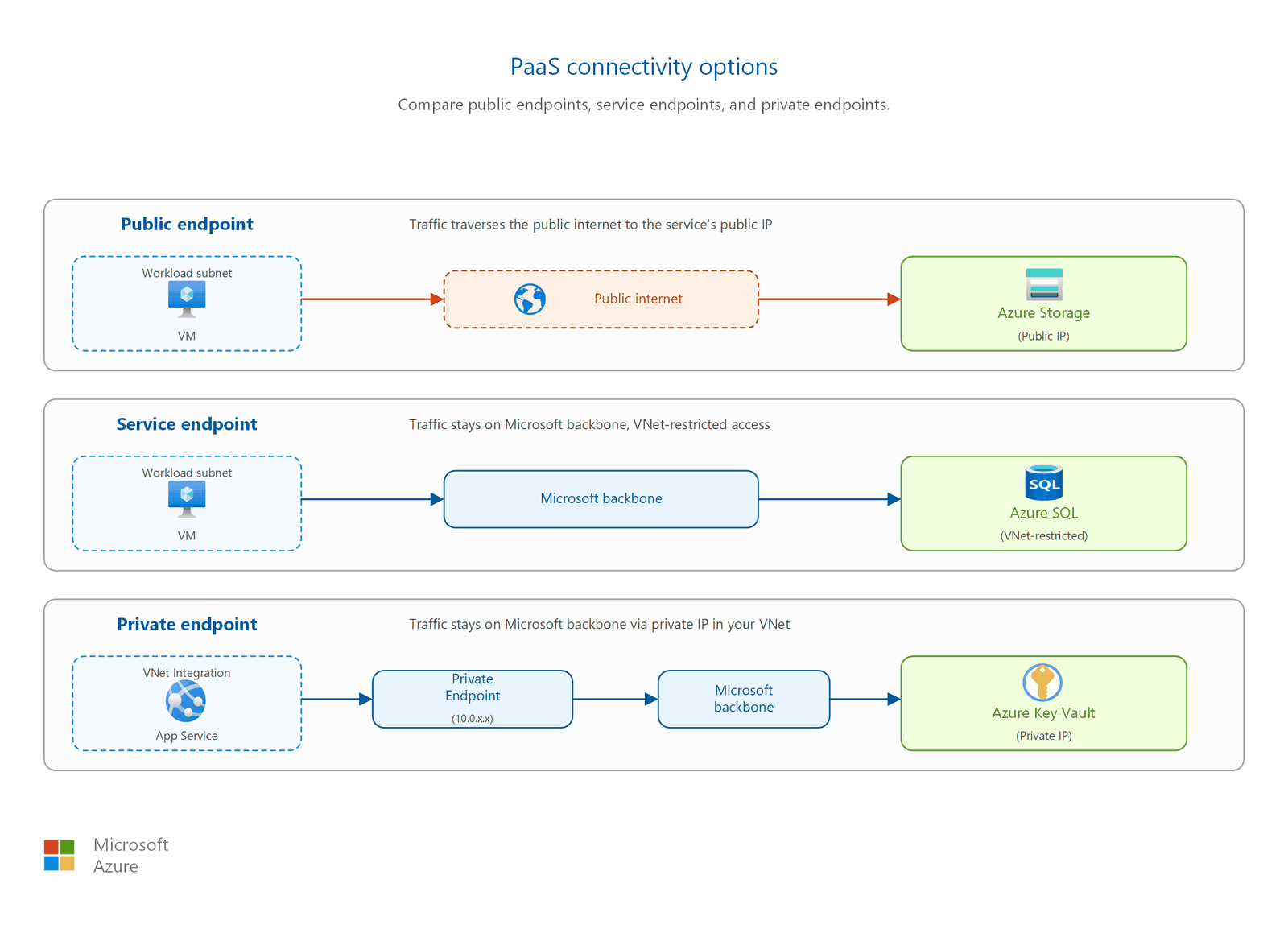
Use the decision tables in this section to select the right connectivity approach for your workload.
Service Endpoints compared to Private Endpoints
The following table compares the two most common approaches for restricting PaaS access to private network paths.
| Factor | Service Endpoints | Private Endpoints |
|---|---|---|
| Traffic path | Microsoft backbone. Destination still uses its public IP address. | Microsoft backbone. Destination uses a private IP address in your VNet. |
| Private IP in VNet | No. Source IP becomes private (VNet address), but the service resolves to its public IP. | Yes. A network interface with a private IP from your subnet is mapped to the specific resource. |
| DNS changes required | No. DNS resolution remains unchanged. | Yes. A private DNS zone is required so the service FQDN resolves to the private IP. |
| Data exfiltration prevention | Limited. Applies at the VNet level to all instances of a service type (for example, all Azure Storage accounts). | Strong. Access is scoped to a specific resource instance. Only the mapped resource is reachable through that endpoint. |
| On-premises access | Not reachable from on-premises networks. Workaround: add your public or NAT IP addresses to the Azure service's IP firewall rules. | Reachable from on-premises over VPN or ExpressRoute because the endpoint has a routable private IP address. |
| Cost | Free. No additional charges. | Per-endpoint hourly charge plus data processing fee. |
When to use which approach
| Scenario | Recommended approach | Why |
|---|---|---|
| Dev/test, low data sensitivity | Public endpoint with service firewall | Simplest setup. Restrict access by IP allow listing. No extra cost or DNS changes. |
| Simple VNet restriction, low exfiltration risk | Service Endpoints | Free. Quick to enable. Appropriate when you don't need resource-level access scoping. |
| Production workloads, sensitive data, compliance | Private Endpoints | Strongest exfiltration protection. Works from on-premises. Supports DNS-based resolution from any connected network. |
| Publishing your own service privately to other tenants | Private Link Service | Consumers create a Private Endpoint in their VNet. No VNet peering required. Supports approval workflows and visibility controls. |
| App Service or Functions needs to reach VNet resources | VNet Integration | Outbound-only connectivity. Requires subnet delegation to Microsoft.Web/serverFarms. Combine with Private Endpoints for secure data access to PaaS services. |
Azure Front Door with Private Link origins
Azure Front Door Premium supports Private Link origins, which you use to connect Front Door to your backend services (App Service, Storage, or internal load balancers) over a private connection. Traffic between Front Door and your origin stays on the Microsoft backbone, and you can turn off public access on the origin entirely. This pattern is the most widely documented integration for Private Link across Azure networking services.
Use Front Door Premium with Private Link origins when you need:
- Global load balancing with web application firewall (WAF) protection.
- Private connectivity to origins without exposing them to the public internet.
- Centralized TLS termination with backend traffic over private paths.
VNet Integration for outbound access
VNet Integration doesn't provide inbound private connectivity. It enables App Service or Azure Functions to route outbound calls through your virtual network. This means your app can reach resources behind Private Endpoints or access VNet-private services. VNet Integration requires a dedicated subnet delegated to Microsoft.Web/serverFarms.
Combine VNet Integration with Private Endpoints when your application needs to:
- Call Azure SQL Database or Azure Storage through a private IP.
- Access internal APIs or services deployed in spoke virtual networks.
- Route outbound traffic through a network virtual appliance (NVA) for inspection.
Design considerations
Most lift-and-shift projects defer Private Link adoption to a later phase. Your immediate priority is migrating VMs and establishing basic connectivity. Consider Private Link when:
- Individual workload components already use PaaS: If a lifted application connects to Azure SQL Database or Azure Storage, add a Private Endpoint for that specific service. You don't need to convert all PaaS access at once.
- Compliance mandates private connectivity: Some regulated workloads require private data paths from day one. In this case, create Private Endpoints during migration, not after.
- Plan subnet capacity now: Even if you defer Private Link, reserve a /27 or /28 subnet in each spoke for future Private Endpoints. Retrofitting subnet space later is harder than reserving it upfront.
For most lift-and-shift migrations, skip detailed Private Link implementation and return to this article when PaaS adoption begins.
Create a dedicated Private Link subnet in each spoke VNet. App teams use this subnet to create Private Endpoints for the PaaS services their applications consume:
- Dedicated Private Link subnet per spoke: Size each subnet based on the number of PaaS services the spoke workloads need (one IP per Private Endpoint). A /27 (32 addresses) supports up to 27 Private Endpoints after Azure reserves 5 addresses.
- App admins decide PaaS connections: The IT team provides the subnet and DNS infrastructure. App teams create Private Endpoints for their specific PaaS resources (Azure SQL, Key Vault, Storage) based on application requirements.
- Centralize DNS zones in hub: Private DNS zones (for example,
privatelink.database.windows.net) live in the connectivity subscription and link to all spoke VNets. This approach ensures consistent name resolution and avoids split-brain DNS. - Turn off public access on PaaS resources: After creating a Private Endpoint, turn off public network access on the target PaaS resource. Otherwise, traffic can still reach the service over the internet, defeating the purpose of private connectivity.
- Combine with VNet Integration: App Service and Azure Functions use VNet Integration to route outbound calls through the spoke VNet, reaching PaaS services through Private Endpoints in the same or peered VNet.
Azure Migrate appliance supports Private Endpoint connectivity, which secures the migration control plane traffic. Beyond that, defer Private Link planning to post-migration optimization:
- Azure Migrate with Private Endpoint: During the migration process, the Azure Migrate appliance can use a Private Endpoint to communicate with the Azure Migrate project. This approach keeps migration control traffic off the public internet.
- Defer broad Private Link adoption: Focus on cross-cloud transit connectivity first. Once you migrate and stabilize workloads in Azure, plan Private Endpoints for PaaS services as a separate optimization pass.
- Reserve subnet space: Even if you skip Private Link now, reserve a subnet in each spoke for future Private Endpoints. Cross-cloud workloads that later adopt Azure PaaS services need this capacity.
Prerequisites
Before you implement private PaaS access, confirm that you have the following resources and knowledge in place:
- A deployed virtual network with at least one subnet. Private Endpoints require a subnet with available IP addresses. For virtual network design, see Virtual networks and subnets.
- An Azure PaaS service to connect privately. The service must support either Service Endpoints or Private Link. Check the Azure Private Link availability documentation for your service.
- Understanding of DNS infrastructure. Private Endpoints require a private DNS zone. If you use custom DNS servers, you need conditional forwarders pointing to Azure DNS (168.63.129.16). For DNS design patterns, see the DNS integration article for Private Endpoints in Related resources.
- IP address planning. Each Private Endpoint consumes one private IP address from the subnet. Plan your subnet sizes accordingly. See IP address planning for guidance.
Security considerations
Private PaaS connectivity directly affects your data exfiltration posture, DNS reliability, and network policy enforcement. Consider the following guidance when you design your implementation.
Data exfiltration prevention
Private Endpoints provide the strongest exfiltration protection because each endpoint is mapped to a single resource instance. A user or application in your VNet can only reach the specific storage account or database that the Private Endpoint is configured for. They can't redirect data to a different instance of the same service type.
Service Endpoints, by contrast, restrict access at the VNet level but apply to all instances of a service type. For example, a Service Endpoint for Azure Storage means the VNet can reach any Azure Storage account that grants access, not just your intended account. This gap makes Service Endpoints insufficient for environments where data exfiltration is a compliance concern.
DNS zone configuration
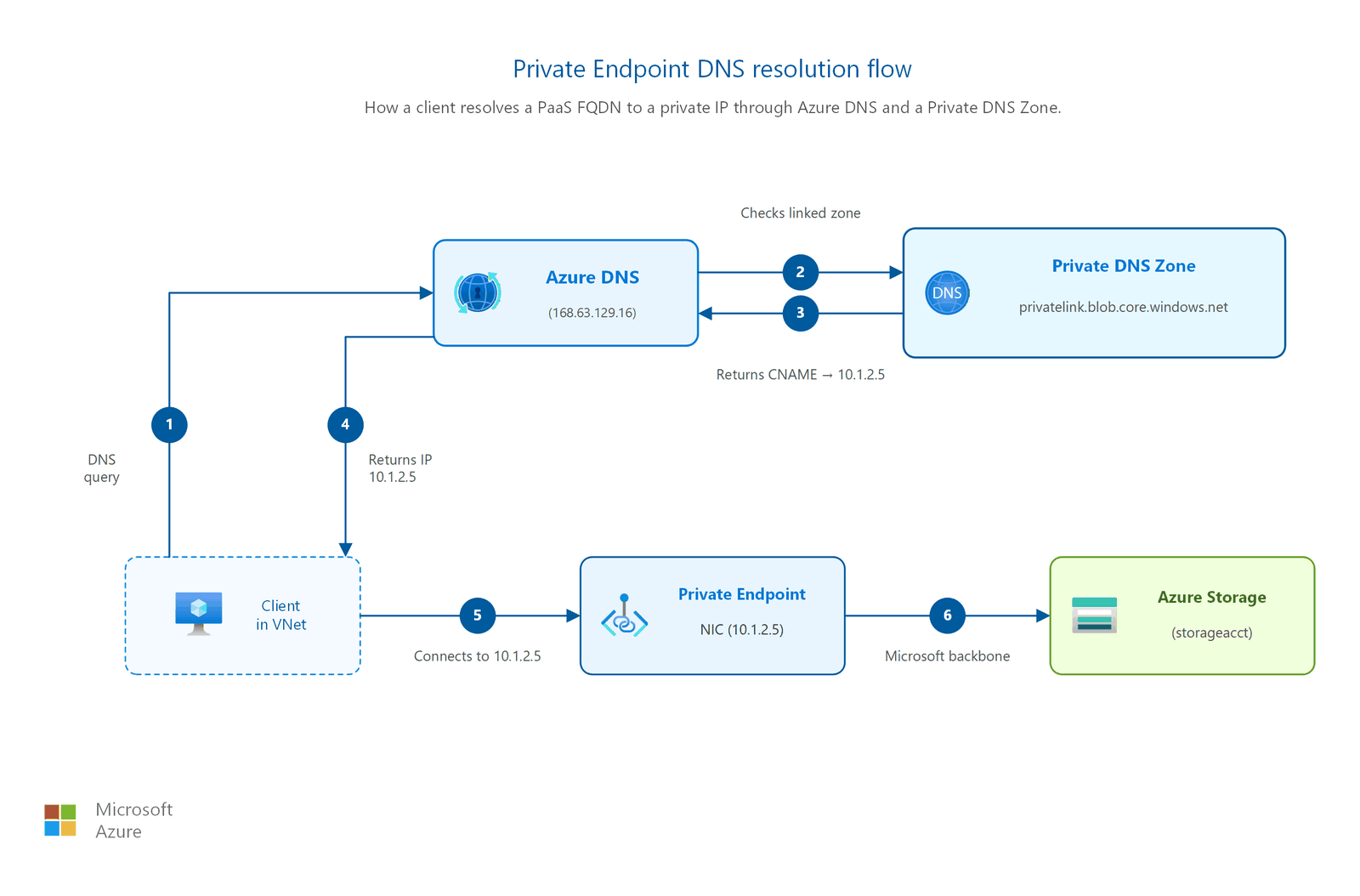
Private Endpoints depend on correct DNS resolution to function. When you create a Private Endpoint, you configure a private DNS zone (for example, privatelink.blob.core.windows.net for Azure Blob Storage) so that the service FQDN resolves to the private IP instead of the public IP.
Misconfiguring DNS zones can cause:
- Applications resolving to the public IP, bypassing the Private Endpoint entirely.
- On-premises clients unable to reach the private IP because conditional forwarders aren't configured.
- Split-brain DNS problems where some clients resolve privately and others resolve publicly.
Centralize private DNS zones in a shared services or connectivity subscription and link them to all virtual networks that need resolution. Use Azure Policy to enforce private DNS zone integration when Private Endpoints are created.
Network policies on Private Endpoint subnets
Network security groups (NSGs) and user-defined routes (UDRs) are now supported on Private Endpoint subnets. This support is disabled by default and must be explicitly enabled per subnet. After you enable network policies:
- You can apply NSG rules to control which sources can reach the Private Endpoint.
- You can use UDRs to route Private Endpoint traffic through a network virtual appliance for inspection.
- You can reference Private Endpoints in application security group (ASG) rules.
Enable network policies on Private Endpoint subnets in production environments to keep a consistent security posture across all subnets in your virtual network.
Important
After you configure a Private Endpoint for a PaaS service, turn off public network access on that service. If public access remains enabled, traffic can still reach the service over the internet, which defeats the purpose of private connectivity.
Private DNS zones for common services
The following table lists the private DNS zones required for commonly used Azure PaaS services.
| Azure service | Private DNS zone |
|---|---|
| Azure Blob Storage | privatelink.blob.core.windows.net |
| Azure SQL Database | privatelink.database.windows.net |
| Azure Key Vault | privatelink.vaultcore.azure.net |
| Azure Cosmos DB | privatelink.documents.azure.com |
| Azure App Service | privatelink.azurewebsites.net |
Tip
When you create a private endpoint in the Azure portal, it often automatically creates an associated private DNS zone. Deleting the private endpoint doesn't always remove the zone or its virtual network links. Periodically audit for orphaned private endpoints and private DNS zones. They add cost and clutter to your name-resolution configuration.
Network Security Perimeter for PaaS access
Private Link controls how traffic reaches a PaaS service, over a private IP address. Network Security Perimeter (NSP) controls which networks and resources are allowed to communicate with that service. NSP adds an explicit boundary around PaaS resources such as Azure Storage, Azure SQL Database, and Azure Key Vault: resources inside the perimeter communicate freely, while access from outside is denied by default unless an access rule allows it. Use NSP alongside Private Endpoints when you need PaaS-level data-exfiltration protection in high-security designs. For where NSP fits across security levels, see the security posture matrix in the overview.
Related articles
- Virtual networks and subnets: Subnet design where Private Endpoints deploy.
- IP address planning: Private IP allocation for endpoint interfaces.
- Hybrid and on-premises connectivity: Reach Private Endpoints from on-premises over ExpressRoute or VPN.
- Secure internet inbound traffic: Azure Front Door Premium with Private Link origins for secure ingress patterns.
- Private Link DNS security: DNS zone naming and hybrid DNS resolution for Private Endpoints.
Learn more
- What is Azure Private Link?
- What is a private endpoint?
- Virtual network service endpoints
- What is Azure Private Link service?
- Manage network policies for private endpoints
- Azure Private Link DNS integration
- VNet Integration for App Service
- Azure Front Door Private Link origins
Next steps
Tip
Exploring on your own? Return to the overview navigator to find your next article by capability.
Next in your lift-and-shift journey:
Outbound internet access: Control how your migrated workloads reach the internet through a centralized egress path.
Next in your modernization journey:
Outbound internet access: Route all spoke egress through the hub firewall for consistent, IT-managed control.
Next in your cross-cloud journey:
Network monitoring and diagnostics: Gain visibility into cross-cloud traffic and private endpoint connectivity.
If your cross-cloud design includes centralized internet egress, read Outbound internet access first.