Note
Access to this page requires authorization. You can try signing in or changing directories.
Access to this page requires authorization. You can try changing directories.
Azure Web Application Firewall (WAF) protects your web applications from common HTTP-layer attacks such as SQL injection, cross-site scripting (XSS), and path traversal. Unlike Azure Firewall, which inspects traffic at Layers 3 through 7 for network-level threats, WAF operates only at Layer 7 and understands HTTP semantics including request headers, query strings, request bodies, and cookies. Deploy WAF as a policy attached to either Azure Application Gateway (regional) or Azure Front Door (global edge) to match protection scope with your application architecture.
What this article covers
This article covers HTTP-layer protection by using Azure Web Application Firewall. You learn about:
- Platform comparison between WAF on Application Gateway v2 and WAF on Azure Front Door.
- OWASP-based rule sets including Default Rule Set (DRS) and Core Rule Set (CRS).
- Detection mode versus Prevention mode and when to use each.
- WAF policy scope options: global, per-site, and per-listener associations.
- Custom rules for rate limiting, geo-filtering, and application-specific logic.
- The distinction between WAF (Layer 7 HTTP) and Azure Firewall (Layers 3–7 network).
Who needs this article
Deploy WAF when your workloads meet one or more of the following criteria:
- Public-facing web applications: Your applications accept inbound HTTP/HTTPS traffic from the internet, exposing them to OWASP Top 10 vulnerabilities including injection attacks, broken authentication abuse, and sensitive data exposure attempts.
- Compliance requirements: Regulatory frameworks such as PCI DSS (Payment Card Industry Data Security Standard) mandate a web application firewall in front of any application that processes payment card data.
- API protection: Your APIs are publicly accessible and require protection against request smuggling, oversized payloads, and protocol-level attacks that network firewalls don't inspect.
- Bot mitigation: You need to categorize and control automated traffic, blocking malicious bots while allowing legitimate crawlers and monitoring services.
Organizations that need only network-level traffic filtering (IP, port, and protocol) without HTTP request inspection should use Azure Firewall or NSGs instead.
Lift-and-shift focus: Many rehosted internal apps have no internet ingress and need no WAF. Add WAF only when you expose a web app to the internet during or after migration.
Modernize focus: Front customer-facing web apps with WAF on Azure Front Door for global apps, or on Application Gateway for single-region apps, aligned with your Front Door versus Traffic Manager delivery choice.
Cross-cloud focus: Place a Layer 7 WAF on Application Gateway in the spoke for migrated public web apps, and map other clouds' web protections (such as Google Cloud Armor) to Azure WAF.
Azure WAF platform comparison
Azure WAF is available on two platforms. Each platform integrates WAF inspection into a different point in the traffic flow.
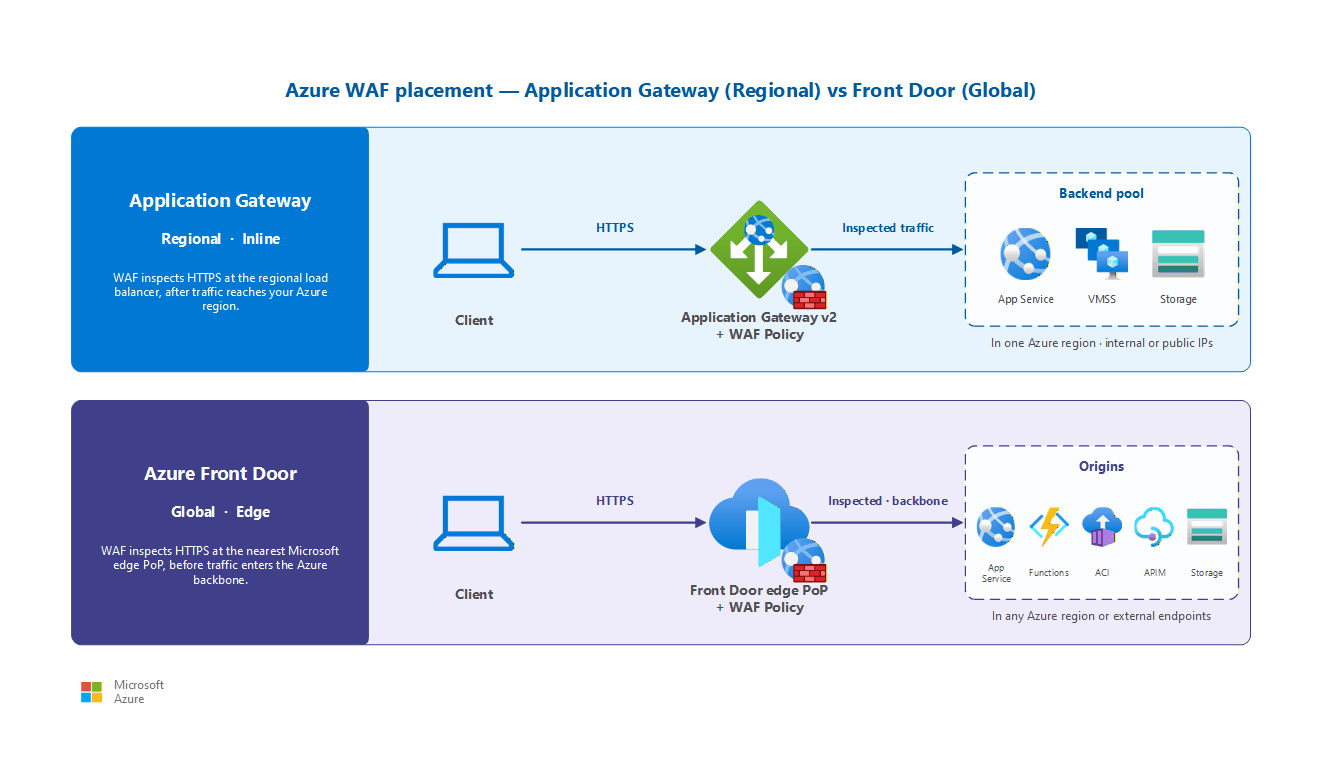
| Capability | WAF on Application Gateway v2 | WAF on Azure Front Door |
|---|---|---|
| Deployment scope | Regional (single Azure region) | Global (192+ edge PoPs worldwide) |
| Inspection point | After traffic reaches your region | At the edge PoP, before traffic reaches origin |
| Supported rule sets | DRS 2.2, DRS 2.1, CRS 3.2 | DRS 2.2, DRS 2.1, DRS 2.0 |
| Custom rules | ✔ | ✔ |
| Bot protection | ✔ | ✔ (Premium tier only) |
| Rate limiting | ✔ | ✔ |
| Geo-filtering | ✔ | ✔ |
| Per-site policy | ✔ (per-listener, per-path) | ✔ (per-endpoint) |
| Managed rule sets | ✔ | ✔ (Premium tier only; Standard supports custom rules only) |
| Request body inspection | Up to 128 KB (configurable) | Up to 128 KB (configurable) |
| Private Link origin support | N/A (inline with App Gateway) | ✔ (private origin connectivity) |
| Best for | Single-region apps, L7 load balancing + WAF | Multi-region apps, global acceleration + WAF |
Note
Azure Front Door has two tiers: Standard and Premium. Managed rule sets (including DRS and bot protection) are available only on Front Door Premium. Front Door Standard supports custom rules only. Front Door (classic) supports only DRS 1.1 or earlier.
How to choose your WAF platform
Use the following decision criteria:
- Choose WAF on Application Gateway when your application deploys in a single region and you already use Application Gateway for Layer 7 load balancing, TLS termination, or path-based routing. WAF adds HTTP inspection inline without introducing an additional service hop.
- Choose WAF on Azure Front Door when your application spans multiple regions, requires global load balancing, or benefits from content delivery network (CDN) acceleration. Front Door WAF inspects traffic at the nearest edge point of presence (PoP). The service blocks malicious requests before they traverse the Azure backbone to reach your origin. This approach reduces attack surface exposure and absorbs volumetric Layer 7 attacks at the edge.
- Choose both (layered) when a multiregion application served by Front Door also requires regional WAF policies that differ for each backend. Front Door provides first-line global protection, while Application Gateway WAF applies region-specific custom rules closer to the workload.
Design considerations
Lift-and-shift WAF design focus
- Skip WAF for internal-only rehosted workloads that have no inbound internet path; revisit when you publish an app to the internet.
- When you do expose a web app, start WAF in Detection mode to baseline traffic, then switch to Prevention after you tune out false positives.
- Use Application Gateway WAF for a single-region rehosted web app you've already fronted with Application Gateway for Layer 7 routing.
- Reuse the intent of your on-premises web protection rules (for example, OWASP coverage) as the starting policy.
Modernize WAF design focus
- Run WAF in Prevention mode from the start for customer-facing apps, and adopt the latest managed rule set so coverage tracks new OWASP threats automatically.
- Enable bot management to separate legitimate crawlers from malicious automation against your public apps.
- Manage WAF policy as code so active-active regional backends stay in sync through your deployment pipeline.
- Pair edge WAF with the hub firewall for defense in depth, and enable the Application Gateway WAF billing discount by turning on DDoS Network Protection on the VNet.
Cross-cloud WAF design focus
- Host a Layer 7 WAF on Application Gateway in the spoke VNet so public web traffic is inspected without attaching public IPs directly to virtual machines.
- Map existing web protections from other clouds (for example, AWS WAF or Google Cloud Armor) to Azure WAF managed rule sets so coverage carries over.
- Inspect public-facing communication through the WAF, and keep east-west and cross-cloud transit inspection on the Virtual WAN hub firewall.
- During cutover, run WAF in Detection (learning) mode first, then enforce once you confirm legitimate traffic patterns.
Prerequisites
Before you deploy Azure Web Application Firewall, make sure you have:
- Application Gateway v2 or Azure Front Door resource: WAF deploys as a policy attached to one of these platforms. You must have an existing Application Gateway v2 instance or Azure Front Door profile provisioned before you create and associate a WAF policy.
- Public-facing HTTP/HTTPS workload: Your application must receive inbound HTTP/HTTPS traffic. WAF inspects request-level semantics and provides no benefit for non-HTTP workloads or purely internal services.
- Understanding of HTTP traffic patterns: Familiarity with your application's normal request patterns (headers, query parameters, and body content) helps you configure exclusions and tune rules to minimize false positives during the Detection-to-Prevention mode transition.
Rule sets and rule processing
WAF uses rule sets to detect malicious patterns in HTTP requests. Understanding the rule hierarchy and processing order helps you tune WAF for your specific applications.
Managed rule sets
Microsoft maintains managed rule sets based on OWASP Core Rule Set (CRS) patterns. The recommended rule set for new deployments is DRS 2.2 (Default Rule Set). DRS 2.2 builds on OWASP CRS 3.3.4 and adds Microsoft Threat Intelligence signatures.
| Rule set | Based on | Platform support | Recommendation |
|---|---|---|---|
| DRS 2.2 | OWASP CRS 3.3.4 + Microsoft Threat Intel | App Gateway v2, Front Door Premium | Recommended for new deployments |
| DRS 2.1 | OWASP CRS 3.3 | App Gateway v2, Front Door Premium | Previous generation; supported on both platforms |
| DRS 2.0 | OWASP CRS 3.2 | Front Door Premium only | Supported; Front Door N-2 version |
| CRS 3.2 | OWASP CRS 3.2 | App Gateway v2 only | Supported; use DRS 2.2 for new deployments |
DRS and CRS rule sets use anomaly scoring. Each matching rule contributes a score instead of immediately blocking the request. When the cumulative anomaly score exceeds a configurable threshold, the WAF takes action (block or log). This approach reduces false positives compared to individual rule blocking because a single low-confidence match doesn't trigger enforcement.
Custom rules
Custom rules execute before managed rules and use priority numbers to control evaluation order (lower number = higher priority). Use custom rules for:
- Rate limiting: Restrict requests for each client IP within a time window to mitigate credential stuffing and brute-force attacks.
- Geo-filtering: Allow or deny traffic based on the client's country or region of origin.
- IP allow lists and deny lists: Permit known partner IPs or block known bad actors before managed rules evaluate.
- Request header inspection: Enforce application-specific requirements such as mandatory API keys or expected content types.
Bot protection rule set
Both platforms offer a bot protection rule set that categorizes automated traffic into good bots (verified search engines), bad bots (known malicious scanners), and unknown bots. Configure actions for each category: allow good bots, block bad bots, and challenge unknown bots with rate limiting or CAPTCHA.
Detection mode versus Prevention mode
WAF policies operate in one of two modes that determine how the system handles matched requests:
| Mode | Behavior | Use case |
|---|---|---|
| Detection | Logs matched requests but doesn't block them. Requests continue to the backend. | Initial deployment and rule tuning. Monitor which rules trigger without affecting production traffic. |
| Prevention | Blocks matched requests and returns a 403 response. Logs the blocked request. | Production workloads after rule tuning is complete. Active protection against attacks. |
Recommended tuning workflow
- Deploy in Detection mode: Enable WAF with your chosen rule set in Detection mode. Route production traffic through the WAF.
- Analyze logs: Review WAF logs to identify false positives. Determine the rules that trigger on legitimate application traffic.
- Create exclusions: For rules that generate false positives, define exclusions that specify the request fields (headers, cookies, and query parameters) to skip for specific rules.
- Switch to Prevention mode: After 1–2 weeks of clean detection logs with acceptable false-positive rates, switch to Prevention mode for active blocking.
- Ongoing monitoring: Continue monitoring logs after switching to Prevention mode. New application features or API changes can introduce new false-positive patterns.
Important
Always run production workloads in Prevention mode. Detection mode provides no protection. It only logs potential attacks. Use Detection mode only during the initial tuning phase or when you troubleshoot a specific false-positive issue.
WAF policy scope and association
A WAF policy is a standalone Azure resource that contains your mode selection, rule set configuration, custom rules, and exclusions. Associate the policy with one or more targets to control protection scope.
Application Gateway WAF policy scope
On Application Gateway, associate a WAF policy at three levels of granularity:
- Global (gateway-wide): The policy applies to all listeners and path rules on the Application Gateway. Use global scope when all applications behind the gateway share the same protection requirements.
- Listener-level: A different WAF policy applies to a specific listener (hostname and port combination). Use listener-level scope when multiple applications share a gateway but need different rule tuning or exclusions.
- Path-rule level: A WAF policy applies to a specific URL path rule within a listener. Use path-rule scope for fine-grained control over applications with diverse backend sensitivity.
When multiple scopes apply to a single request, the most specific policy takes precedence: path-rule overrides listener-level, which overrides global.
Front Door WAF policy scope
On Front Door, WAF policies associate at the endpoint or route level. Each Front Door endpoint can have its own WAF policy. This approach enables application-specific protection profiles within a single Front Door instance.
Sharing policies across resources
Share a single WAF policy across multiple Application Gateway instances or Front Door endpoints. Azure Firewall Manager provides centralized visibility and management across all your WAF policies, regardless of platform. Use shared policies when multiple resources require identical protection to simplify management and keep consistent security posture.
Distinction from Azure Firewall
WAF and Azure Firewall protect different layers of the network stack and serve complementary roles. Deploy both for defense in depth.
| Attribute | Web Application Firewall | Azure Firewall |
|---|---|---|
| OSI layer | Layer 7 (HTTP/HTTPS only) | Layers 3–7 (network and application) |
| Traffic type | Inbound HTTP/HTTPS requests to web applications | All traffic directions (north-south, east-west) |
| Inspection focus | HTTP semantics: headers, body, cookies, URIs | IP addresses, ports, protocols, FQDNs, URLs |
| Rule engine | OWASP-based pattern matching + anomaly scoring | Network rules, application rules, NAT rules |
| Deployment model | Integrated with App Gateway or Front Door | Standalone in hub subnet with UDR routing |
| Typical attacks blocked | SQL injection, XSS, CSRF, path traversal | Port scanning, C2 callbacks, DNS exfiltration |
Use WAF for HTTP application protection and Azure Firewall for centralized network traffic inspection. In a hub-spoke architecture, traffic from the internet to a web application typically flows through Azure Firewall (for DNAT and network-level inspection) and then through Application Gateway with WAF (for HTTP-layer inspection). See Azure Firewall and traffic inspection for the network-level component.
Security considerations
The following security practices help you get the most protection from WAF:
- Prevention mode for production: Never leave production workloads in Detection mode. Detection mode provides visibility but no enforcement, leaving applications exposed to attacks.
- Rule tuning is ongoing: Applications evolve. New API endpoints, parameters, and content types might trigger false positives in existing rule sets. Review WAF logs regularly after deployments.
- Log Analytics integration: Send WAF diagnostic logs to a Log Analytics workspace. Use the WAF workbook for visualization of blocked requests, triggered rules, and anomaly score distributions.
- DDoS and WAF together: WAF protects against Layer 7 application attacks but doesn't mitigate volumetric network-layer DDoS attacks. Pair WAF with Azure DDoS Protection for full-stack coverage.
- Origin lockdown: When you use Front Door WAF, configure your origin to accept traffic only from the Front Door service tag. Without origin lockdown, attackers can bypass Front Door and send requests directly to your origin IP address.
- Sensitive data protection: WAF logs might contain request data. Configure log scrubbing rules to mask sensitive fields (authorization headers, cookies, or body content) in WAF diagnostic logs.
Related articles
The following articles cover related networking security topics:
- Internet ingress and traffic routing: Ingress patterns for public-facing applications.
- Application delivery services: Application Gateway and Front Door as delivery platforms.
- Azure Firewall and traffic inspection: Network-level inspection that complements WAF Layer 7 protection.
- DDoS protection: Volumetric attack protection for public IP addresses.
Learn more
- Azure Web Application Firewall overview
- WAF on Application Gateway
- WAF on Azure Front Door
- WAF policy overview
- Web Application Firewall CRS rule groups and rules
- Tuning Web Application Firewall for Azure Front Door
Next steps
Tip
Exploring on your own? Return to the overview navigator to find your next article by capability.
Next in your lift-and-shift journey:
Set up monitoring for your migrated network: Validate connectivity and performance after configuring your web application firewall.
Next in your modernization journey:
Enable DDoS protection for public endpoints: Protect your public IP resources from distributed denial-of-service attacks.
Next in your cross-cloud journey:
Deliver your migrated applications: Map load balancers from AWS and Google Cloud to Azure equivalents for your cross-cloud workloads.