Note
Access to this page requires authorization. You can try signing in or changing directories.
Access to this page requires authorization. You can try changing directories.
This article helps you select the right Azure load balancing service for your workload. It compares Azure Load Balancer, Application Gateway, and Azure Front Door for regional and global traffic distribution. It also explains when to combine them.
What this article covers
Application delivery encompasses how your network distributes traffic across backend resources after it arrives at the network perimeter. This article covers Layer 4 and Layer 7 load balancing and global traffic acceleration. It also covers the decision criteria for choosing between the three primary Azure load balancing services.
Note
This article complements Internet ingress: expose your application to the internet, which focuses on how traffic arrives at your network. This article focuses on how to balance and deliver that traffic to your application backends.
Who needs this article
Read this article if you:
- Host web applications or APIs that need high availability across multiple backend instances.
- Need SSL/TLS offload, URL-based routing, or Web Application Firewall (WAF) protection for HTTP/S traffic.
- Distribute traffic across multiple Azure regions for performance or disaster recovery.
- Run non-HTTP workloads (TCP/UDP) that require regional load balancing with health probes.
- Want to understand which load balancer fits your traffic type, geographic scope, and security requirements.
Lift-and-shift focus: Many rehosted internal apps need only a regional load balancer. Add internet-facing delivery services when you publish an app to customers.
Modernize focus: Choose delivery by app type: Azure Front Door for global web apps and Traffic Manager for non-web apps, fronting active-active regional endpoints.
Cross-cloud focus: Map load balancers from other clouds to Azure equivalents (for example, AWS ALB to Application Gateway, NLB to Azure Load Balancer) and deliver through the spoke behind the hub firewall.
Azure services and features
The following table summarizes the three primary Azure load balancing services.
| Service | What it provides | When to use it | Key constraints |
|---|---|---|---|
| Azure Standard Load Balancer | Layer 4 (TCP/UDP) load balancing within a region. Health probes, zone redundancy, outbound SNAT rules, and HA ports for network virtual appliances. | Virtual Machine Scale Sets, AKS internal traffic, non-HTTP/S regional workloads, and NVA high availability. | No SSL/TLS termination; no WAF; no URL-based routing; regional scope only. |
| Azure Application Gateway | Layer 7 (HTTP/HTTPS) regional load balancing. SSL/TLS termination, URL path-based routing, multisite hosting, cookie-based session affinity, and optional WAF integration. | Regional web applications that need SSL offload, URL routing, WebSocket support, or WAF protection. | Regional only; requires a dedicated subnet; not suited for global routing or CDN scenarios. |
| Azure Front Door | Global anycast load balancing and CDN. TLS termination at the edge, integrated WAF, origin health probes, traffic splitting, and caching across more than 190 global points of presence (PoPs). | Global web applications, multiregion active-active deployments, CDN and caching, and global WAF enforcement. | HTTP/S only; origins must be publicly accessible or reached through Private Link (Premium tier). |
Zone redundancy
Zone redundancy protects your application delivery tier from datacenter failures. Each service handles availability zones differently:
- Standard Load Balancer (public) is zone-redundant by default because Standard public IP addresses default to zone-redundant configuration. Traffic continues to flow even if one availability zone fails. Standard Load Balancer (internal) requires explicit zone-redundant frontend configuration: you must select multiple zones when you create the frontend IP.
- Application Gateway v2 supports zone redundancy when you deploy instances across multiple availability zones. Specify the zones during deployment. A zone-redundant Application Gateway spreads instances across the zones you select, maintaining availability if a single zone goes offline.
- Azure Front Door is inherently zone-redundant as a global anycast service. Its more than 190 edge PoPs span multiple regions worldwide, so no single zone or region failure impacts global traffic routing.
Autoscaling
Each service handles scale differently:
- Application Gateway v2 (Standard_v2 and WAF_v2 tiers) supports autoscaling based on traffic load. You configure minimum and maximum instance counts, and the gateway scales within those bounds. Pricing uses capacity units: a composite measure of new connections per second, persistent connections, and throughput. Set a minimum instance count of at least 2 for production workloads to avoid cold-start latency during traffic spikes.
- Azure Front Door scales automatically as a managed global service. You don't need capacity planning or instance sizing.
- Standard Load Balancer scales to millions of TCP/UDP flows without manual intervention or configuration changes. It's a fully managed platform service with no instance concept.
Health probes
All three services use health probes to detect unhealthy backends and stop routing traffic to them:
- Standard Load Balancer supports TCP, HTTP, and HTTPS health probes. Configure probe intervals and unhealthy thresholds to control failover speed. Shorter intervals detect failures faster but generate more probe traffic.
- Application Gateway uses HTTP/HTTPS health probes with customizable paths, hostnames, and response matching. Custom probes let you validate application logic (for example, check a
/healthendpoint that verifies database connectivity). - Front Door uses HTTP/HTTPS health probes against origins. It supports configurable probe paths, intervals, and response code matching. Front Door probes origins from multiple PoPs, providing distributed health verification.
How to choose
The following flowchart summarizes the primary decision path for selecting an Azure load balancing service.
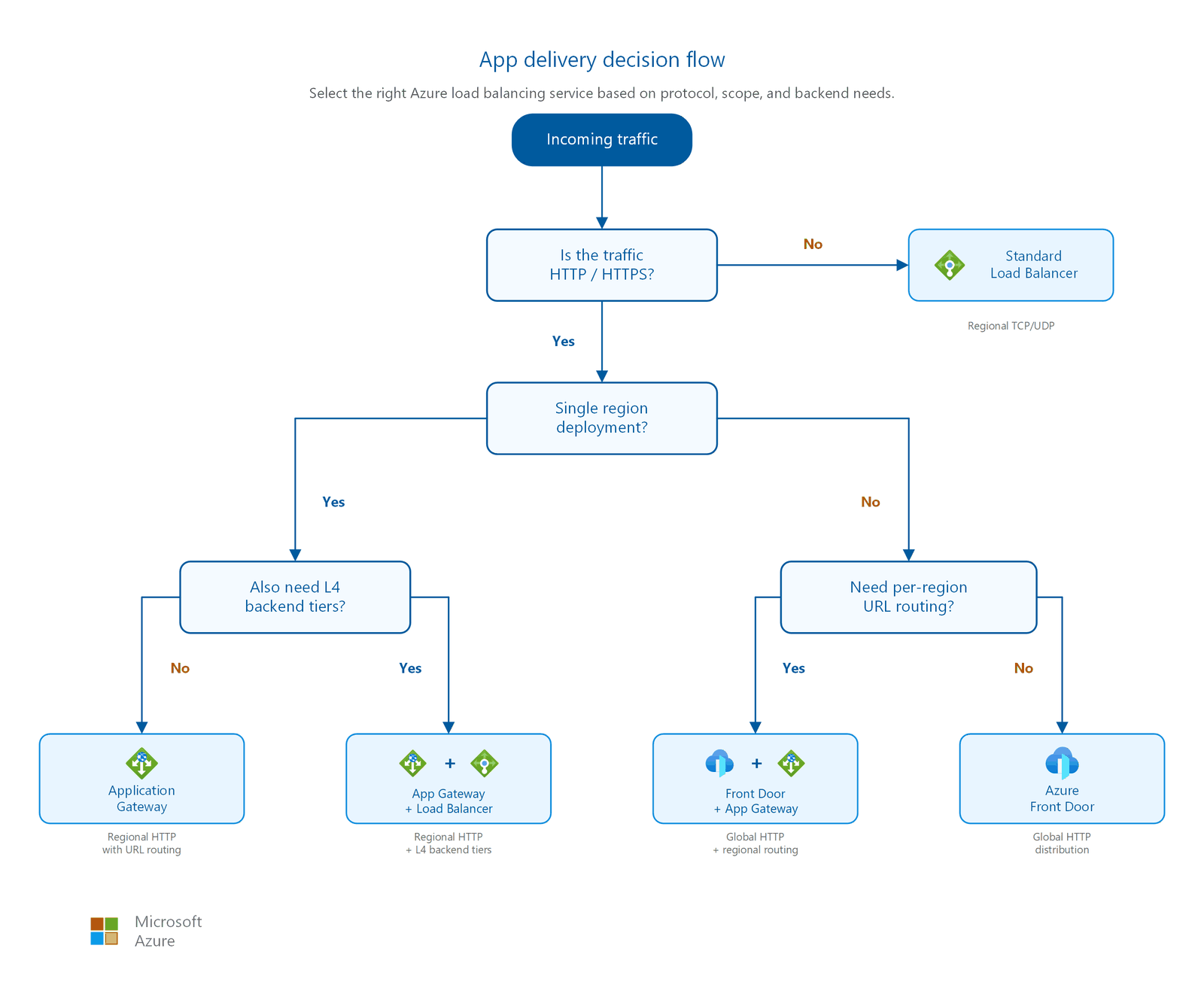
Use the following decision tables to select the right load balancing service for your scenario.
Which load balancer do I need?
| I need to… | Use |
|---|---|
| Load balance TCP/UDP traffic within a single region | Azure Standard Load Balancer: Layer 4 distribution with health probes, zone redundancy, and HA ports. |
| Terminate SSL/TLS, route by URL path or hostname, and add WAF for a regional web app | Azure Application Gateway: Layer 7 regional load balancing with integrated WAF (v2 SKU). |
| Route HTTP/S traffic globally, reduce latency with edge caching, or fail over across regions | Azure Front Door: Global anycast with CDN, WAF, and multiregion origin health probes. |
Key constraints comparison
| Service | Layer | Scope | Key limitation |
|---|---|---|---|
| Standard Load Balancer | Layer 4 (TCP/UDP) | Regional | No application awareness: can't inspect HTTP headers, URLs, or cookies. |
| Application Gateway | Layer 7 (HTTP/HTTPS) | Regional | Requires a dedicated subnet (/24 recommended); can't route traffic globally. |
| Front Door | Layer 7 (HTTP/HTTPS) | Global | Origins must be public or accessed through Private Link (Premium tier only); no TCP/UDP support. |
Combining services
Many production architectures combine multiple load balancing services in a chain. Each service handles what it does best:
- Front Door + Application Gateway: Use Front Door for global traffic distribution and edge WAF, then route to regional Application Gateway instances for URL path-based routing and backend pool management. Front Door Premium can connect to Application Gateway through Private Link, keeping the Application Gateway private. This pattern suits multiregion deployments where each region has complex URL routing requirements.
- Front Door + Load Balancer: Use Front Door for global HTTP/HTTPS distribution, with internal Standard Load Balancer behind it to distribute traffic across Virtual Machine Scale Sets or NVAs within a region. Front Door handles global routing and caching while Load Balancer provides Layer 4 distribution to compute instances.
- Application Gateway + Load Balancer: Use Application Gateway for HTTP/HTTPS traffic management at the frontend and Load Balancer for non-HTTP backend tiers (databases, message queues) in the same deployment. This keeps Layer 7 intelligence at the edge with lightweight Layer 4 distribution internally.
Routing capabilities
Understanding routing capabilities helps narrow your choice:
| Capability | Standard Load Balancer | Application Gateway | Front Door |
|---|---|---|---|
| URL path-based routing | No | Yes | Yes |
| Multi-site (host-header) routing | No | Yes | Yes |
| Cookie-based session affinity | No | Yes | Yes |
| Weighted traffic splitting | No | No | Yes |
| Geographic routing | No | No | Yes |
| SSL/TLS offload | No | Yes | Yes |
| WebSocket support | Pass-through | Yes | Yes |
| HTTP/2 support | No | Yes | Yes |
Tip
Application Gateway v2 autoscales between a minimum and maximum instance count, and you pay for at least the minimum capacity even when traffic is idle. Set the minimum instance count to your baseline load, not your peak, and let autoscaling absorb spikes. Over-provisioning the minimum is a common source of avoidable Application Gateway cost.
Design considerations
Lift-and-shift application delivery design focus
- Use an internal Azure Load Balancer for east-west traffic between tiers of a rehosted app, matching the load balancing the app already relied on.
- Add public delivery services only for apps you expose to the internet; many migrated internal workloads need none.
- Keep the delivery design simple and single-region during the initial rehost.
- Route any inbound internet traffic through the hub firewall before it reaches the workload.
Modernize application delivery design focus
- Choose by application type: Azure Front Door for global web apps (edge termination, WAF) and Azure Traffic Manager for non-web apps that need DNS-based regional distribution.
- Deploy active-active across regions and distribute traffic to each region's public endpoint, fronted by the hub firewall acting as SNAT and DNAT.
- Use Application Gateway for regional Layer 7 routing and TLS termination within a region, behind Front Door where global delivery is needed.
- Don't deploy both Front Door and Traffic Manager for the same flow; pick one based on whether the app is web or non-web.
Cross-cloud application delivery design focus
- Map delivery services from other clouds to Azure: AWS Application Load Balancer or Google Cloud Application Load Balancing to Azure Application Gateway, and network load balancers to Azure Load Balancer.
- Host Layer 7 delivery (Application Gateway, with WAF) in the spoke and avoid attaching public IPs directly to virtual machines.
- Route public ingress through the secured hub firewall before it reaches migrated workloads.
- Use Front Door or Traffic Manager for multi-region delivery once workloads run in more than one Azure region.
Prerequisites
Before you implement application delivery services:
- Deployed virtual network: You need at least one virtual network with subnets. See Virtual network and subnet design for subnet planning guidance.
- Workload traffic type identified: Know whether your workload uses HTTP/HTTPS (Layer 7) or TCP/UDP (Layer 4). This determines your primary load balancer choice.
- Geographic scope defined: Determine whether your users are in a single region or distributed globally. Global user bases benefit from Front Door's anycast acceleration.
- Subnet capacity for Application Gateway: Application Gateway requires a dedicated subnet with no other resources. A /24 subnet supports up to 125 instances plus 5 Azure-reserved addresses.
Security considerations
Load balancing services are part of your security perimeter. They're the first components to process incoming traffic, which makes their security configuration critical. Follow these practices to protect your application delivery tier.
Web Application Firewall (WAF)
Enable WAF in Prevention mode on Application Gateway or Front Door for all production web workloads. Detection mode only logs threats without blocking them. Use it during initial tuning to identify false positives, then switch to Prevention mode before production traffic flows.
WAF protects against common web exploits including:
- SQL injection and cross-site scripting (XSS)
- Protocol anomalies and request smuggling
- Bots and crawlers (with bot protection rules)
- OWASP Top 10 vulnerabilities through managed rule sets
Both Application Gateway WAF and Front Door WAF use the same rule engine but differ in scope. Application Gateway WAF protects a regional deployment, while Front Door WAF enforces policies at the global edge before traffic reaches any origin. For detailed WAF tuning and rule set configuration, see Web Application Firewall.
DDoS protection
All public IP addresses associated with your load balancing services should have Azure DDoS Protection enabled. Standard Load Balancer public frontend IPs and Application Gateway public IPs are primary targets for volumetric attacks. These IPs represent your application's entry points.
Azure DDoS Protection provides:
- Always-on traffic monitoring with adaptive tuning.
- Automatic attack mitigation when traffic exceeds a threshold.
- Attack telemetry and alerting through Azure Monitor.
- Cost protection (service credit) for resource scaling triggered by DDoS attacks.
For DDoS protection planning and configuration, see DDoS protection.
Private Link to origin (Front Door Premium)
Azure Front Door Premium supports Private Link connectivity to origins. This capability removes the need for publicly accessible backend servers. Front Door connects to your origin through the Azure backbone network instead of the public internet. Use Private Link origins when:
- Your backends are internal services that shouldn't have public IP addresses.
- You need to lock down origin access to Front Door traffic only.
- Compliance requirements prohibit public endpoints on application servers.
- You want to remove the attack surface of a publicly exposed origin.
Supported Private Link origins include App Service, Azure Storage, Application Gateway, internal Standard Load Balancer, and custom origins with Private Link service.
For Private Link architecture patterns, see Private access to Azure PaaS services.
Important
Front Door Standard tier does not support Private Link to origins. Only Front Door Premium provides this capability.
Mutual TLS (mTLS)
Application Gateway v2 supports mutual TLS for backend authentication. Use mTLS when your backend servers require certificate-based client authentication from the gateway. This authentication adds a layer of trust verification. The backend can confirm that traffic arrives from the legitimate Application Gateway instance, not from an attacker who bypassed the gateway.
Related articles
- Internet ingress: expose your application to the internet: How traffic arrives at your Azure network perimeter.
- Virtual network and subnet design: Subnet planning, including Application Gateway dedicated subnet sizing.
- Private access to Azure PaaS services: Private Link patterns including Front Door Premium to origin.
- Cross-region connectivity: Multiregion architectures with Front Door as global entry point.
- Outbound internet egress: SNAT, outbound rules, and NAT gateway for egress traffic from load-balanced backends.
Learn more
- What is Azure Load Balancer?
- What is Azure Application Gateway?
- What is Azure Front Door?
- Azure Front Door edge locations by metro
- Reliability in Azure Load Balancer
- Application Gateway infrastructure configuration
- Secure your origin with Private Link in Azure Front Door Premium
Next steps
Tip
Exploring on your own? Return to the overview navigator to find your next article by capability.
Next in your lift-and-shift journey:
Control outbound internet traffic: Centralize outbound access through your hub firewall and turn off default outbound.
Next in your modernization journey:
Set up private connectivity to PaaS services: Create Private Link subnets in each spoke VNet for your AKS, ASE, and managed database workloads.
Next in your cross-cloud journey:
Secure your cross-cloud transit path: Deploy Azure Firewall in your secure virtual hub to inspect all cross-cloud and internet-bound traffic.