Note
本記事では 、標準ハーネスで駆動されるエージェントやエージェントフローで使用される機能について説明します。
エージェント キャンバスは、ユーザーに対するエージェントの表示方法を制御します。 キャンバスは、次の 2 つの方法でカスタマイズできます。
Web サイトで JavaScript と CSS を使用して、既定のキャンバスをカスタマイズします。 このオプションは、単純な変更に使用します。
Bot Framework Web チャット キャンバスに基づいてカスタム キャンバスを使用します。 このオプションでは、開発エクスペリエンスが必要であり、完全なカスタマイズがサポートされます。
また、カスタマイズしたキャンバスと 自動会話開始の構成を組み合わせることもできます。
ポータルでエージェント名とアイコンを変更できます。
エージェントをパブリッシュした後、ユーザーはWeb チャットキャンバスを介して操作できます。
Important
この記事に含まれるサンプル コードは、Copilot Studio でのみインストールして使用できます。 サンプル コードは "現状のまま" ライセンスされており、任意のサービスレベル契約やサポート サービスから除外されています。 お客様は、その使用に関するリスクを負うものとします。
Microsoft は、明示的な責任や保証責任または条件を一切負いません。また商品性、特定目的に対する適合性、非侵害性に関するいかなる黙示的保証も除外します。
エージェントの名前とアイコンを変更する
Important
- エージェントのアイコンを更新した後、新しいアイコンがあらゆる場所に表示されるまでに最大 24 時間かかる場合があります。
- エージェントが Omnichannel for Customer Service に接続されている場合、Azure ポータル登録の Display name プロパティがその名前を定義します。
- エージェントを Teams に公開する場合は、Microsoft Teams 開発者ドキュメントの「アイコンに関する要件」を確認してください。
エージェントの [概要 ] ページに移動します。
詳細の横にある編集を選択します。
必要に応じて、エージェントの名前とアイコンを変更します。
保存を選びます。
既定のキャンバスをカスタマイズする (簡易)
JavaScript と CSS を使用して、既定のキャンバスを調整します。
まず、エージェントキャンバスをどこにデプロイするか設定します。
サンプル HTML コードを
index.htmlという名前のファイルにコピーします。 HTML try-it エディターを使用することもできます。<!DOCTYPE html> <html lang="en"> <head> <meta charset="UTF-8" /> <meta name="viewport" content="width=device-width, initial-scale=1.0" /> <meta name="description" content="Contoso Web Chat Assistant" /> <title>Contoso Sample Web Chat Test</title> <script src="https://cdn.botframework.com/botframework-webchat/latest/webchat.js"></script> <script> let webChatInstance = null; let directLineUrl = null; // Replace with your token endpoint const tokenEndpoint = "<YOUR TOKEN ENDPOINT>"; const styleOptions = { "accent": "#0078D4", "autoScrollSnapOnPage": true, "autoScrollSnapOnPageOffset": 0, "avatarBorderRadius": "7%", "avatarSize": 31, "backgroundColor": "#e8e9eb", "botAvatarBackgroundColor": "#ffffff00", "botAvatarImage": "https://powercatexternal.blob.core.windows.net/creatorkit/Assets/ChatbotLogoBlue.png", "botAvatarInitials": "B", "bubbleAttachmentMaxWidth": 480, "bubbleAttachmentMinWidth": 250, "bubbleBackground": "#f0eded", "bubbleBorderColor": "#f5f5f5", "bubbleBorderRadius": 41, "bubbleBorderStyle": "solid", "bubbleBorderWidth": 1, "bubbleFromUserBackground": "#ebefff", "bubbleFromUserBorderColor": "#f5f5f5", "bubbleFromUserBorderRadius": 41, "bubbleFromUserBorderStyle": "solid", "bubbleFromUserBorderWidth": 1, "bubbleFromUserNubOffset": 0, "bubbleFromUserNubSize": 0, "bubbleFromUserTextColor": "#242424", "bubbleImageHeight": 10, "bubbleImageMaxHeight": 240, "bubbleImageMinHeight": 240, "bubbleMessageMaxWidth": 480, "bubbleMessageMinWidth": 120, "bubbleMinHeight": 50, "bubbleNubOffset": 0, "bubbleTextColor": "#242424", "emojiSet": true, "fontSizeSmall": "70%", "hideUploadButton": false, "messageActivityWordBreak": "break-word", "monospaceFont": "Consolas", "paddingRegular": 10, "paddingWide": 10, "primaryFont": null, "sendBoxBackground": "#e8e9eb", "sendBoxBorderTop": "solid 1px #808080", "sendBoxButtonColor": "#0078d4", "sendBoxButtonColorOnHover": "#006cbe", "sendBoxButtonShadeBorderRadius": 40, "sendBoxButtonShadeColorOnHover": "", "sendBoxHeight": 60, "sendBoxPlaceholderColor": "#171616", "sendBoxTextColor": "#2e2d2d", "showAvatarInGroup": "status", "spinnerAnimationHeight": 16, "spinnerAnimationPadding": 12, "spinnerAnimationWidth": 16, "subtleColor": "#000000FF", "suggestedActionBackgroundColor": "#006FC4FF", "suggestedActionBackgroundColorOnHover": "#0078D4", "suggestedActionBorderColor": "", "suggestedActionBorderRadius": 10, "suggestedActionBorderWidth": 1, "suggestedActionLayout": "flow", "suggestedActionTextColor": "#FFFFFFFF", "typingAnimationBackgroundImage": "url('https://wpamelia.com/wp-content/uploads/2018/11/ezgif-2-6d0b072c3d3f.gif')", "typingAnimationDuration": 5000, "typingAnimationHeight": 20, "typingAnimationWidth": 64, "userAvatarBackgroundColor": "#222222", "userAvatarImage": "https://avatars.githubusercontent.com/u/8174072?v=4&size=64", "userAvatarInitials": "U" }; const backgroundImage = ""; document.addEventListener('DOMContentLoaded', () => { const root = document.documentElement; root.style.setProperty('--primary-color', createGradient(styleOptions.accent)); root.style.setProperty('--header-textColor', styleOptions.suggestedActionTextColor); if (backgroundImage) { const webchatElement = document.getElementById('webchat'); webchatElement.style.backgroundImage = `url(${backgroundImage})`; webchatElement.style.backgroundSize = 'cover'; webchatElement.style.backgroundPosition = 'center'; webchatElement.style.backgroundRepeat = 'no-repeat'; const overlay = document.createElement('div'); overlay.className = 'webchat-overlay'; webchatElement.appendChild(overlay); } }); function createGradient(baseColor) { const r = parseInt(baseColor.slice(1, 3), 16); const g = parseInt(baseColor.slice(3, 5), 16); const b = parseInt(baseColor.slice(5, 7), 16); const lighterColor = `#${Math.min(255, r + 30).toString(16).padStart(2, '0')}${Math.min(255, g + 30).toString(16).padStart(2, '0')}${Math.min(255, b + 30).toString(16).padStart(2, '0')}`; const darkerColor = `#${Math.max(0, r - 30).toString(16).padStart(2, '0')}${Math.max(0, g - 30).toString(16).padStart(2, '0')}${Math.max(0, b - 30).toString(16).padStart(2, '0')}`; return `linear-gradient(135deg, ${lighterColor}, ${baseColor}, ${darkerColor})`; } const environmentEndPoint = tokenEndpoint.slice( 0, tokenEndpoint.indexOf("/powervirtualagents") ); const apiVersion = tokenEndpoint .slice(tokenEndpoint.indexOf("api-version")) .split("=")[1]; const regionalChannelSettingsURL = `${environmentEndPoint}/powervirtualagents/regionalchannelsettings?api-version=${apiVersion}`; function showChat() { const popup = document.getElementById("chatbot-popup"); const openButton = document.getElementById("open-chat"); popup.classList.add("visible"); openButton.classList.add("hidden"); } function hideChat() { const popup = document.getElementById("chatbot-popup"); const openButton = document.getElementById("open-chat"); popup.classList.remove("visible"); openButton.classList.remove("hidden"); } function createCustomStore() { return window.WebChat.createStore( {}, ({ dispatch }) => (next) => (action) => { if (action.type === "DIRECT_LINE/CONNECT_FULFILLED") { dispatch({ type: "DIRECT_LINE/POST_ACTIVITY", meta: { method: "keyboard" }, payload: { activity: { channelData: { postBack: true }, name: "startConversation", type: "event", }, }, }); } return next(action); } ); } async function restartConversation() { try { if (!directLineUrl) { console.error("DirectLine URL not initialized"); return; } const response = await fetch(tokenEndpoint); const conversationInfo = await response.json(); if (!conversationInfo.token) { throw new Error("Failed to get conversation token"); } const newDirectLine = window.WebChat.createDirectLine({ domain: `${directLineUrl}v3/directline`, token: conversationInfo.token, }); const webchatElement = document.getElementById("webchat"); webChatInstance = window.WebChat.renderWebChat( { directLine: newDirectLine, styleOptions, store: createCustomStore(), }, webchatElement ); } catch (err) { console.error("Failed to restart conversation:", err); } } async function initializeChat() { try { const response = await fetch(regionalChannelSettingsURL); const data = await response.json(); directLineUrl = data.channelUrlsById.directline; if (!directLineUrl) { throw new Error("Failed to get DirectLine URL"); } const conversationResponse = await fetch(tokenEndpoint); const conversationInfo = await conversationResponse.json(); if (!conversationInfo.token) { throw new Error("Failed to get conversation token"); } const directLine = window.WebChat.createDirectLine({ domain: `${directLineUrl}v3/directline`, token: conversationInfo.token, }); webChatInstance = window.WebChat.renderWebChat( { directLine, styleOptions, store: createCustomStore(), }, document.getElementById("webchat") ); } catch (err) { console.error("Failed to initialize chat:", err); } } initializeChat(); </script> <style> :root { --primary-gradient: var(--primary-color); --chat-width: 450px; --chat-height: 520px; --header-height: 56px; --border-radius: 16px; --transition-speed: 0.3s; } * { margin: 0; padding: 0; box-sizing: border-box; font-family: system-ui, -apple-system, BlinkMacSystemFont, "Segoe UI", Roboto, sans-serif; } body { min-height: 100vh; background-color: #f3f4f6; } #chatbot-popup { display: none; position: fixed; bottom: 32px; right: 32px; width: var(--chat-width); height: var(--chat-height); background: white; border-radius: var(--border-radius); box-shadow: 0 18px 40px -5px rgba(0, 0, 0, 0.2), 0 15px 20px -5px rgba(0, 0, 0, 0.1); overflow: hidden; opacity: 0; transform-origin: bottom right; transform: scale(0.95); transition: all var(--transition-speed) ease-in-out; z-index: 999; } #chatbot-popup.visible { display: block; opacity: 1; transform: scale(1); } #chatbot-header { background: var(--primary-color); padding: 16px 20px; height: var(--header-height); display: flex; justify-content: space-between; align-items: center; color: var(--header-textColor); } .header-title { display: flex; align-items: center; gap: 12px; font-size: 16px; font-weight: 500; } .header-buttons { display: flex; gap: 12px; align-items: center; } .icon-button { background: none; border: none; color: var(--header-textColor); cursor: pointer; padding: 8px; border-radius: 8px; display: flex; align-items: center; justify-content: center; transition: all 0.2s ease; } .icon-button:hover { color: var(--header-textColor); background: rgba(255, 255, 255, 0.1); } .icon-button:focus { outline: 2px solid rgba(255, 255, 255, 0.5); outline-offset: 2px; } #webchat { height: calc(100% - var(--header-height)); background-color: #f9fafb; position: relative; } .webchat-overlay { position: absolute; top: 0; left: 0; right: 0; bottom: 0; background: rgba(255, 255, 255, 0.85); pointer-events: none; z-index: 1; } #webchat > div { position: relative; z-index: 2; } #webchat .webchat__basic-transcript__content { white-space: pre-wrap !important; word-break: break-word !important; } #webchat .webchat__bubble__content { padding: 8px 12px !important; } #webchat .webchat__bubble { max-width: 85% !important; margin: 8px !important; } #webchat .webchat__basic-transcript__content ul, #webchat .webchat__basic-transcript__content ol, #webchat .webchat__bubble__content ul, #webchat .webchat__bubble__content ol { padding-left: 24px !important; margin: 8px 0 !important; list-style-position: outside !important; } #webchat .webchat__basic-transcript__content li, #webchat .webchat__bubble__content li { margin: 4px 0 !important; padding-left: 4px !important; } #open-chat { position: fixed; bottom: 32px; right: 32px; width: 64px; height: 64px; border-radius: 50%; background: var(--primary-gradient); border: none; cursor: pointer; display: flex; align-items: center; justify-content: center; box-shadow: 0 4px 6px -1px rgba(0, 0, 0, 0.1); transition: all var(--transition-speed) ease-in-out; z-index: 998; } #open-chat.hidden { opacity: 0; transform: scale(0.95) translateY(10px); pointer-events: none; } #open-chat:hover { transform: translateY(-4px); box-shadow: 0 10px 15px -3px rgba(0, 0, 0, 0.1); } #open-chat:focus { outline: 3px solid rgba(79, 70, 229, 0.5); outline-offset: 2px; } #open-chat svg { width: 28px; height: 28px; color: white; transition: transform 0.2s ease; } .main-content { max-width: 1200px; margin: 0 auto; padding: 48px 24px; } .main-content h1 { font-size: 36px; color: #111827; text-align: center; } .main-content p { font-size: 18px; color: #4b5563; line-height: 1.6; margin-bottom: 48px; text-align: center; max-width: 800px; margin-left: auto; margin-right: auto; } .content-grid { display: grid; grid-template-columns: repeat(2, 1fr); gap: 32px; margin-bottom: 32px; } .content-box { background: linear-gradient(135deg, #e6e6e6, #c4c4c4, #9f9f9f); padding: 32px; border-radius: 12px; box-shadow: 0 4px 6px -1px rgba(0, 0, 0, 0.1), 0 2px 4px -1px rgba(0, 0, 0, 0.06); min-height: 300px; display: flex; flex-direction: column; justify-content: center; align-items: center; text-align: center; position: relative; overflow: hidden; } .content-box::before { content: ''; position: absolute; top: 0; left: 0; right: 0; height: 4px; } .content-box.featured { grid-column: span 2; min-height: 350px; background: linear-gradient(135deg, #e6e6e6, #c4c4c4, #9f9f9f); color: #000000; } .content-box h2 { font-size: 24px; margin-bottom: 16px; position: relative; } .content-box p { font-size: 16px; color: #6b7280; margin-bottom: 0; } .content-box.featured p { color: #000000; } @media (max-width: 768px) { .content-grid { grid-template-columns: 1fr; } .content-box.featured { grid-column: span 1; } .main-content { padding: 24px 16px; } .main-content h1 { font-size: 28px; } #chatbot-popup { width: 100%; height: 100%; bottom: 0; right: 0; border-radius: 0; } } </style> </head> <body> <div class="main-content"> <h1>Header</h1> <p>Lorem ipsum dolor sit amet consectetur adipiscing elit. Quisque faucibus ex sapien vitae pellentesque sem placerat.</p> <div class="content-grid"> <div class="content-box featured"> <h2>Featured Content</h2> <p>Primary content area with custom styling and gradient background</p> </div> <div class="content-box"> <h2>Section One</h2> <p>Content box with minimal design</p> </div> <div class="content-box"> <h2>Section Two</h2> <p>Another content section with consistent styling</p> </div> </div> </div> <div id="chatbot-popup" role="complementary" aria-label="Chat Assistant"> <div id="chatbot-header"> <div class="header-title"> <svg class="chat-icon" width="24" height="24" viewBox="0 0 24 24" fill="none" stroke="currentColor" stroke-width="2" stroke-linecap="round" stroke-linejoin="round" aria-hidden="true" > <path d="M21 15a2 2 0 0 1-2 2H7l-4 4V5a2 2 0 0 1 2-2h14a2 2 0 0 1 2 2z" ></path> </svg> <span>Contoso Assistant</span> </div> <div class="header-buttons"> <button class="icon-button" id="restart-button" onclick="restartConversation()" aria-label="Restart Conversation" > <svg width="20" height="20" viewBox="0 0 24 24" fill="none" stroke="currentColor" stroke-width="2" stroke-linecap="round" stroke-linejoin="round" aria-hidden="true" > <path d="M3 12a9 9 0 1 0 9-9 9.75 9.75 0 0 0-6.74 2.74L3 8" ></path> <path d="M3 3v5h5"></path> </svg> </button> <button class="icon-button" id="close-button" onclick="hideChat()" aria-label="Close Chat" > <svg width="20" height="20" viewBox="0 0 24 24" fill="none" stroke="currentColor" stroke-width="2" stroke-linecap="round" stroke-linejoin="round" aria-hidden="true" > <line x1="18" y1="6" x2="6" y2="18"></line> <line x1="6" y1="6" x2="18" y2="18"></line> </svg> </button> </div> </div> <div id="webchat" role="main"></div> </div> <button id="open-chat" onclick="showChat()" aria-label="Open Chat Assistant" > <svg viewBox="0 0 24 24" fill="none" stroke="currentColor" stroke-width="2" stroke-linecap="round" stroke-linejoin="round" aria-hidden="true" > <path d="M21 15a2 2 0 0 1-2 2H7l-4 4V5a2 2 0 0 1 2-2h14a2 2 0 0 1 2 2z" ></path> </svg> </button> </body> </html>index.htmlで、次の値を置き換えます。const tokenEndpoint = "<YOUR TOKEN ENDPOINT>";トークン エンドポイントと共に使用します。
Microsoft Edgeなど、最新のブラウザーで
index.htmlを開きます。エージェントをテストします。
エージェントが応答しない場合:
- エージェントが公開されていることを確認してください。
- トークン エンドポイントの値を確認します。
- トークンエンドポイントが
=の後に表示され、二重引用符"で囲まれていることを確認してください。
エージェントのトークン エンドポイントを取得する
キャンバスをカスタマイズするには、既定のキャンバスでも、接続するカスタム キャンバスでも、エージェントのトークン エンドポイントが必要です。
[設定] で、[チャネル] を選択します。
メールを選択します。
[ トークン エンドポイント] の横にある [ コピー] を選択します。
エージェントのアイコン、背景色、名前をカスタマイズする
styleOptions オブジェクトを使用して、定義済みのスタイルを構成します。
カスタマイズできる内容と、defaultStyleOptions.js ファイルへのリンクの詳細については、「Web チャット カスタマイズを参照してください。
エージェント アイコンを変更する
次のサンプル コードを使用して、
index.htmlファイルを更新します。const styleOptions = { "accent": "#00809d", "botAvatarBackgroundColor": "#FFFFFF", "botAvatarImage": "https://learn.microsoft.com/azure/bot-service/v4sdk/media/logo_bot.svg", "botAvatarInitials": "BT", "userAvatarImage": "https://avatars.githubusercontent.com/u/661465", "userAvatarInitials": "U" };両方のアバター画像を会社の画像に置き換えてください。 画像 URL がない場合は、代わりに Base64 エンコードされた画像文字列を使用できます。
背景の色の変更
index.htmlbackgroundColor定義にstyleOptions要素を加えます:const styleOptions = { "backgroundColor": "lightgray", // ... };好きな色に変え
backgroundColor。 標準の CSS の色の名前、RGB 値、または HEX を使用できます。
エージェント名を変更する
<h1>ファイルのindex.htmlヘッダーテキストを以下のコードで更新してください:<body> <div id="banner"> <h1><img src="contoso-agent.png"> Contoso agent name</h1> </div> <!-- ... -->テキストをエージェントを呼び出すものに変更します。 画像を挿入することもできますが、見出しのセクションに収まるようにスタイルを変える必要があるかもしれません。
チャット キャンバスをカスタマイズおよびホストする (詳細)
あなたの Copilot Studio エージェントを、あなたがスタンドアロン Web アプリとしてホストするカスタム キャンバスに接続できます。 このオプションは、カスタマイズされたiFrameを複数のウェブページに埋め込む必要がある場合に最も効果的です。
Note
ユーザー定義キャンバスをホストするには、ソフトウェア開発が必要です。 このガイダンスは、開発者ツール、ユーティリティ、統合開発環境 (IDE) について十分に理解している IT 管理者や開発者など、経験豊富な IT プロフェッショナルを対象としています。
Copilot Studio で動作するようにカスタムビルドされた次のいずれかのサンプルから始めます。
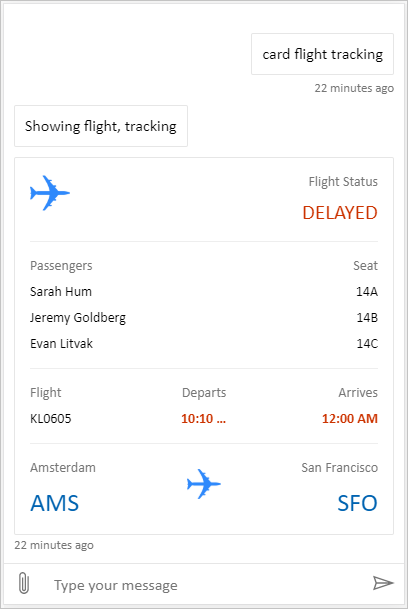
Full bundle は、Copilot Studio のすべてのリッチ コンテンツを表示できるカスタム キャンバスです。 例えば次が挙げられます。
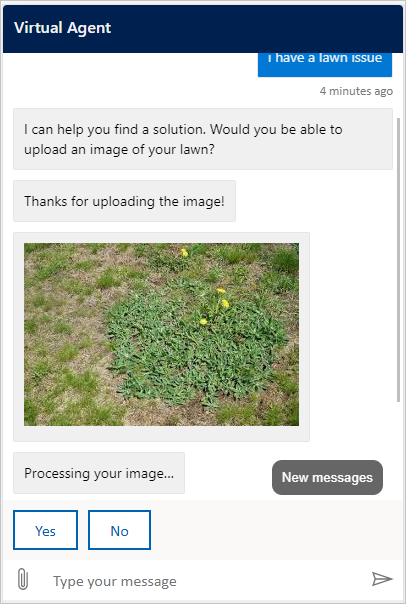
Location とファイルのアップロードは、ユーザーの場所を取得し、Copilot Studio エージェントに送信できるカスタム キャンバスです。 例えば次が挙げられます。
または、Bot Framework から他のサンプル Web チャット キャンバスを試してください。
デフォルトのキャンバスと同様に、 styleSetOptions を使ってカスタムキャンバスを調整できます。 すべてのカスタマイズ可能なプロパティは、 defaultStyleOptions.jsに一覧表示されます。 カスタマイズできる内容の詳細については、「Web チャットカスタマイズを参照してください。
カスタマイズされたキャンバスを展開する
カスタム キャンバスをホストするには、すべてのファイルを Web アプリにデプロイします。