Note
Access to this page requires authorization. You can try signing in or changing directories.
Access to this page requires authorization. You can try changing directories.
This article is the second in a series that provides guidance about disaster recovery (DR) for an Azure data platform. It provides a reference architecture that shows how to structure an Azure data platform with DR capabilities. Use this architecture as a foundation to plan your own DR implementation.
Contoso use case
In this example, the fictitious company, Contoso, uses an Azure data platform based on Microsoft reference architectures.
Data platform architecture
Contoso implemented the following foundational Azure architecture, which is a subset of the landing zone design.
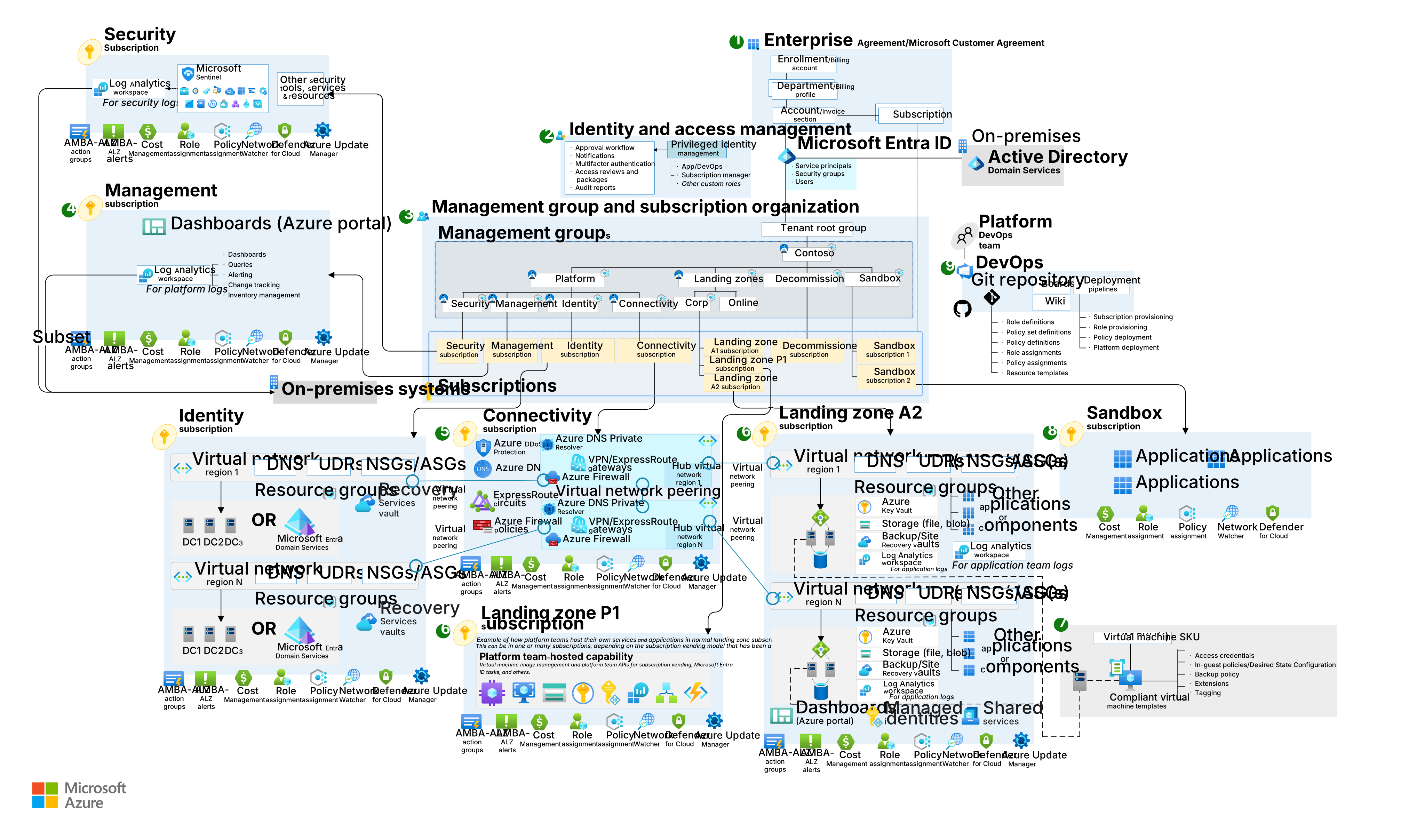
Download a Visio file of this architecture.
Azure foundations workflow
The following workflow corresponds to the previous diagram:
Enterprise enrollment: The top-level enterprise enrollment in Azure that reflects Contoso's commercial agreement with Microsoft. This enrollment defines the organizational account structure, available Azure subscriptions, and billing foundation for the digital estate.
Identity and access management: Components that provide identity, authentication, access, and authorization services across Contoso's Azure environment.
Management group and subscription organization: A scalable hierarchy of management groups that aligns with the data platform's core capabilities. This structure provides centralized security and governance at scale and maintains clear workload separation. Management groups define the governance scope for subscriptions.
Management subscription: A dedicated subscription for management functions that support the data platform.
Connectivity subscription: A dedicated subscription for networking functions, including service identification, secure routing, and communication between internal and external services.
Landing zone subscription: One or more subscriptions for Azure-native online applications and workloads, both internal and external.
Compliant virtual machine (VM) templates: Standardized VM SKUs and templates that enforce compliant configurations across landing zones, including access credentials, in-guest policies or Desired State Configuration, backup policy, extensions, and tagging.
Sandbox subscription: Isolated subscriptions that provide nonproduction environments for experimentation, separated from platform and landing zone workloads through the sandbox management group.
DevOps platform: The platform that supports the entire Azure estate. It contains the code base source control repository and continuous integration and continuous delivery (CI/CD) pipelines for automated infrastructure as code (IaC) deployments.
Note
Many customers still have a large infrastructure as a service (IaaS) footprint. For IaaS recovery capabilities, use Azure Site Recovery to orchestrate and automate replication of Azure VMs between regions, on-premises VMs and physical servers to Azure, and on-premises machines to a secondary datacenter.
Within this foundational structure, Contoso implements the following elements to support its enterprise business intelligence (BI) needs. These elements align with the Microsoft Fabric analytics architecture.
The following diagram shows the Contoso data platform.
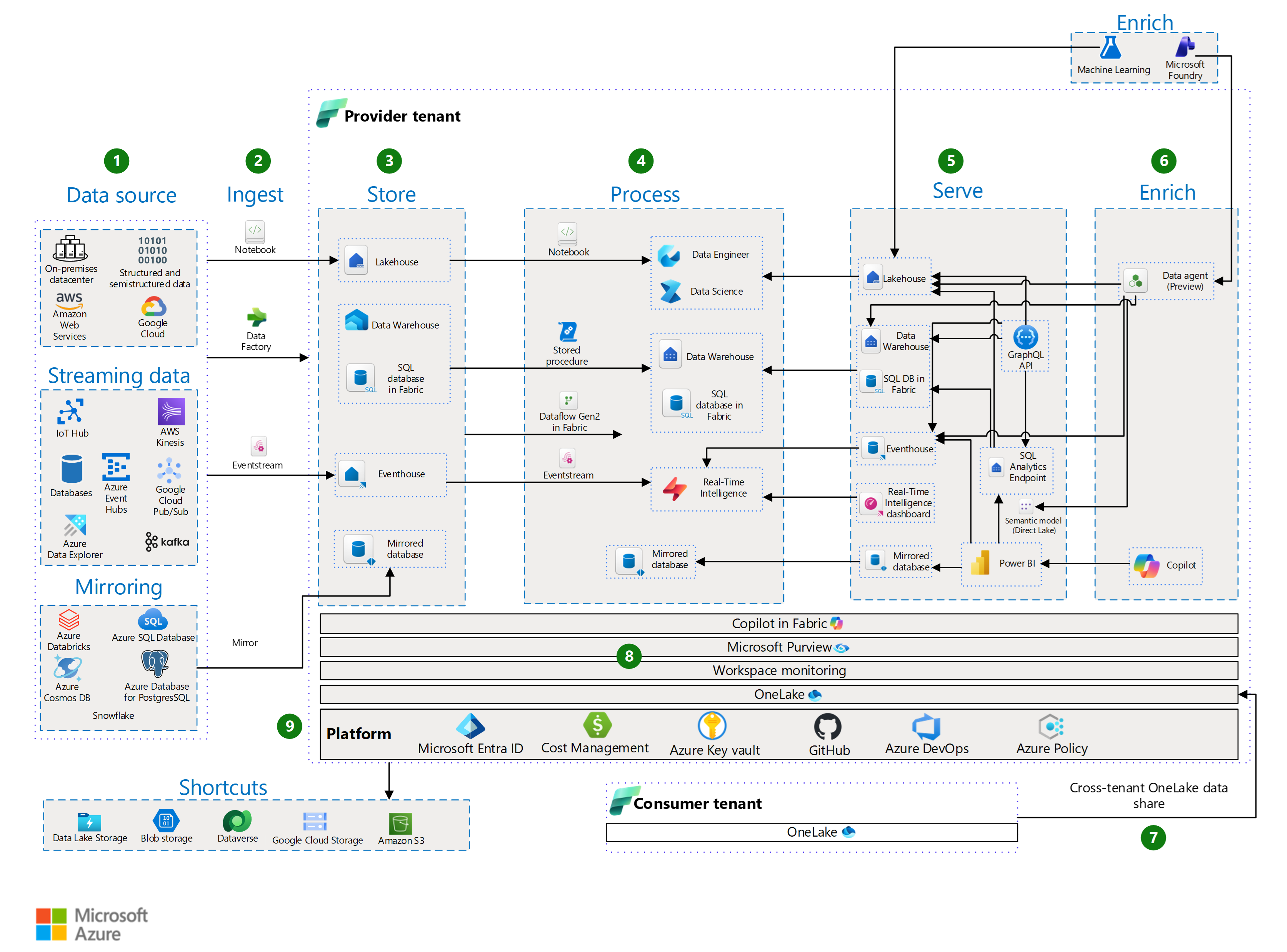
Download a Visio file of this architecture.
Amazon Simple Storage Service (AWS S3), Amazon Web Services (AWS), AWS Kinesis, Google Cloud Storage, Google Cloud, Google Cloud Pub/Sub, and Snowflake are either registered trademarks or trademarks of their respective owners. Apache® and Apache Kafka are either registered trademarks or trademarks of the Apache Software Foundation in the United States and/or other countries. No endorsement by the respective trademark owners is implied by the use of these marks.
Data flow
The following data flow corresponds to the previous diagram:
Data sources: The sources and types of data that the platform can ingest.
Ingest
Ingest structured, semistructured, and unstructured data into OneLake by using Fabric Data Factory, eventstreams, notebooks, shortcuts, or mirroring.
Use Data Factory for batch extract, transform, and load (ETL) and extract, load, and transform (ELT) pipelines. Use eventstreams for real-time ingestion via the Real-Time Intelligence hub.
Mirror supported databases for near real-time replication or use shortcuts to access external data without copying the data into OneLake.
Use eventstreams to provide real-time ingestion and support a Lambda architecture.
Store
OneLake stores all ingested data. OneLake is the unified data lake in Fabric that serves as the foundation for all Fabric experiences. OneLake supports open formats like Delta, Parquet, and comma-separated values (CSV). It also provides built-in geo-redundancy and business continuity and disaster recovery (BCDR) options to ensure durability and resilience. With OneLake as the foundation, Fabric provides specialized services to organize and manage data.
The lakehouse combines the flexibility of a data lake with the structured query capabilities of a data warehouse. It supports large-scale analytics and machine learning workloads and enforces schemas to keep data organized and manageable.
The data warehouse is a managed, scalable SQL-based environment optimized for structured queries and enterprise analytics. It delivers high performance for BI and reporting workloads.
The eventhouse manages real-time event streaming and processing. It ingests and analyzes time-sensitive data for scenarios like Internet of Things (IoT) telemetry and operational monitoring.
The mirrored database provides near real-time replication of operational data from sources like Azure SQL Database or Azure Cosmos DB into OneLake. This approach keeps analytics up to date without requiring complex ETL processes.
Process
Fabric provides multiple ways to process and transform data. Choose your approach based on your workload and skill set. Whether you use low-code ETL flows, perform advanced data engineering, apply real-time analytics, or require embedded business logic, Fabric provides tools that work with data in OneLake. This approach ensures that data remains cleansed, enriched, and prepared for analytics or machine learning.
Notebooks in Fabric perform advanced transformations, data cleansing, and enrichment by using languages like PySpark or Apache Spark SQL.
DataFlow Gen2 connects to multiple data sources and performs low-code ETL transformations. Use this approach to ingest and shape data from multiple sources.
Stored procedures that you run in your Fabric SQL environment apply business logic or batch transformations directly on your OneLake tables.
Eventstreams process real-time data as it flows into your eventhouse. They apply transformations, filters, and enrichment to incoming events before storage, so streaming data is immediately shaped for analytics or downstream applications. Use this approach for scenarios that require instant insights, anomaly detection, or Real-Time Intelligence dashboards.
Serve
Serve curated data through SQL analytics endpoints. This approach provides secure, governed access to lakehouses, data warehouses, and mirrored databases without exposing underlying data or direct connections to the data sources.
Create a semantic model in Direct Lake storage mode to optimize performance and share governed datasets with business users for self-service analytics.
Build Real-Time Intelligence dashboards in the Real-Time Intelligence hub in Fabric to visualize streaming data and provide instant insights for operational decision-making.
Expose data programmatically via the Fabric API for GraphQL. This API lets developers query multiple curated data sources efficiently through a single endpoint.
Enrich
Use data science tools in Fabric with Azure Machine Learning to build, train, and deploy machine learning models. These models run directly on the Fabric unified data foundation. This approach enriches datasets and delivers real-time predictive insights within analytics experiences.
Copilot in Power BI helps business users, analysts, and report creators get insights without writing complex queries or building visuals manually. It uses generative AI to help create reports, summarize data, and generate visuals from natural language prompts.
Use the data agent in Fabric to explore insights through natural language interactions. With Microsoft Foundry integration, the data agent provides access to enterprise data and supports data-driven decision-making.
Data share
External data sharing in Fabric lets a provider tenant securely share OneLake data with a consumer tenant. This capability supports cross-tenant access and collaboration without moving data. In the previous diagram, a provider tenant is the organization that shares data externally, and a consumer tenant is the organization that accesses and uses that shared data.
DR for external data sharing ensures that shared data remains available and consistent during outages or failures. Key aspects include the following components:
Geo-redundancy: OneLake data resides in geo-replicated regions, so shared datasets remain available if the primary region experiences downtime.
Failover support: When a regional outage occurs, the provider tenant's DR strategy redirects access to the secondary region, which ensures continuity for consumer tenants.
Metadata synchronization: Sharing configurations, like permissions and access policies, are replicated across regions to preserve external sharing integrity during failover.
Discover and govern: Use Microsoft Purview, the OneLake catalog, and Fabric governance tools to manage lineage, metadata, and access control.
Platform: Fabric provides a unified software as a service (SaaS) analytics platform that has centralized data storage in OneLake and embedded AI capabilities. Microsoft Entra ID manages identity and access control. Workspace monitoring and cost management deliver operational visibility and optimization. Azure DevOps and GitHub support development and deployment workflows for CI/CD, and Azure Policy enforces consistent governance across resources. Fabric also supports bring your own key (BYOK) through Azure Key Vault, which lets you manage and control encryption keys for securing data at rest.
Note
Many customers follow this reference architecture conceptually but use different services for their physical implementation. For example, you might use Azure Data Factory for ELT processes. The DR planning for stateful and stateless components section provides guidance that applies regardless of which specific services you use.
Contoso uses the lowest recommended production service tiers for all components and adopts a Redeploy on disaster DR strategy to minimize operating costs.
The following sections explain the DR process and the options that you can use to improve your DR posture.
DR options by Azure service
The following sections describe each Azure service and component in the Contoso data platform, along with options for DR uplift.
Note
The following sections are organized by stateful versus stateless services.
Stateful foundational components
Microsoft Entra ID (including role entitlements)
- Component recovery responsibility: Microsoft
- Workload and configuration recovery responsibility: Microsoft
- Contoso SKU selection: Premium P1
- DR uplift options: Microsoft Entra reliability is part of its SaaS offering.
- Notes:
Azure Key Vault
- Component recovery responsibility: Microsoft
- Workload and configuration recovery responsibility: Microsoft
- Contoso SKU selection: Not applicable
- DR uplift options: Not applicable. Covered as part of the Azure service.
Azure DevOps
- Component recovery responsibility: Microsoft
- Workload and configuration recovery responsibility: Microsoft
- Contoso SKU selection: DevOps Services
- DR uplift options: DevOps service and data reliability is part of its SaaS offering.
- Notes: You manage DR for the following components:
- On-premises DevOps Server
- Non-Microsoft services like SonarCloud, JFrog Artifactory, and Jenkins build servers
- IaaS VMs used within the DevOps toolchain
GitHub
- Component recovery responsibility: GitHub (Microsoft)
- Workload and configuration recovery responsibility: GitHub (Microsoft)
- Contoso SKU selection: GitHub Enterprise Cloud
- DR uplift options:
- Back up repositories for DR purposes.
- Follow DR guidance for GitHub Codespaces to prepare for regional outages. If an entire region experiences a service disruption, locally redundant copies of data become temporarily unavailable.
- Notes: You manage DR for the following components:
- GitHub Enterprise Server (self-hosted or on-premises), including backup and restore of repositories and configuration
- Non-Microsoft integrations like CI/CD tools and artifact repositories
- GitHub Actions runners hosted on customer-managed infrastructure (VMs or containers)
Stateless foundational components
Subscriptions
- Component recovery responsibility: Microsoft
- Workload and configuration recovery responsibility: Microsoft
- Contoso SKU selection: Not applicable
- DR uplift options: Not applicable. Covered as part of the Azure service.
Management groups
- Component recovery responsibility: Microsoft
- Workload and configuration recovery responsibility: Microsoft
- Contoso SKU selection: Not applicable
- DR uplift options: Not applicable. Covered as part of the Azure service.
Azure Monitor
- Component recovery responsibility: Microsoft
- Workload and configuration recovery responsibility: Microsoft
- Contoso SKU selection: Not applicable
- DR uplift options: Not applicable. Covered as part of the Azure service.
Microsoft Cost Management
- Component recovery responsibility: Microsoft
- Workload and configuration recovery responsibility: Microsoft
- Contoso SKU selection: Not applicable
- DR uplift options: Not applicable. Covered as part of the Azure service.
Microsoft Defender for Cloud
- Component recovery responsibility: Microsoft
- Workload and configuration recovery responsibility: Microsoft
- Contoso SKU selection: Not applicable
- DR uplift options: Not applicable. Covered as part of the Azure service.
Azure DNS
- Component recovery responsibility: Microsoft
- Workload and configuration recovery responsibility: Microsoft
- Contoso SKU selection: Single Zone - Public
- DR uplift options: Not applicable. DNS is highly available by design.
Virtual networks, including subnets, user-defined routes (UDRs), and network security groups (NSGs)
- Component recovery responsibility: Contoso
- Workload and configuration recovery responsibility: Contoso
- Contoso SKU selection: Not applicable
- DR uplift options: Replicate virtual networks into the secondary, paired region.
Azure Firewall
- Component recovery responsibility: Contoso
- Workload and configuration recovery responsibility: Contoso
- Contoso SKU selection: Standard
- DR uplift options: Azure Firewall is highly available by design. Deploy the firewall across availability zones to increase availability.
Azure DDoS
- Component recovery responsibility: Microsoft
- Workload and configuration recovery responsibility: Contoso
- Contoso SKU selection: DDoS Network Protection
- DR uplift options: Not applicable. Covered as part of the Azure service.
ExpressRoute circuit
- Component recovery responsibility: Contoso, connectivity partner, and Microsoft
- Workload and configuration recovery responsibility: Connectivity partner and Microsoft
- Contoso SKU selection: Standard
- DR uplift options:
- Configure ExpressRoute to use private peering to provide geo-redundancy.
- ExpressRoute has high availability (HA) designs.
- Use a site-to-site VPN connection as a backup for ExpressRoute.
- Notes:
- ExpressRoute provides built-in redundancy. Each circuit consists of two connections to two Microsoft Enterprise edge routers (MSEEs) at an ExpressRoute location from the connectivity provider or client's network edge.
- ExpressRoute Premium circuits provide access to all Azure regions globally.
VPN Gateway
- Component recovery responsibility: Contoso
- Workload and configuration recovery responsibility: Contoso
- Contoso SKU selection: Single Zone - VpnGw1
- DR uplift options: Deploy a VPN gateway in an availability zone by using the VpnGw#AZ SKUs to create a zone-redundant service.
Stateful data platform-specific services
Storage account: Azure Data Lake Storage
- Component recovery responsibility: Microsoft
- Workload and configuration recovery responsibility: Contoso
- Contoso SKU selection: LRS
- DR uplift options: Storage accounts offer several data redundancy options, from primary region redundancy to secondary region redundancy.
- Notes:
- Use geo-redundant storage (GRS) to improve redundancy. GRS provides a copy of your data in the paired region.
Azure Database for PostgreSQL
- Component recovery responsibility: Microsoft
- Workload and configuration recovery responsibility: Contoso
- Contoso SKU selection: Standard
- DR uplift options: Use availability zones for zone-level resilience, which maintains operation during a single zone failure. For region-wide disruptions, add geo-redundant backup to support failover and recovery.
- Notes:
- For more information, see Business continuity with Azure Database for PostgreSQL flexible server.
Azure Data Explorer
- Component recovery responsibility: Microsoft
- Workload and configuration recovery responsibility: Contoso
- Contoso SKU selection: Pay as you go (or cluster size based on workload)
- DR uplift options:
- Azure Data Explorer doesn't provide automatic regional failover. For DR, deploy multiple clusters in paired regions that use an active-active or active-passive configuration, and replicate ingestion pipelines.
- Use zone-redundant storage (ZRS) for intraregion resiliency, and select Availability zones during cluster creation to protect against zone-level failures. For regional resiliency, combine ZRS with a multiple-cluster architecture and ingestion redundancy through Event Hubs or IoT Hub.
- Notes:
- For more information, see BCDR for Azure Data Explorer.
Azure Event Hubs
- Component recovery responsibility: Microsoft
- Workload and configuration recovery responsibility: Contoso
- Contoso SKU selection: Standard, Premium, and Dedicated tiers
- DR uplift options:
- Enable geo-disaster recovery for metadata replication across paired namespaces.
- For full data replication, use geo-replication (Premium and Dedicated tiers only).
- Notes:
- Geo-disaster recovery replicates metadata only, not event data.
- Geo-replication replicates metadata and data for business continuity (BC).
- For more information, see Event Hubs geo-disaster recovery.
Azure IoT Hub
- Component recovery responsibility: Microsoft
- Workload and configuration recovery responsibility: Contoso
- Contoso SKU selection: Premium or Enterprise tier
- DR uplift options: Implement a custom multiregion solution to increase Azure IoT Hub resilience during localized faults. Cross-region deployment and failover processes improve recoverability. For more information, see Resilience to region-wide failures.
- Notes:
- IoT Hub supports both Microsoft-initiated and manual failover by replicating data to the paired region for each hub.
- IoT Hub automatically uses availability zones when you create hubs in supported Azure regions.
Azure Machine Learning
- Component recovery responsibility: Contoso and Microsoft
- Workload and configuration recovery responsibility: Contoso
- Contoso SKU selection: General Purpose, D-Series instances
- DR uplift options:
- Machine Learning depends on multiple Azure services. Some of these services are provisioned in your subscription, so you configure high availability for them.
- Deploy across multiple regions to increase resiliency.
- Notes:
- Machine Learning doesn't provide automatic failover or DR.
Azure SQL Database
- Component recovery responsibility: Microsoft
- Workload and configuration recovery responsibility: Contoso
- Contoso SKU selection: Business Critical or Premium tier recommended
- DR uplift options:
- Create failover groups for automatic cross-region failover.
- Use active geo-replication for readable secondary databases.
- Configure geo-redundant backup storage for geo-restore capability.
- Notes:
- For more information, see DR for SQL Database.
Dataverse
- Component recovery responsibility: Microsoft
- Workload and configuration recovery responsibility: Microsoft
- Contoso SKU selection: Not applicable
- DR uplift options:
- Use the built-in DR capability, which uses Azure availability zones for in-region resilience.
- Configure self-service cross-region failover for production environments.
- Notes:
- For more information, see BCDR for Dynamics 365 and Microsoft Power Platform.
Power BI
- Component recovery responsibility: Microsoft
- Workload and configuration recovery responsibility: Microsoft
- Contoso SKU selection: Power BI Pro
- DR uplift options: Not applicable. Power BI reliability is part of its SaaS offering.
- Notes:
- Power BI resides in the Microsoft 365 tenancy, not that of Azure.
- Power BI uses Azure availability zones to protect reports, applications, and data from datacenter failures.
- During a regional failure, Power BI fails over to a new region, usually in the same geographic location, as noted in the Microsoft Trust Center.
Azure Cosmos DB
- Component recovery responsibility: Microsoft
- Workload and configuration recovery responsibility: Microsoft
- Contoso SKU selection: Single Region Write with Periodic backup
- DR uplift options:
- Single-region accounts might lose availability after a regional outage. Increase resiliency by adding a single write region with at least a second (read) region and enabling service-managed failover.
- Use Azure Cosmos DB accounts for production workloads to provide automatic failover. Without this configuration, the account loses write availability during a write region outage because manual failover can't succeed without region connectivity.
- Notes:
- To protect against data loss in a region, Azure Cosmos DB provides two backup modes: Periodic and Continuous.
- The Azure Cosmos DB client detects and handles regional failovers. You don't need to change the application.
- For more information, see Resilience to region-wide failures.
Azure Data Share
- Component recovery responsibility: Microsoft
- Workload and configuration recovery responsibility: Microsoft
- Contoso SKU selection: Not applicable
- DR uplift options: Deploy Azure Data Share resources in a secondary region.
Microsoft Purview
- Component recovery responsibility: Microsoft
- Workload and configuration recovery responsibility: Contoso
- Contoso SKU selection: Not applicable
- DR uplift options: Not applicable
- Notes:
- Microsoft Purview doesn't support automated BCDR. You manage backup and restore activities.
Fabric: OneLake
- Component recovery responsibility: Microsoft
- Workload and configuration recovery responsibility: Contoso
- Contoso SKU selection: Fabric capacity
- DR uplift options:
- Turn on BCDR for Fabric capacity.
- Notes:
- For more information, see DR and data protection for OneLake.
Fabric: SQL database in Fabric
- Component recovery responsibility: Microsoft
- Workload and configuration recovery responsibility: Contoso
- Contoso SKU selection: Fabric capacity
- DR uplift options:
- Turn on DR capacity in Fabric for cross-region replication of SQL database data via OneLake.
- Perform manual geo-backup or geo-replication for active-active setups across regions.
- Notes:
- For more information, see Experience-specific DR for SQL database.
Fabric: Data Engineer
- Component recovery responsibility: Microsoft
- Workload and configuration recovery responsibility: Contoso
- Contoso SKU selection: Fabric capacity
- DR uplift options:
- Turn on DR capacity in Fabric for cross-region replication of lakehouse data via OneLake.
- Perform manual geo-backup or geo-replication for active-active setups across regions.
- Notes:
- Redeploy notebooks via CI/CD.
- For more information, see Experience-specific DR for Data Engineer.
Fabric: Data Warehouse
- Component recovery responsibility: Microsoft
- Workload and configuration recovery responsibility: Contoso
- Contoso SKU selection: Fabric capacity
- DR uplift options:
- Perform manual geo-backup or geo-replication for active-active setups across regions.
- Turn on DR capacity in Fabric for cross-region replication of warehouse data via OneLake.
- Notes:
- For more information, see Experience-specific DR for Data Warehouse.
- For cross-regional DR with fully automated BC, deploy two identical Fabric warehouses in different regions. Run deployments and data ingestion to both sites regularly so that they remain synced.
Fabric: SQL analytics endpoint
- Component recovery responsibility: Microsoft
- Workload and configuration recovery responsibility: Contoso
- Contoso SKU selection: Fabric capacity
- DR uplift options:
- Turn on DR capacity in Fabric for cross-region replication of lakehouse and warehouse data via OneLake.
- Use CI/CD pipelines to redeploy SQL objects, like views, stored procedures, and security roles, in the DR region.
- Use the metadata sync API or perform a UI refresh to ensure that the SQL endpoint schema remains up to date after failover.
- Notes:
- The SQL analytics endpoint provides read-only access to Delta Lake tables stored in OneLake.
Fabric: Mirrored database
- Component recovery responsibility: Microsoft
- Workload and configuration recovery responsibility: Contoso
- Contoso SKU selection: Fabric capacity
- DR uplift options:
- Use manual geo-backup or geo-replication to create active-active setups across regions.
- Notes:
- Mirrored databases from the primary region become unavailable and their settings don't replicate to the secondary region.
- To restore access, create a new mirrored database in a workspace in a different region.
Stateless data platform-specific services
Foundry
- Component recovery responsibility: Microsoft
- Workload and configuration recovery responsibility: Contoso
- Contoso SKU selection: Enterprise
- DR uplift options:
- Deploy multiregion Foundry workspaces to ensure redundancy for model hosting and orchestration.
- Store datasets, model artifacts, and prompt flows in Azure Storage accounts that use GRS or read-access GRS (RA-GRS).
- Notes:
- For more information about BCDR with Foundry Agent Service, see Customer-enabled DR.
Fabric: Real-Time Intelligence
- Component recovery responsibility: Microsoft
- Workload and configuration recovery responsibility: Contoso
- Contoso SKU selection: Fabric capacity
- DR uplift options:
- Use geo-replication for active-active setups across regions.
- Notes:
- For customers that require cross-regional DR and automated BC, maintain two Real-Time Intelligence environments in different regions. Ensure parity by replicating data, eventstream configurations, Kusto Query Language (KQL) queries, and ingestion pipelines regularly.
- For more information, see Experience-specific DR for Real-Time Intelligence.
Fabric: Data Factory
- Component recovery responsibility: Microsoft
- Workload and configuration recovery responsibility: Contoso
- Contoso SKU selection: Fabric capacity
- DR uplift options:
- Use a cross-region pipeline deployment.
- Notes:
- Redeploy pipelines via CI/CD.
- If your data pipelines use on-premises or virtual network data gateways, you must reconfigure those gateways after you move to a workspace in a different region.
- For more information, see Experience-specific DR for Data Factory.
Fabric: Data Science
- Component recovery responsibility: Microsoft
- Workload and configuration recovery responsibility: Contoso
- Contoso SKU selection: Fabric capacity
- DR uplift options:
- Create workspaces in two different regions. Then copy your data and import notebooks, machine learning experiments, and models into the secondary workspace.
- Notes:
- DR for Data Science requires you to manually copy and re-create resources in a secondary region because this workload doesn't include built-in cross-region replication.
- For more information, see DR for Data Science.
DR planning for stateful and stateless components
Azure services evolve rapidly, so this section frames DR planning around the durable distinction between stateful and stateless components.
A stateful component retains data between events or interactions. Examples include lakehouses, eventhouses, and warehouses, which store data and metadata that you must protect and recover. A stateless component processes each request independently without retaining a record of prior interactions. Examples include Data Factory and notebooks, which rely on external stateful components for persistence.
For a DR scenario that requires redeployment:
Redeploy stateless components, like Azure Functions and Azure Data Factory pipelines, from source control. Run a smoke test to validate availability before you introduce them into the broader system.
Stateful components, like SQL Database and storage accounts, require more attention. When you choose a component, consider its data redundancy feature. Balance availability and durability against operating costs.
Datastores need a data backup strategy. The data redundancy functionality of the underlying storage mitigates the risk of data loss for some designs, while other datastores like SQL databases need a separate backup process.
If needed, redeploy the component from source control and run a smoke test to validate the configuration.
Rehydrate the dataset by using data redundancy (when available) or a backup dataset. Then validate the data for accuracy and completeness.
Before you apply a backup, verify its integrity. Corruption or errors in the backup process might require you to use an earlier backup instead of the most recent one.
Rerun data ingestion processes from the point of the last backup to bring the dataset up to date.
After the dataset is current, introduce the component into the broader system.
Other Azure data services
This section contains HA and DR guidance for other key Azure data components and services.
Azure Analysis Services: For more information, see Analysis Services HA.
Azure Database for MySQL: For more information, see BC with Azure Database for MySQL flexible server and Azure Database for MySQL documentation.
SQL: For more information, see BC and HADR for SQL Server on Azure VMs and BC in SQL Database.
Foundry Tools: If you deploy Foundry Tools in customer-managed Docker containers, you're responsible for recovering those containers.
Azure AI Search: This service doesn't include a built-in mechanism for DR. If you require continuous service during a catastrophic failure, deploy a second service in a different region and implement a geo-replication strategy to ensure that indexes remain fully redundant across all services.
Azure Stream Analytics: Stream Analytics is a managed PaaS offering that doesn't provide automatic geo-failover. To achieve geo-redundancy, deploy identical Stream Analytics jobs in multiple Azure regions.
Azure Data Share: Enhance resiliency by deploying Data Share resources in a secondary region.
Example costs for the architecture
Use this Azure pricing estimate as a starting point to estimate the costs for your scenario. The estimate focuses on the Fabric capacity units (CUs) used in the architecture as described in this article series.
Next steps
Continue to the scenario details to learn about the DR processes, testing strategies, and implementation considerations for this architecture.