CPU usage.

Heisenberg 266 Reputation points
2021-08-25T17:28:29.457+00:00

hello, im seeing high CPU usage on sql server. We dont have fragmentation, stats are upto date. We have 32 cores on the server . dm_os_wait_stats shows following waits. What are the areas i can look at. CPU usage is high in past couple of weeks.

wait_type waiting_task_count

MEMORY_ALLOCATION_EXT 17453797742
RESERVED_MEMORY_ALLOCATION_EXT 3326705786
SOS_SCHEDULER_YIELD 1732357515
DUMP_LOG_COORDINATOR_QUEUE 1144317473

SQL Server | Other
{count} votes

2 answers

Sort by: Most helpful
  1. Erland Sommarskog 128.7K Reputation points MVP Volunteer Moderator
    2021-08-25T21:27:22.527+00:00

    To get any meaning out of waiting tasks, you need to sample it at two occasions and compute the deltas. Else you have values accumulated since SQL Server last started, and it may be a hotchpotch of everything.

    If you are on SQL 2016 enable Query Store, if you haven't done so. After a day or so, you can start to look at resource-consuming queries. There is a UI for it in SSMS, You find it under the node for the database.
    0 comments No comments

  2. CathyJi-MSFT 22,406 Reputation points Microsoft External Staff
    2021-08-26T03:12:27.19+00:00

    Hi @SQLServerBro,

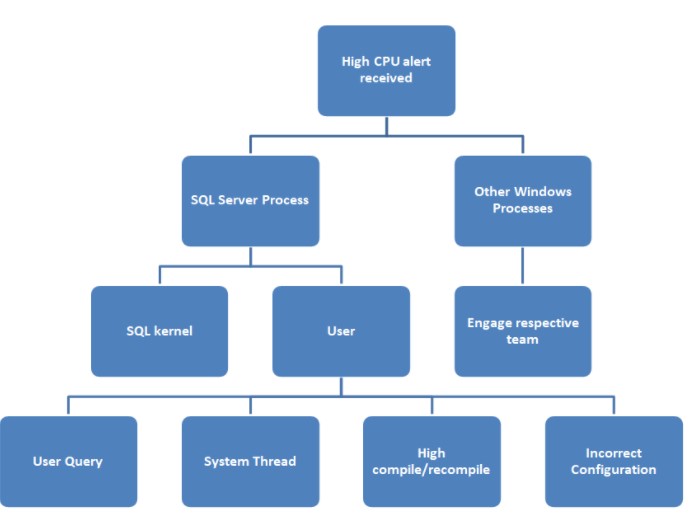
    Could you share us the process that you troubleshoot this high CPU issue? We can follow the below steps to isolate the problem and mitigate it.
    126594-screenshot-2021-08-26-110859.jpg

    Please refer to below blogs to troubleshot high CPU issues.

    Troubleshooting High CPU Issues in SQL Server (Part 1)
    Troubleshooting High CPU issues in SQL Server (Part 2)


    If the response is helpful, please click "Accept Answer" and upvote it, as this could help other community members looking for similar thread.

    0 comments No comments

Your answer

Answers can be marked as 'Accepted' by the question author and 'Recommended' by moderators, which helps users know the answer solved the author's problem.

