Note
Access to this page requires authorization. You can try signing in or changing directories.
Access to this page requires authorization. You can try changing directories.
This article explains how to control outbound internet access from Azure virtual networks. It compares NAT Gateway, Azure Firewall, and combined egress patterns to help you choose a predictable, secure method for your workloads.
What this article covers
Outbound egress control determines how your Azure workloads reach the public internet. A well-designed egress strategy provides predictable public IP addresses, prevents SNAT port exhaustion, and optionally filters outbound connections by destination.
Note
This article covers egress-specific concepts. For full firewall coverage, see Azure Firewall and traffic inspection.
Who needs this article
Read this article if one or more of these conditions apply:
- Your workloads need controlled outbound access to the internet for updates, APIs, or external services.
- You need predictable public IP addresses for outbound connections.
- You need to prevent SNAT port exhaustion or scale outbound connectivity for high-connection workloads.
- You need to choose between NAT Gateway, Azure Firewall, or a combined pattern for egress control and inspection.
Tip
Following a scenario path? Select your scenario at the top of the page for tailored guidance. The core guidance that follows applies to all readers.
Lift-and-shift focus: Your migrated VMs need controlled outbound internet access. Centralize all outbound traffic through the hub firewall to enforce consistent security policy across migrated workloads.
Read this article if you:
- Deploy workloads that need to reach the internet for updates, API calls, or third-party services.
- Want to centralize outbound control through Azure Firewall in the hub VNet.
- Need to turn off default outbound access on migrated workloads and replace it with an explicit egress method.
- Require a fixed, predictable public IP address for outbound connections.
Modernization focus: All spoke VNets route outbound through the hub firewall through user-defined routes (UDR). This centralized egress model is integral to your security architecture because it prevents app teams from bypassing IT-managed security controls.
Read this article if you:
- Need to enforce that all spoke workloads (AKS, App Service, VMs) route outbound traffic through the hub firewall.
- Want UDR-based routing from each spoke to the hub Azure Firewall for consistent egress policy.
- Require the hub firewall to act as SNAT for all outbound connections.
- Need to prevent SNAT port exhaustion for high-connection-count workloads.
Cross-cloud focus: Include centralized egress if your target design requires a controlled internet egress policy. Otherwise, cross-cloud traffic goes through the transit path (Azure Firewall in secure virtual hub) and doesn't need a separate egress configuration.
Read this article if you:
- Need centralized internet egress policy in your Azure landing zone.
- Want to share the same Azure Firewall for both cross-cloud transit inspection and internet egress.
- Replace default outbound access before it's phased out.
Azure services and features
The following table describes the services and features available for outbound internet access in Azure virtual networks.
| Service or feature | What it provides | When to use it |
|---|---|---|
| Default outbound access (retired) | Azure automatically assigns a temporary public IP for outbound connections. The assigned IP isn't predictable and can change without notice. | Don't use for new deployments. Replace with NAT Gateway or Azure Firewall. See Security considerations. |
| Azure NAT Gateway | Managed SNAT service with fixed, predictable public IPs. Provides 64,512 SNAT ports per public IP, up to 16 public IPs (over 1 million ports total). No content filtering. | Outbound-only workloads that need a fixed egress IP, high-connection-count applications, and scenarios where SNAT port exhaustion is a risk. |
| Azure Firewall | Full Layer 3–7 inspection for outbound traffic. FQDN filtering, URL filtering, web categories, and IDPS (Premium SKU). Centralized policy management. | When you need to control what destinations your resources connect to, not just that they have outbound access. |
| NAT Gateway + Azure Firewall | NAT Gateway handles SNAT scaling on the firewall subnet. Azure Firewall handles inspection and filtering. No double NAT occurs. | Production environments that need both scalable egress and content-aware filtering. Recommended architecture for enterprise workloads. |
| VM with public IP (outbound) | The virtual machine uses its own public IP address for outbound traffic. No centralized control or filtering. | Avoid for production. No centralized management, unpredictable at scale, and doesn't benefit from shared SNAT resources. |
How to choose
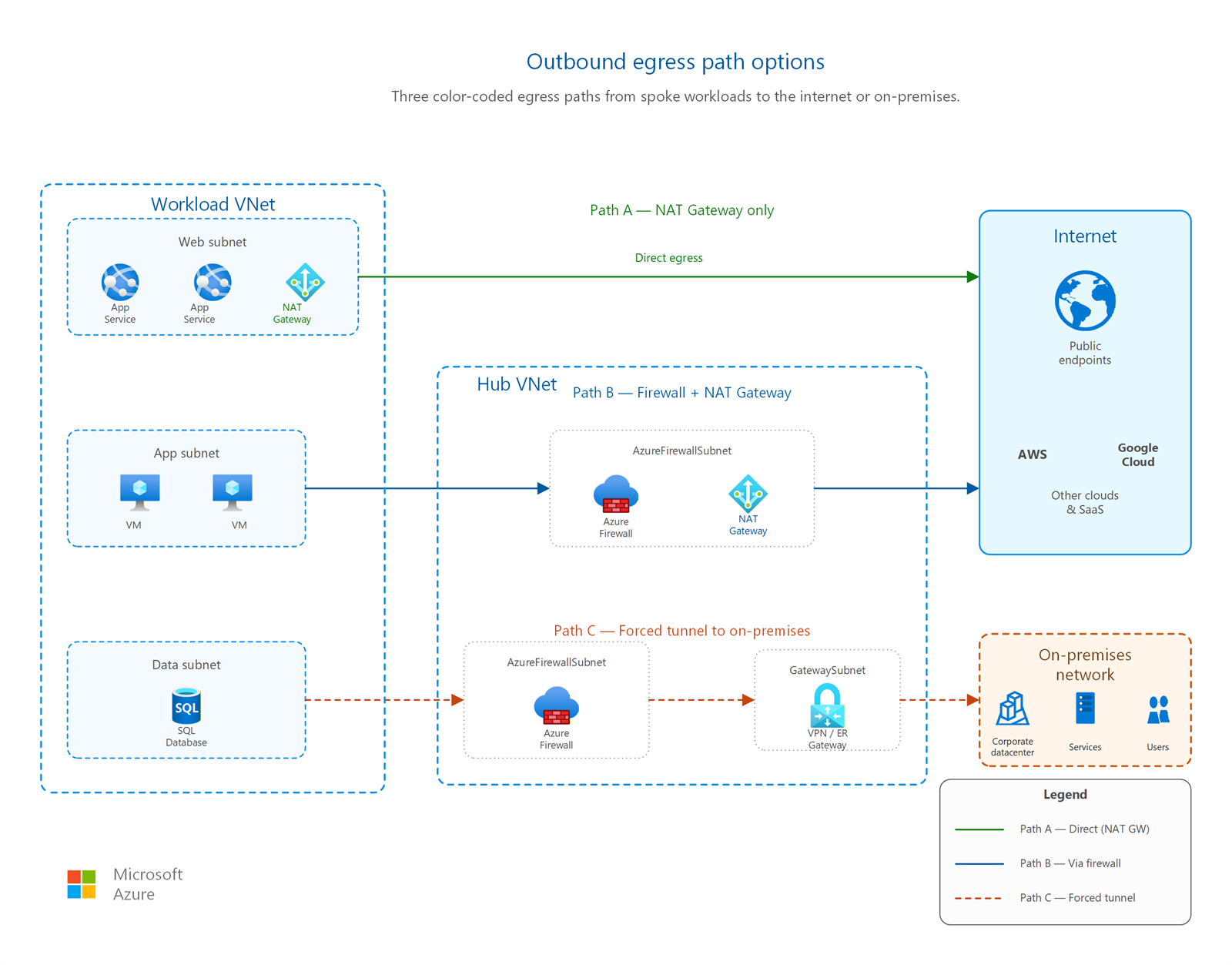
How to control outbound access
Use the following table to select an egress method based on your requirements.
| Your requirement | Recommended approach | Why |
|---|---|---|
| Fixed outbound IP address only, no filtering needed | NAT Gateway | Provides predictable public IPs with automatic SNAT port allocation. No inspection overhead or filtering cost. Simplest production-ready option. |
| FQDN filtering, URL filtering, or traffic inspection | Azure Firewall | Filters outbound connections by destination FQDN or URL. Premium SKU adds IDPS and TLS inspection for advanced threat detection. |
| Fixed outbound IP and content filtering | NAT Gateway + Azure Firewall | NAT Gateway on the AzureFirewallSubnet provides scalable SNAT. Firewall inspects traffic before egress. Best of both capabilities. |
| Don't use for new deployments | Default outbound access or VM public IP | Default outbound access is retired. VM public IPs provide no centralized control. Both are unsuitable for production workloads. |
NAT Gateway versus Azure Firewall for egress
Use the following comparison to understand the tradeoffs between NAT Gateway and Azure Firewall when used independently.
| Capability | NAT Gateway | Azure Firewall |
|---|---|---|
| SNAT ports | 64,512 per public IP (up to 16 IPs, over 1 million total) | 2,496 per public IP per backend instance (max 250 IPs) |
| Traffic filtering | None: passes all outbound traffic | FQDN rules, URL filtering, web categories, network rules |
| IDPS and TLS inspection | Not available | Premium SKU only |
| Throughput | Line rate for the subnet (no published cap for SNAT) | Up to 100 Gbps (Premium), 30 Gbps (Standard), 250 Mbps (Basic) |
| Cost model | Per-hour resource + per-GB data processed | Per-hour resource + per-GB data processed (higher base cost) |
| Routing complexity | Associates directly to a subnet, no UDR needed | Requires UDR (0.0.0.0/0 → firewall private IP) on workload subnets |
| Use case | High-volume outbound connections needing fixed IPs | Regulated environments needing egress filtering and logging |
Routing priority for outbound traffic
Azure evaluates outbound methods in the following priority order. Higher-priority methods override lower-priority ones on the same subnet:
- UDR to a virtual appliance or virtual network gateway: overrides all other outbound methods, including NAT Gateway.
- NAT Gateway: takes priority over instance-level public IPs and load balancer outbound rules.
- Instance-level public IP on the virtual machine.
- Load balancer outbound rules.
- Default system route to the internet (Microsoft retired this option for new deployments).
Important
A user-defined route (UDR) with destination 0.0.0.0/0 pointing to a virtual appliance (such as Azure Firewall) overrides NAT Gateway. This behavior is by design for the combined NAT Gateway + Firewall architecture. The UDR on workload subnets forces traffic through the firewall, while NAT Gateway on the AzureFirewallSubnet provides the final egress IPs.
Combined architecture: NAT Gateway + Azure Firewall
The recommended production pattern for enterprise egress combines both services:
- Workload subnets have a UDR that sends 0.0.0.0/0 traffic to the Azure Firewall private IP address.
- Azure Firewall inspects and filters the outbound traffic by using network rules, application rules, or both.
- NAT Gateway associates with the AzureFirewallSubnet and provides scalable SNAT for the firewall's outbound connections.
- No double NAT occurs. The firewall sends traffic to NAT Gateway using its private IP, and NAT Gateway applies SNAT once using its public IPs.
This architecture gives you centralized inspection with scalable SNAT. The AzureFirewallSubnet doesn't need extra UDRs because NAT Gateway automatically routes outbound internet traffic when associated.
Note
Standard NAT Gateway is a zonal resource and doesn't support zone-redundant deployments. If you deploy a zone-redundant Azure Firewall, use NAT Gateway V2 (StandardV2 SKU) for zone-redundant SNAT. Standard NAT Gateway becomes a single point of failure during a zonal outage when paired with a zone-redundant firewall. For more information, see NAT Gateway SKUs.
Data-flow walkthrough
The following sequence shows how a single outbound request flows through the combined architecture:
- A VM in a workload subnet starts a TCP connection to an external API (for example,
api.contoso.com:443). - The subnet's UDR matches 0.0.0.0/0 and sends the packet to the Azure Firewall private IP.
- Azure Firewall evaluates the connection against application rules and network rules. If an application rule with an FQDN allow entry matches, the firewall permits the connection.
- The firewall sends the permitted packet from its own interface on the AzureFirewallSubnet.
- NAT Gateway, associated with the AzureFirewallSubnet, performs SNAT. It translates the firewall's private source IP to one of its public IPs and allocates a SNAT port from the pool.
- The response from the external API returns to the NAT Gateway public IP. NAT Gateway performs reverse translation and delivers the packet back to the firewall.
- The firewall sends the response to the originating VM through the existing connection state.
In this end-to-end flow, the firewall inspects traffic exactly once and NAT Gateway applies SNAT exactly once, with no double NAT.
Monitoring and diagnostics
Monitor your egress infrastructure to detect capacity problems before they affect workloads:
- NAT Gateway metrics: Monitor Total SNAT Connection Count, SNAT Connection Count (per state), and Datapath Availability in Azure Monitor. Set alerts when SNAT port usage exceeds 80% of allocated capacity.
- Azure Firewall logs: Enable diagnostic settings to send logs to Log Analytics. Use the AzureFirewallApplicationRule and AzureFirewallNetworkRule log categories to audit allowed and denied outbound connections.
- Connection Monitor: Use Network Watcher Connection Monitor to test end-to-end connectivity from workload VMs to external endpoints. Connection Monitor detects latency increases and connectivity failures that might indicate SNAT exhaustion or firewall misconfiguration.
- Firewall metrics: Track Throughput, Rules Hit Count, and SNAT Port Utilization to right-size your firewall SKU and identify hot rules.
Design considerations
Use Azure Firewall for all outbound communication from migrated workloads. This approach gives you centralized FQDN filtering, logging, and threat detection from day one:
- Turn off default outbound access: For new deployments, subnets default to private (no automatic outbound). For existing VNets, explicitly replace default outbound with Azure Firewall egress to avoid relying on unpredictable, uncontrolled public IPs.
- UDR on workload subnets: Create a user-defined route (0.0.0.0/0 → Azure Firewall private IP) on every spoke workload subnet. This configuration forces all internet-bound traffic through the hub firewall.
- NAT Gateway on AzureFirewallSubnet: Associate NAT Gateway with the firewall subnet for scalable SNAT. This combination provides predictable egress IPs and avoids SNAT port exhaustion.
- Start with broad allow rules, tighten over time: During migration, allow outbound to destinations your applications need (Windows Update, package repositories, third-party APIs). After migration stabilizes, audit firewall logs and restrict to known FQDNs.
UDR-based routing from each spoke to the hub firewall is the foundation of your egress security model. App teams can't bypass IT-managed outbound controls:
- UDR in each spoke VNet: Every spoke workload subnet has a route table with 0.0.0.0/0 → hub Azure Firewall private IP. This configuration ensures that AKS nodes, App Service VNet-integrated subnets, and VMs all route outbound through the firewall.
- Hub firewall as SNAT: Azure Firewall performs source NAT for all outbound connections. All spoke workloads share the firewall's egress IP addresses, which simplifies partner firewall allow-listing.
- NAT Gateway for SNAT scaling: Associate NAT Gateway with the AzureFirewallSubnet. With 16 public IPs (over 1 million SNAT ports), you handle high-connection-count workloads like AKS clusters with many pods making external API calls.
- Application rules for FQDN control: Use Azure Firewall application rules to restrict outbound by FQDN. App teams request FQDN allow entries through a change management process. Deny-by-default prevents data exfiltration.
Azure Firewall in the secure virtual hub inspects both cross-cloud transit traffic and internet egress. Sharing a single firewall for both paths simplifies the architecture:
- Secure virtual hub firewall for egress: If you deploy Virtual WAN with a secure hub, Azure Firewall in the hub handles internet egress for all connected VNets. Configure the secure hub's internet traffic routing policy to send 0.0.0.0/0 through the firewall.
- Egress and cross-cloud transit share the same firewall: Traffic destined for the internet and traffic destined for AWS/Google Cloud through IPSec tunnels both pass through Azure Firewall for inspection. This design means you keep one rule set for all outbound paths.
- Centralize only if required: If your cross-cloud design doesn't mandate centralized internet egress (for example, workloads only communicate between clouds), you can skip this configuration and rely on the cross-cloud transit firewall inspection alone.
Prerequisites
Before you implement outbound egress controls, confirm the following items:
- A virtual network is deployed with subnets sized for your workloads. See Virtual networks and subnets for subnet design guidance.
- You understand user-defined routes (UDRs) and how they override default Azure routing. See Virtual networks and subnets for UDR configuration details.
- Your firewall subnet is sized correctly if you use Azure Firewall. The AzureFirewallSubnet requires a minimum of /26 (64 addresses).
- You know your SNAT scale requirements. Calculate peak concurrent outbound connections to determine how many NAT Gateway public IPs you need (64,512 ports per IP).
Security considerations
Replace default outbound access
Default outbound access is retired. For API versions released after March 31, 2026, new virtual networks default to private subnets (no automatic outbound). Existing virtual networks are unaffected, but you should migrate to an explicit outbound method. For full details, see the default outbound access documentation.
Note
Existing virtual networks and VMs that currently use default outbound access continue to work. However, the assigned public IP isn't predictable, provides no filtering, and triggers Azure Advisor alerts. Plan migration to NAT Gateway or Azure Firewall regardless of the retirement timeline.
UDR routing for centralized firewall inspection
When you use Azure Firewall for egress control, create a UDR on every workload subnet with:
- Destination: 0.0.0.0/0
- Next hop type: Virtual Appliance
- Next hop address: Azure Firewall private IP (for example, 10.0.1.4)
This configuration ensures that all internet-bound traffic from workload subnets passes through the firewall for inspection. Without this UDR, traffic bypasses the firewall and uses whatever outbound method is configured on the subnet directly.
Prevent SNAT port exhaustion
SNAT port exhaustion happens when a workload opens more concurrent outbound connections than the available port inventory supports. Symptoms include intermittent connection timeouts, TCP RST packets on outbound connections, and failed HTTP requests with socket errors. Application logs show "address already in use" or "can't assign requested address" errors. Exhaustion typically manifests under load when many short-lived connections open rapidly to the same destination IP and port.
To prevent exhaustion:
- Use NAT Gateway for workloads with high outbound connection counts. Each public IP provides 64,512 SNAT ports with dynamic allocation across all resources in the subnet.
- Add public IPs to your NAT Gateway if monitoring shows port usage exceeding 80%. Add up to 16 public IPs.
- Use connection pooling in application code to reuse existing connections instead of opening new ones for every request.
- Diversify destination endpoints when possible. SNAT port allocation is per destination IP/port tuple, so distributing traffic across multiple destination IPs reduces port pressure.
- Reduce idle timeouts to reclaim ports faster. NAT Gateway's default idle timeout is 4 minutes. Lower this value for workloads that create many short-lived connections.
Network security groups complement egress control
Network security groups (NSGs) and outbound egress methods serve different purposes and work together. NSGs filter traffic by IP address and port at the subnet or NIC level. NAT Gateway and Azure Firewall control how traffic reaches the internet. Use both layers for defense in depth. See Network security groups and application security groups for NSG design guidance.
Forced tunneling considerations
Forced tunneling egress through on-premises can introduce latency and adds dependency on the on-premises firewall. Consider Azure Firewall for egress inspection if low latency is important. If compliance mandates on-premises inspection, test end-to-end latency from workload subnets and make sure the on-premises path can handle the throughput requirements without becoming a bottleneck.
Prevent data exfiltration
Azure Firewall FQDN filtering prevents data exfiltration by restricting outbound connections to approved domain names only. Define application rules that allow traffic to specific FQDNs (for example, *.blob.core.windows.net or api.partner.com) and deny all other outbound connections. This approach ensures that compromised workloads can't send data to attacker-controlled endpoints.
Related articles
- Virtual networks and subnets: subnet design and UDR routing
- IP address planning: public IP allocation for NAT Gateway
- Azure Firewall placement and rules: detailed firewall guidance covering rule collection priorities and architecture patterns
- Network security groups and application security groups: traffic filtering that complements egress control
- Hybrid connectivity: forced tunneling sends egress to on-premises when required
- Inbound internet connectivity: the inbound counterpart to egress
Learn more
- Azure NAT Gateway documentation
- Azure Firewall documentation
- Default outbound access for VMs in Azure
- Scale SNAT ports with Azure NAT Gateway (Firewall integration)
- Azure Firewall Premium features
Next steps
Tip
Exploring on your own? Return to the overview navigator to find your next article by capability.
Next in your lift-and-shift journey:
Configure your hub firewall: Set up Azure Firewall for centralized east-west inspection and outbound traffic control.
Next in your modernization journey:
Configure your hub firewall: Set up Azure Firewall as SNAT/DNAT in your hub to scrub all traffic before it reaches your app tier.
Next in your cross-cloud journey:
Set up cross-cloud monitoring: Cross-cloud estates are harder to troubleshoot. Establish monitoring before going live.