Events
Power BI DataViz World Championships
Feb 14, 4 PM - Mar 31, 4 PM
With 4 chances to enter, you could win a conference package and make it to the LIVE Grand Finale in Las Vegas
Learn moreThis browser is no longer supported.
Upgrade to Microsoft Edge to take advantage of the latest features, security updates, and technical support.
Important
Some of the functionality described in this release plan has not been released. Delivery timelines may change and projected functionality may not be released (see Microsoft policy). Learn more: What's new and planned
| Enabled for | Public preview | General availability |
|---|---|---|
| Admins, makers, marketers, or analysts, automatically | Apr 2025 | Apr 2025 |
Several releases ago, we introduced the powerful ability to open Visual Studio Code from within the web client, that is, a specific environment, to investigate or debug code. We now add the ability to proactively select the extensions to include in the project when opening Visual Studio Code. If the user has permissions to access source, that code will be available in the opened Visual Studio Code. Otherwise, it will be symbols that can be used for investigating functionality in AL Explorer or to code against.
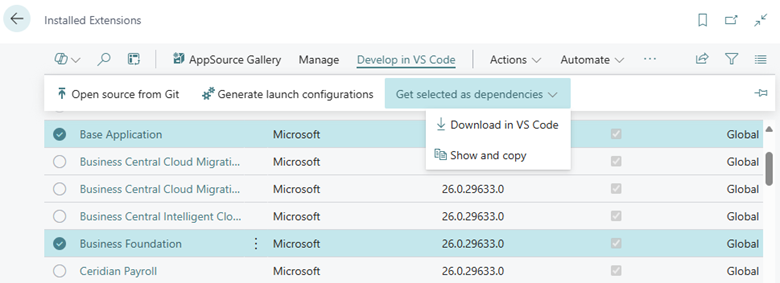
On the Extension Management page there's now a Develop in VS Code action group with a number of new possibilities for developers. One of these is the Download in VS Code action that allows the user to select one or more extensions to open in Visual Studio Code.
In the opened Visual Studio Code project, there's always access to symbols for those extensions, whereas access to source depends on IP protection settings for the involved extensions and user permissions.
Help us improve Dynamics 365 Business Central by discussing ideas, providing suggestions, and giving feedback. Use the forum at https://aka.ms/bcideas.
Events
Power BI DataViz World Championships
Feb 14, 4 PM - Mar 31, 4 PM
With 4 chances to enter, you could win a conference package and make it to the LIVE Grand Finale in Las Vegas
Learn more