Add a class to a project
A class is a software construct that expresses the data and methods of the objects, which are later constructed from that class. These objects are also referred to as instances. Data in a class defines the state of an object, and the methods in a class define the behavior of that object. Methods are a sequence of statements that operate on the data in a class.
Usually, methods are declared to operate on the instance variables of a class. These methods are referred to as instance or object methods. An instance variable is a variable that is bound within the instance or within an instantiated object, as opposed to a static or class variable that is bound to a class.
You can add a class to your project in Solution Explorer. Additionally, you can select the type of class that you want to create during this process.
- In Visual Studio 2022, while running as an administrator, go to Solution Explorer.
- Right-click your project.
- Select Add > New Item.
- Under Dynamics 365 Items, select Code.
- Select either Class or Runnable Class (Job), depending on the purpose of the class.
- Enter a name for the class.
- Select Add to add the class to your project.
When you are creating a class, it is declared as public, even if
you remove the public modifier. In addition to the
public modifier, you can add the final,
internal, static, abstract, and/or extends modifiers. Using the final
modifier helps prevent the class from being inherited. The internal
modifier limits use of the class to the model where it's defined. An
abstract class can't be instantiated directly; only its subclasses can be.
The extends modifier is used when your class is derived from
another class.
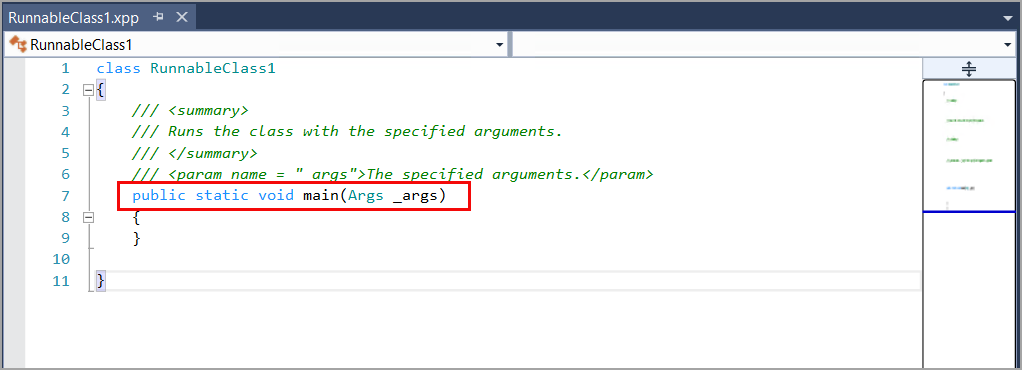
A runnable class for finance and operations apps, known previously as a job,
is similar to a standard class, except that it contains a main
method. You can manually add methods to your class, including a main
method. Methods will be described in further detail in the next unit.
The following screenshot shows the code editor window when you create a
runnable class named RunnableClass1.